
Application kit: inter-applications messaging
 DigitalBox
- KitLab
- February 16, 2026
In the previous KitLab articles, we explored how to run background tasks with BLooper and BHandler.
Now let's discover one of Haiku's powerful features: inter-application messaging.
Using BMessenger, applications can communicate with each other seamlessly, enabling collaboration, automation, and powerful scripting capabilities. This is a fundamental part of the Haiku Application Kit architecture.
What is BMessenger?
BMessenger is the class used to send BMessage objects to another application, window, or handler in Haiku. It acts as a reliable postal service for your messages.
A BMessenger can target:
- Another application (by signature)
- A specific team (by team_id)
- A BHandler or BLooper in any application
Key features:
- Asynchronous messaging - send messages without blocking
- Target validation - check if the recipient still exists
- Type-safe - messages carry structured data, not just strings
Why Use BMessenger?
Inter-application messaging enables:
- Automation - control other apps programmatically
- Data sharing - send structured information between processes
- Event notification - broadcast events to interested applications
- Scriptability - create scriptable applications that respond to external commands
The Demo: Sender & Receiver
We'll create two applications:
- Receiver - displays incoming messages in a text view
- Sender - sends messages using two different methods
This demonstrates both ways to target an application with BMessenger.
Source Code: Receiver.cpp
This application waits for messages and displays them in a scrollable text view.
#include <Application.h>
#include <Window.h>
#include <TextView.h>
#include <ScrollView.h>
#include <Message.h>
#include <String.h>
#include <stdio.h>

const uint32 MSG_CUSTOM = 'CMSG';

class ReceiverWindow : public BWindow {
public:
    ReceiverWindow()
        : BWindow(BRect(100, 100, 600, 400), "Message Receiver",
                  B_TITLED_WINDOW, B_QUIT_ON_WINDOW_CLOSE)
    {
        BRect textRect = Bounds();
        textRect.InsetBy(5, 5);

        fTextView = new BTextView(textRect, "textview",
                                  textRect.OffsetToCopy(B_ORIGIN),
                                  B_FOLLOW_ALL_SIDES,
                                  B_WILL_DRAW);
        fTextView->MakeEditable(false);
        fTextView->SetWordWrap(true);

        BScrollView* scrollView = new BScrollView("scrollview", fTextView,
                                                   B_FOLLOW_ALL_SIDES, 0,
                                                   false, true);
        AddChild(scrollView);

        AddMessage("=== Receiver Application Started ===\n");
        AddMessage("Signature: application/x-vnd.example-Receiver\n");
        AddMessage("Waiting for messages...\n\n");
    }

    virtual void MessageReceived(BMessage* message) {
        switch (message->what) {
            case MSG_CUSTOM: {
                BString text;
                text << "Message received!\n";
                text << "  Code: 0x" << B_HOST_TO_BENDIAN_INT32(MSG_CUSTOM) << "\n";

                const char* data;
                if (message->FindString("data", &data) == B_OK) {
                    text << "  Content: \"" << data << "\"\n";
                }

                int32 count;
                if (message->FindInt32("count", &count) == B_OK) {
                    text << "  Counter: " << count << "\n";
                }

                text << "\n";
                AddMessage(text.String());
                break;
            }

            default:
                BWindow::MessageReceived(message);
                break;
        }
    }

private:
    void AddMessage(const char* text) {
        fTextView->Insert(fTextView->TextLength(), text, strlen(text));
        fTextView->ScrollToSelection();
    }

    BTextView* fTextView;
};

class ReceiverApp : public BApplication {
public:
    ReceiverApp()
        : BApplication("application/x-vnd.example-Receiver")
    {
        fWindow = new ReceiverWindow();
        fWindow->Show();
    }

    virtual void MessageReceived(BMessage* message) {
        // Forward to window for display
        fWindow->PostMessage(message);
    }

private:
    ReceiverWindow* fWindow;
};

int main() {
    ReceiverApp app;
    app.Run();
    return 0;
}
Source Code: Sender.cpp
This application demonstrates two methods of sending messages to the receiver.
#include <Application.h>
#include <Window.h>
#include <Button.h>
#include <TextControl.h>
#include <StringView.h>
#include <Messenger.h>
#include <Message.h>
#include <Roster.h>
#include <String.h>
#include <Alert.h>

const uint32 MSG_SEND_BY_SIGNATURE = 'SNDS';
const uint32 MSG_SEND_BY_TARGET = 'SNDT';
const uint32 MSG_CUSTOM = 'CMSG';

class SenderWindow : public BWindow {
public:
    SenderWindow()
        : BWindow(BRect(150, 150, 550, 350), "Message Sender",
                  B_TITLED_WINDOW, B_QUIT_ON_WINDOW_CLOSE),
          fMessageCount(0)
    {
        BView* background = new BView(Bounds(), "background", B_FOLLOW_ALL, B_WILL_DRAW);
        background->SetViewColor(ui_color(B_PANEL_BACKGROUND_COLOR));
        AddChild(background);

        BRect frame = Bounds();
        frame.InsetBy(10, 10);

        // Title
        BStringView* title = new BStringView(
            BRect(frame.left, frame.top, frame.right, frame.top + 20),
            "title", "Inter-application Message Sending");
        title->SetFont(be_bold_font);
        background->AddChild(title);

        // Text field
        fTextControl = new BTextControl(
            BRect(frame.left, frame.top + 30, frame.right, frame.top + 55),
            "text", "Message:", "Hello from Sender!",
            NULL, B_FOLLOW_LEFT_RIGHT | B_FOLLOW_TOP);
        background->AddChild(fTextControl);

        // Send by signature button
        fSignatureButton = new BButton(
            BRect(frame.left, frame.top + 70, frame.left + 180, frame.top + 100),
            "sigbtn", "Send by Signature",
            new BMessage(MSG_SEND_BY_SIGNATURE));
        background->AddChild(fSignatureButton);

        // Send by target button
        fTargetButton = new BButton(
            BRect(frame.right - 180, frame.top + 70, frame.right, frame.top + 100),
            "tgtbtn", "Send by Target",
            new BMessage(MSG_SEND_BY_TARGET));
        background->AddChild(fTargetButton);

        // Info
        BString info;
        info << "Method 1: Uses receiver app signature\n";
        info << "Method 2: Uses be_roster to find target\n\n";
        info << "Receiver application must be running!";

        BStringView* infoView = new BStringView(
            BRect(frame.left, frame.top + 115, frame.right, frame.top + 180),
            "info", info.String());
        infoView->SetAlignment(B_ALIGN_CENTER);
        background->AddChild(infoView);
    }

    virtual void MessageReceived(BMessage* message) {
        switch (message->what) {
            case MSG_SEND_BY_SIGNATURE:
                SendBySignature();
                break;

            case MSG_SEND_BY_TARGET:
                SendByTarget();
                break;

            default:
                BWindow::MessageReceived(message);
                break;
        }
    }

private:
    void SendBySignature() {
        // Method 1: Create a BMessenger with signature
        const char* signature = "application/x-vnd.example-Receiver";
        BMessenger messenger(signature);

        if (!messenger.IsValid()) {
            BAlert* alert = new BAlert("Error",
                "Unable to find receiver application!\n"
                "Make sure it is running.",
                "OK", NULL, NULL, B_WIDTH_AS_USUAL, B_WARNING_ALERT);
            alert->Go();
            return;
        }

        BMessage msg(MSG_CUSTOM);
        msg.AddString("data", fTextControl->Text());
        msg.AddInt32("count", ++fMessageCount);

        status_t status = messenger.SendMessage(&msg);
        if (status == B_OK) {
            BString text;
            text << "Message #" << fMessageCount << " sent by signature!";
            ShowSuccess(text.String());
        }
    }

    void SendByTarget() {
        // Method 2: Use be_roster to find the application
        const char* signature = "application/x-vnd.example-Receiver";
        team_id team = be_roster->TeamFor(signature);

        if (team < 0) {
            BAlert* alert = new BAlert("Error",
                "Receiver application not found!",
                "OK", NULL, NULL, B_WIDTH_AS_USUAL, B_WARNING_ALERT);
            alert->Go();
            return;
        }

        BMessenger messenger(NULL, team);

        BMessage msg(MSG_CUSTOM);
        msg.AddString("data", fTextControl->Text());
        msg.AddInt32("count", ++fMessageCount);

        status_t status = messenger.SendMessage(&msg);
        if (status == B_OK) {
            BString text;
            text << "Message #" << fMessageCount << " sent by target (team_id)!";
            ShowSuccess(text.String());
        }
    }

    void ShowSuccess(const char* text) {
        BAlert* alert = new BAlert("Success", text, "OK",
                                   NULL, NULL, B_WIDTH_AS_USUAL,
                                   B_INFO_ALERT);
        alert->Go();
    }

    BTextControl* fTextControl;
    BButton* fSignatureButton;
    BButton* fTargetButton;
    int32 fMessageCount;
};

class SenderApp : public BApplication {
public:
    SenderApp()
        : BApplication("application/x-vnd.example-Sender")
    {
        fWindow = new SenderWindow();
        fWindow->Show();
    }

private:
    SenderWindow* fWindow;
};

int main() {
    SenderApp app;
    app.Run();
    return 0;
}
How It Works
The Receiver Side
- Application Signature: The receiver uses
"application/x-vnd.example-Receiver"as its unique identifier - MessageReceived(): Overrides this method to intercept custom messages
- Message Parsing: Extracts data from the BMessage using
FindString()andFindInt32() - Display: Shows received messages in a scrollable text view
The Sender Side
Method 1: Send by Signature
BMessenger messenger("application/x-vnd.example-Receiver");
if (messenger.IsValid()) {
    messenger.SendMessage(&msg);
}
This creates a messenger directly using the target's application signature.
The system automatically finds the running application.
Method 2: Send by Team ID
team_id team = be_roster->TeamFor("application/x-vnd.example-Receiver");
BMessenger messenger(NULL, team);
messenger.SendMessage(&msg);
This uses BRoster to find the team_id first, then creates a messenger targeting that specific team. Useful when you need more control over the target.
BMessage Structure
BMessage msg(MSG_CUSTOM);
msg.AddString("data", "Hello!");
msg.AddInt32("count", 42);
BMessage is a container that can hold:
- Strings, integers, floats, booleans
- BRects, BPoints, RGB colors
- Raw data blocks
- Even other BMessages (nested)
Compilation
gcc -o Receiver Receiver.cpp -lbe
gcc -o Sender Sender.cpp -lbe
Running the Demo
- Start the receiver first:
./Receiver &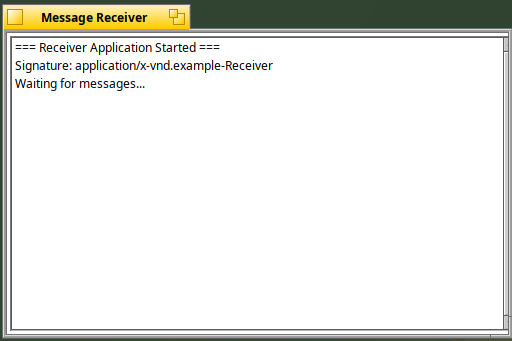
- Then launch the sender:
./Sender &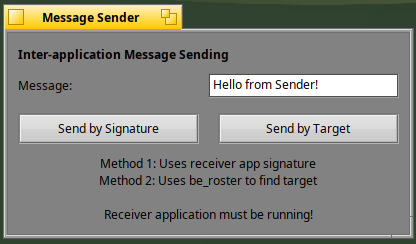
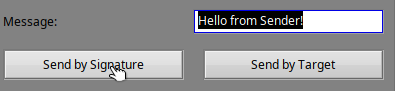
- Send messages:
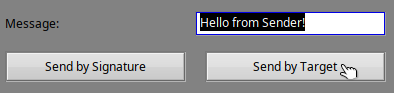
- Type a message in the text field
- Click "Send by Signature"
-
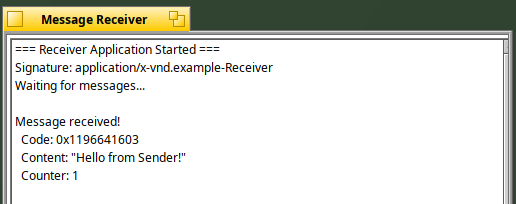
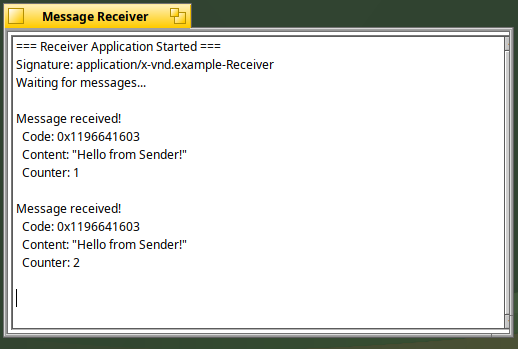
- Watch the message appear in the Receiver window
-
- Repeat the same but with "Send by Target"
-
- Watch the message appear in the Receiver window
Key Concepts
BMessenger validation: Always check IsValid() before sending
if (!messenger.IsValid()) {
    // Target doesn't exist or died
}
Asynchronous messaging: SendMessage() returns immediately without waiting for a reply
be_roster: The global roster object that tracks all running applications
team_id team = be_roster->TeamFor(signature);Application signatures: Must be unique and follow the format "application/x-vnd.vendor-appname"
Try This
- Modify the message: Add more fields like
AddFloat()orAddBool() - Reply messages: Use
SendMessage(msg, replyHandler)for two-way communication - Broadcast: Send the same message to multiple applications
- Error handling: Check the status_t return value from SendMessage()
What's Next?
Now that you understand inter-applications messaging, future KitLab articles will explore:
- BMessageRunner & BMessageQueue - to handle periodic tasks
- BRoster, BClipboard and BCursor - for system interaction
Conclusion
With BMessenger and BMessage, Haiku provides a clean, powerful way for applications to communicate.
This isn't just theory—real Haiku applications use this every day for automation, scripting, and inter-process collaboration.
The messaging architecture is one of Haiku's greatest strengths, inherited from BeOS, and it makes building integrated, cooperative applications natural and straightforward.
Stay tuned for the next KitLab article!