
Application kit: running background tasks
 DigitalBox
- KitLab
- February 9, 2026
In the previous KitLab article, we created a simple application for sending and receiving messages using existing BLooper and BHandler.
Let’s take the next step: performing background tasks while keeping the UI responsive.
In Haiku, all background processing can be handled using BLooper and BHandler.
These classes allow you to run tasks in a separate thread and communicate with the main window via messages.
Let's learn the basis of asynchronous processing in Haiku by subclassing BLooper and BHandler.
What are BLooper and BHandler?
BLooper and BHandler are core classes in Haiku for multithreading and message dispatch:
-
BLooper is a thread that runs a message loop.
-
BHandler receives messages posted to a BLooper.
-
Together, they allow your application to process tasks in the background while keeping the main window responsive.
A BLooper can host multiple BHandlers, each responsible for a specific type of message.
Source Code: BackgroundLooperApp.cpp
This example creates a main window with a Start button and a BStringView to display log messages.
When the Start button is clicked, three background tasks are launched in a separate BLooper thread.
Each task takes 3 seconds to simulate work.
Status updates are sent back to the main window and displayed in the log view.
#include <Application.h>
#include <Window.h>
#include <Looper.h>
#include <Handler.h>
#include <Message.h>
#include <Messenger.h>
#include <View.h>
#include <Button.h>
#include <StringView.h>
#include <String.h>

enum {
    MSG_DO_WORK = 'dwrk',
    MSG_WORK_DONE = 'wdon',
    MSG_START = 'strt'
};

// ----- Worker Handler -----
class WorkerHandler : public BHandler {
public:
    WorkerHandler(const char* name) : BHandler(name) {}

    virtual void MessageReceived(BMessage* msg) override {
        switch (msg->what) {
            case MSG_DO_WORK: {
                int32 taskId;
                BMessenger replyTo;
                if (msg->FindInt32("taskId", &taskId) == B_OK &&
                    msg->FindMessenger("return", &replyTo) == B_OK) {

                    BMessage update(MSG_WORK_DONE);
                    update.AddInt32("taskId", taskId);
                    update.AddInt32("status", 1); // Processing
                    replyTo.SendMessage(&update);

                    snooze(3000000); // 3 seconds

                    update.ReplaceInt32("status", 2); // Done
                    replyTo.SendMessage(&update);
                }
                break;
            }
            default:
                BHandler::MessageReceived(msg);
        }
    }
};

// ----- Worker Looper -----
class WorkerLooper : public BLooper {
public:
    WorkerLooper() : BLooper("WorkerLooper") {
        fHandler = new WorkerHandler("WorkerHandler");
        AddHandler(fHandler);
    }
    BHandler* Handler() { return fHandler; }
private:
    WorkerHandler* fHandler;
};

// ----- Main window -----
class MainWindow : public BWindow {
public:
    MainWindow(BRect frame)
        : BWindow(frame, "BLooper & BHandler GUI Example",
                  B_TITLED_WINDOW, B_QUIT_ON_WINDOW_CLOSE)
    {
        BView* view = new BView(Bounds(), "mainView",
                                B_FOLLOW_ALL, B_WILL_DRAW);
        view->SetViewColor(ui_color(B_PANEL_BACKGROUND_COLOR));
        AddChild(view);

        fLogView = new BStringView(BRect(10, 50, Bounds().Width()-10, Bounds().Height()-10),
                                   "logView", "", B_FOLLOW_ALL_SIDES);
        view->AddChild(fLogView);

        fButton = new BButton(BRect(10, 10, 150, 35), "startButton", "Start",
                              new BMessage(MSG_START));
        view->AddChild(fButton);

        fWorkerLooper = new WorkerLooper();
        fWorkerLooper->Run();

        fTasksTotal = 3;
        fTasksCompleted = 0;
    }

    virtual void MessageReceived(BMessage* msg) override {
        switch (msg->what) {
            case MSG_START:
                StartTasks();
                break;

            case MSG_WORK_DONE: {
                int32 taskId, status;
                if (msg->FindInt32("taskId", &taskId) == B_OK &&
                    msg->FindInt32("status", &status) == B_OK) {

                    BString line;
                    if (status == 1)
                        line << "[Worker] Task " << taskId << " is processing...";
                    else {
                        line << "[Worker] Task " << taskId << " done.";
                        fTasksCompleted++;
                    }
                    AppendLog(line);

                    if (fTasksCompleted == fTasksTotal)
                        AppendLog("[Main] All tasks completed!");
                }
                break;
            }

            default:
                BWindow::MessageReceived(msg);
        }
    }

private:
    void StartTasks() {
        fTasksCompleted = 0;
        AppendLog("[Main] -----------------");
        AppendLog("[Main] Starting tasks...");
        for (int i = 1; i <= fTasksTotal; i++) {
            BMessage msg(MSG_DO_WORK);
            msg.AddInt32("taskId", i);
            msg.AddMessenger("return", BMessenger(this));
            BMessenger(fWorkerLooper->Handler()).SendMessage(&msg);

            BString line;
            line << "[Main] Sent task " << i << " to worker...";
            AppendLog(line);
        }
    }

    void AppendLog(const BString& line) {
        fLogText << line << "\n";
        fLogView->SetText(fLogText.String());
    }

private:
    WorkerLooper* fWorkerLooper;
    BStringView* fLogView;
    BButton* fButton;
    BString fLogText;
    int fTasksTotal;
    int fTasksCompleted;
};

// ----- Application -----
class BackgroundLooper : public BApplication {
public:
    BackgroundLooper() : BApplication("application/x-vnd.Haiku.BackgroundLooper") {}
    virtual void ReadyToRun() override {
        BWindow* window = new MainWindow(BRect(100, 100, 500, 300));
        window->Show();
    }
};

int main() {
    BackgroundLooper app;
    app.Run();
    return 0;
}
How it works
-
WorkerHandler is a subclass of BHandler that receives messages from the main window.
-
Each task first sends a “Processing” message, waits 3 seconds, and then sends a “Done” message.
-
The main window receives these messages in
MessageReceived()and updates the BStringView log. -
Once all tasks are complete, a final message
[Main] All tasks completed!is displayed.
Note: The BMessenger allows safe communication between threads in Haiku.
Compilation
g++ BackgroundLooperApp.cpp -o BackgroundLooperApp -lbeLaunch from a terminal:
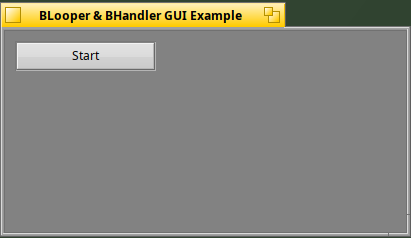
./BackgroundLooperAppYou’ll see a window with a Start button.
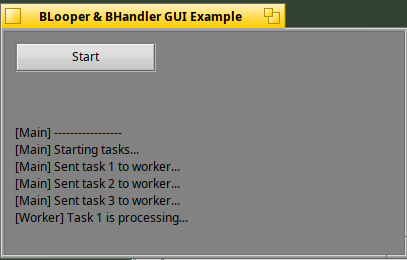
Clicking it starts three background tasks with live status updates in the window:
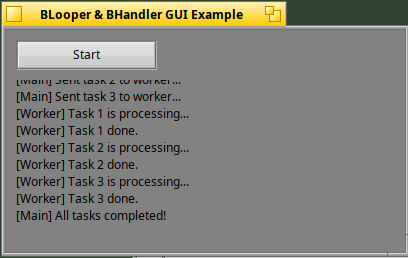
When all the tasks are finished a "completed" message is displayed at the end:
Try this
-
Change the number of tasks by modifying
fTasksTotal. -
Adjust the processing delay in
snooze()for longer or shorter tasks. -
Replace BStringView with a scrollable BTextView to handle longer logs.
Conclusion
With just a few lines of code, you’ve learned how to:
-
Run background tasks using BLooper & BHandler
-
Send and receive messages between threads safely
-
Update a GUI while keeping it responsive
This pattern is fundamental for building dynamic, responsive applications in Haiku.
In the next KitLab article we will review how to handle inter-applications messaging.
Stay tuned :)