
Application kit: system interaction
 DigitalBox
- KitLab
- March 2, 2026
In the previous KitLab articles, we explored periodic tasks and message queuing in Haiku.
Now, let's take a step further and interact directly with the system.
This article demonstrates:
-
BRoster – Launch other applications or list running apps.
-
BClipboard – Copy text from your application to the clipboard and paste it back.
-
BCursor – Change the mouse cursor when hovering over a view.
BRoster: Launch and List Applications
BRoster is Haiku’s interface to the running applications and system launcher.
-
Launching an application:
be_roster->Launch("application/x-vnd.Haiku-StyledEdit");
This starts another application from your own app.
The example uses a button labeled “Launch StyledEdit”.
-
Listing running applications:
BList appList;
be_roster->GetAppList(&appList);

for (int32 i = 0; i < appList.CountItems(); i++) {
    team_id team = static_cast<team_id>((intptr_t)appList.ItemAt(i));
    app_info info;
    be_roster->GetRunningAppInfo(team, &info);
    cout << info.signature << endl;
}
be_roster->GetAppList() retrieves all running teams.GetRunningAppInfo() provides the application signature and other info.
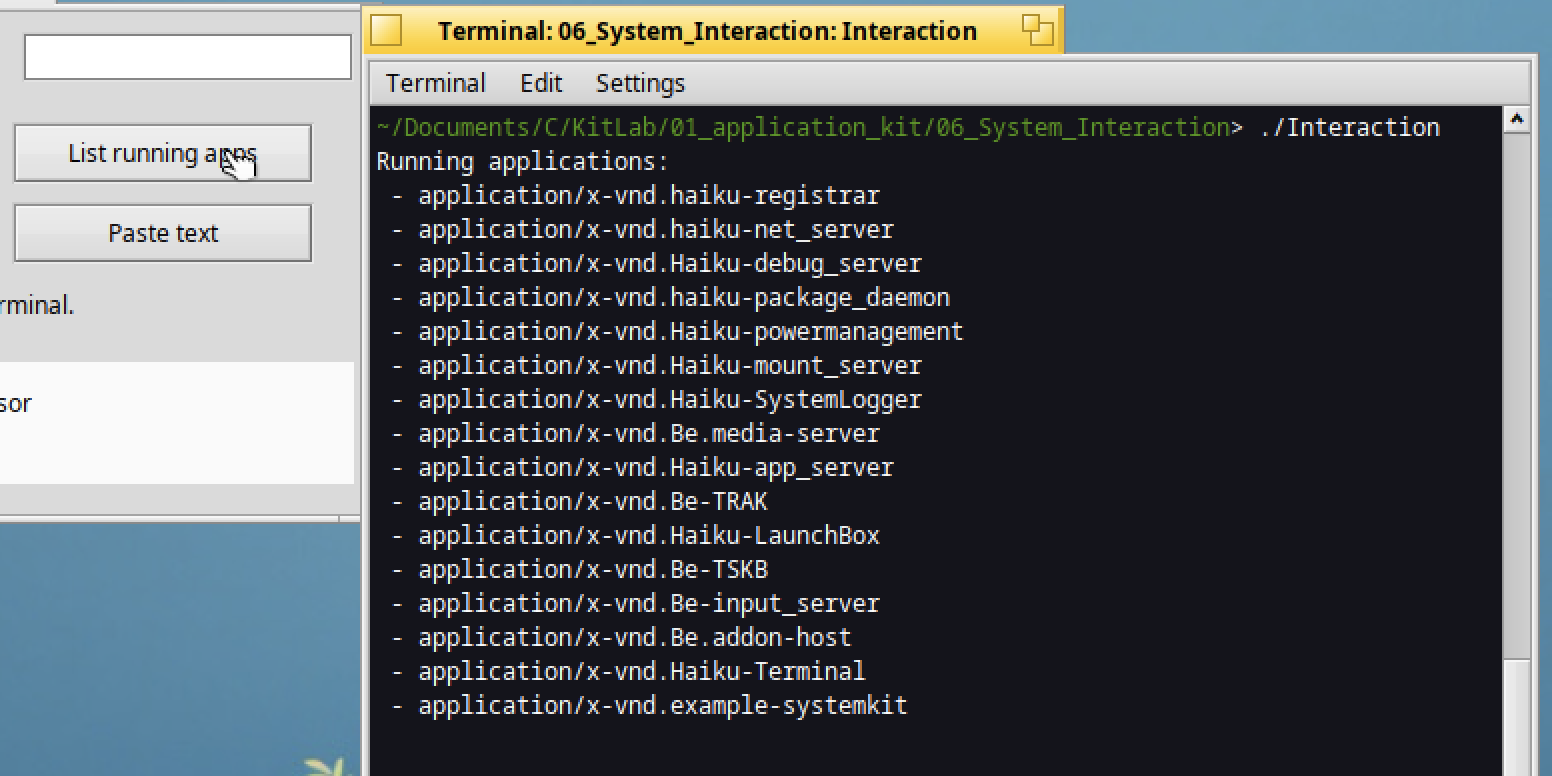
In the example, the list is printed to the terminal while the GUI shows a confirmation.
BClipboard: Copy and Paste Text
Haiku provides a global clipboard through BClipboard. You can lock it, write data, and commit changes.
-
Copy text to the clipboard:
if (be_clipboard->Lock()) {
    be_clipboard->Clear();
    BMessage* clip = be_clipboard->Data();
    clip->AddData("text/plain", B_MIME_TYPE, fText->Text(), strlen(fText->Text()));
    be_clipboard->Commit();
    be_clipboard->Unlock();
}
- Paste text from the clipboard:
if (be_clipboard->Lock()) {
    BMessage* clip = be_clipboard->Data();
    const char* text;
    ssize_t size;
    if (clip->FindData("text/plain", B_MIME_TYPE, (const void**)&text, &size) == B_OK) {
        fText->SetText(text);
    }
    be_clipboard->Unlock();
}
Key points:
-
Always lock the clipboard before reading or writing.
-
Use
B_MIME_TYPEandtext/plainfor simple text. -
BTextControlis updated dynamically with pasted content.
BCursor: Change Cursor on Hover
BCursor allows you to change the mouse pointer over any view.
-
The example uses a
HoverView:
void MouseMoved(BPoint where, uint32 transit, const BMessage* message) override
{
    if (transit == B_ENTERED_VIEW)
        SetViewCursor(B_CURSOR_I_BEAM, true);
    else if (transit == B_EXITED_VIEW)
        SetViewCursor(B_CURSOR_SYSTEM_DEFAULT, true);
}
-
B_CURSOR_I_BEAMis the text editing cursor. -
B_CURSOR_SYSTEM_DEFAULTrestores the normal pointer. -
transitindicates when the mouse enters or leaves the view.
Putting It All Together
Interaction.cpp
#include <Application.h>
#include <Window.h>
#include <View.h>
#include <Button.h>
#include <TextControl.h>
#include <StringView.h>
#include <Clipboard.h>
#include <Roster.h>
#include <Cursor.h>
#include <Message.h>
#include <String.h>
#include <iostream>

using std::cout;
using std::endl;

class HoverView : public BView {
public:
    HoverView(BRect frame)
        : BView(frame, "hover", B_FOLLOW_LEFT | B_FOLLOW_TOP,
                B_WILL_DRAW | B_FRAME_EVENTS)
    {
        SetViewColor(250,250,250);
    }

    void Draw(BRect updateRect) override
    {
        SetHighColor(0, 0, 0);
        DrawString("Hover here to change cursor", BPoint(10, 25));
    }

    void MouseMoved(BPoint where, uint32 transit, const BMessage* message) override
    {
    if (transit == B_ENTERED_VIEW) {
        SetViewCursor(B_CURSOR_I_BEAM, true);
    } else if (transit == B_EXITED_VIEW) {
        SetViewCursor(B_CURSOR_SYSTEM_DEFAULT, true);
    }
    }
};

// ===== Main Window =====
class MainWindow : public BWindow {
public:
    MainWindow(BRect frame)
        : BWindow(frame, "System Interaction", B_TITLED_WINDOW,
                  B_QUIT_ON_WINDOW_CLOSE)
    {
        BRect bounds = Bounds();

        BView* background = new BView(bounds, "background", B_FOLLOW_ALL, B_WILL_DRAW);
        background->SetViewColor(ui_color(B_PANEL_BACKGROUND_COLOR));
        AddChild(background);

        // Input field
        fText = new BTextControl(BRect(10, 10, bounds.right - 10, 35),
                                 "text", "Text:", "", nullptr);
        background->AddChild(fText);

        // Buttons
        float y = 55;

        BButton* launchBtn = new BButton(BRect(10, y, 150, y + 30),
                                         "launch", "Launch StyledEdit",
                                         new BMessage('lapp'));
        launchBtn->SetTarget(this);
        background->AddChild(launchBtn);

        BButton* listBtn = new BButton(BRect(170, y, 320, y + 30),
                                       "list", "List running apps",
                                       new BMessage('list'));
        listBtn->SetTarget(this);
        background->AddChild(listBtn);

        y += 40;

        BButton* copyBtn = new BButton(BRect(10, y, 150, y + 30),
                                       "copy", "Copy text",
                                       new BMessage('copy'));
        copyBtn->SetTarget(this);
        background->AddChild(copyBtn);

        BButton* pasteBtn = new BButton(BRect(170, y, 320, y + 30),
                                        "paste", "Paste text",
                                        new BMessage('past'));
        pasteBtn->SetTarget(this);
        background->AddChild(pasteBtn);

        // Output label
        fOutput = new BStringView(BRect(10, y + 40, bounds.right - 10, y + 60),
                                  "output", "");
        background->AddChild(fOutput);

        // Cursor example view
        HoverView* hv = new HoverView(BRect(10, y + 80, bounds.right - 10, y + 140));
        background->AddChild(hv);
    }

    void MessageReceived(BMessage* msg) override {
        switch (msg->what) {

            case 'lapp': {
                status_t s = be_roster->Launch("application/x-vnd.Haiku-StyledEdit");
                fOutput->SetText(s == B_OK ? "StyledEdit launched." :
                                             "Failed to launch StyledEdit.");
                break;
            }

            case 'list': {
                BList appList;
                be_roster->GetAppList(&appList);

                cout << "Running applications:" << endl;

                for (int32 i = 0; i < appList.CountItems(); i++) {

                    team_id team = static_cast<team_id>((intptr_t)appList.ItemAt(i));

                    app_info info;
                    if (be_roster->GetRunningAppInfo(team, &info) == B_OK) {
                        cout << " - " << info.signature << endl;
                    }
                }

                fOutput->SetText("Application list printed to terminal.");
                break;
            }

            case 'copy': {
                if (be_clipboard->Lock()) {
                    be_clipboard->Clear();
                    BMessage* clip = be_clipboard->Data();
                    clip->AddData("text/plain", B_MIME_TYPE,
                                  fText->Text(), strlen(fText->Text())+1);
                    be_clipboard->Commit();
                    be_clipboard->Unlock();
                }
                fOutput->SetText("Copied to clipboard.");
                break;
            }

            case 'past': {
                if (be_clipboard->Lock()) {
                    BMessage* clip = be_clipboard->Data();
                    const char* text;
                    ssize_t size;
                    if (clip->FindData("text/plain", B_MIME_TYPE,
                                       (const void**)&text, &size) == B_OK) {
                        fText->SetText(text);
                        fOutput->SetText("Pasted from clipboard.");
                    }
                    be_clipboard->Unlock();
                }
                break;
            }

            default:
                BWindow::MessageReceived(msg);
        }
    }

private:
    BTextControl* fText;
    BStringView*  fOutput;
};

// ===== Application =====
class SystemApp : public BApplication {
public:
    SystemApp() : BApplication("application/x-vnd.example-systemkit") {}

    void ReadyToRun() override {
        MainWindow* w = new MainWindow(BRect(100, 100, 450, 350));
        w->Show();
    }
};

// ===== main =====
int main() {
    SystemApp app;
    app.Run();
    return 0;
}
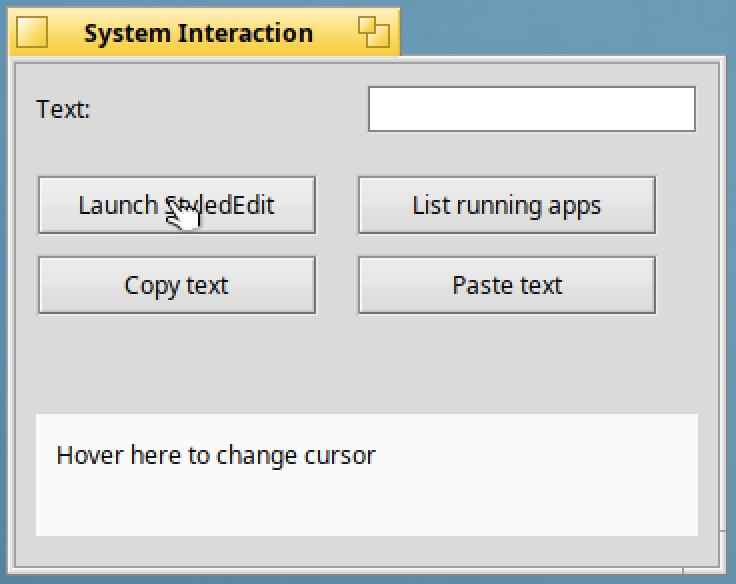
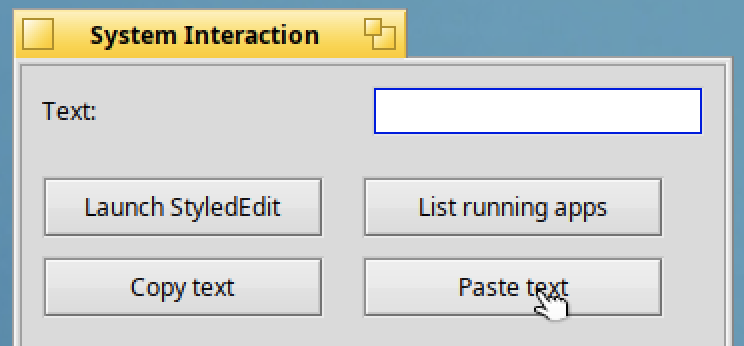
The example GUI contains:
-
A BTextControl for text input.
-
Four BButtons:
-
Launch StyledEdit
-
List running apps
-
Copy text
-
Paste text
-
-
A BStringView to display output messages.
-
A HoverView to demonstrate cursor changes.
Each button sends a BMessage to the window, which handles the action in MessageReceived().
Compilation
Save the code as Interaction.cpp and compile:
g++ Interaction.cpp -o Interaction -lbeRun the application
./InteractionYou will see the below GUI:
Click on the "Launch StyledEdit" button:
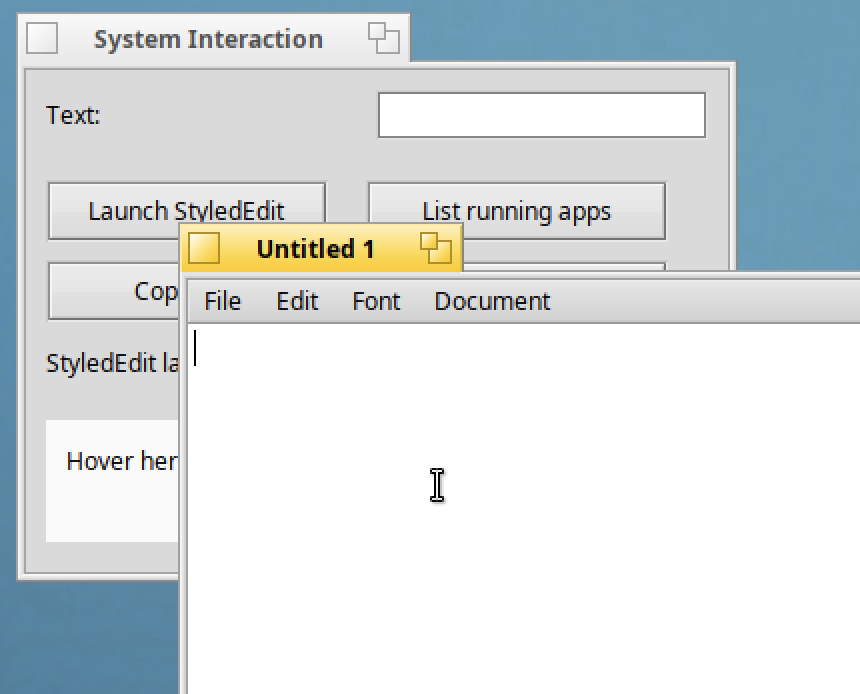
The corresponding application is launched :)
Now click on "List running apps".
You will see in the Terminal window all the applications which are running on your system:
Great, what about playing with the Clipboard ?
Enter a text in the corresponding field, select click on "Copy text":
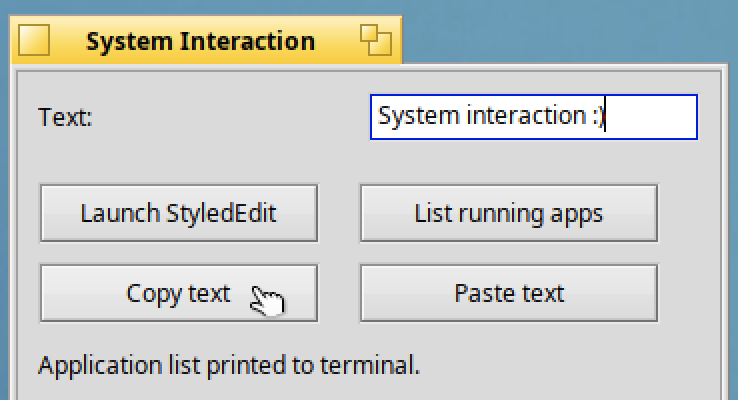
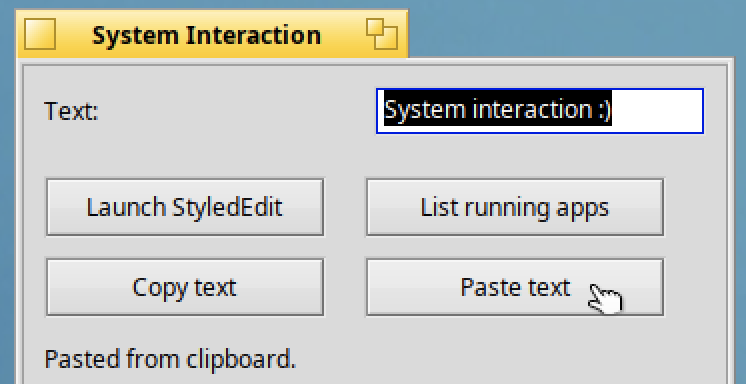
Now delete the text content and click on "Paste text":
The text is now copied from the Clipboard to the application GUI:
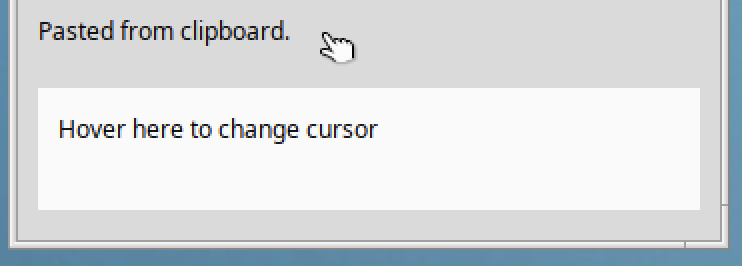
Last action: play with the Hover view :)
As you can see, when you are outside this Hover view, the default pointer (a hand) is displayed:
Now what about entering in the Hover view with the mouse:
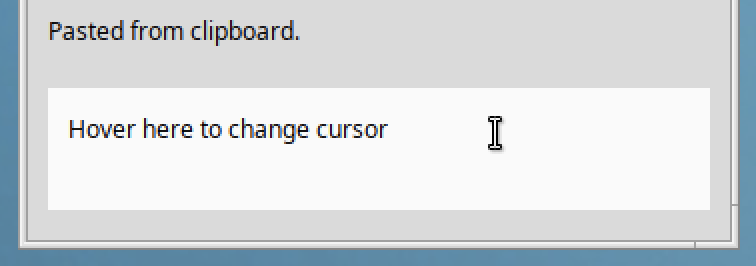
You can notice the pointer is changing accordingly :)
Try This
-
Change the cursor to B_CURSOR_HAND or other system cursors.
-
Launch a different application via
be_roster->Launch(). -
Copy complex text with different MIME types to the clipboard.
-
Add multiple
HoverViewareas, each with a different cursor.
Conclusion
With just a few lines of code, you've created an application that interacts with the system:
This example shows the power and simplicity of Haiku's Application Kit for interacting with the operating system.
In the next articles, we will explore the Support kit, stay tuned !