
Cross-compiling WebKit2
 DigitalBox
- Dev
- October 12, 2026
I love cross-compilation.
There's something deeply satisfying about building software for a machine that isn't the one you're typing on.
I've been hooked on it for a while: with spksrc, I cross-compiled packages for Synology NAS devices (my PostgreSQL contribution is one example), and every time it felt a bit like magic. One powerful Linux box, and suddenly you're producing binaries for hardware you may not even own.
And that's exactly where cross compilation shines.
Sometimes you simply don't have the target machine at hand. Other times you do, but building natively would take forever. Imagine a Raspberry Pi 3, 4 or 5 trying to compile a huge codebase: with a cross toolchain, your fast desktop does the heavy lifting and the little board just runs the result.
Time saved, patience preserved!
WebKit on Haiku is a perfect showcase. On 32-bit Haiku, the toolchain runs into memory limitations that make a native build painful, if not impossible. Cross-compiling from Debian sidesteps the problem: you get the horsepower and memory of a modern 64-bit host while still targeting Haiku 32-bit.
In this article, I'll show you step by step how to cross-compile WebKit2 for Haiku (32-bit) from Debian.
Let's dive in!
Prerequisites
The WebKit2 port for Haiku lives in the `haiku-webkit2` branch of the haikuwebkit repository on Codeberg.
Several patches have been merged recently to fix some 32-bit build issues.
You will need a Linux machine to do the cross-compilation: I'm using the Debian distribution in this article.
The big picture
The process is in five steps:
- Install a 32-bit Haiku in QEMU
- Build the Haiku cross-compiler on Debian
- Copy the libraries and headers from QEMU into a sysroot
- Cross-compile WebKit2
- Test MiniBrowser in QEMU
Why QEMU for the sysroot?
Because Haiku packages are installed with `pkgman`, and the simplest way to get every development library (ICU, curl, libxml2, Mesa...) at the right version is to let Haiku install them itself, then copy the result to Linux.
This part was inspired by this article by Jessica Hamilton.
Step 1: A 32-bit Haiku in QEMU
Download Haiku x86 32-bit on the official Haiku website.
Create a disk image and boot the installer from the ISO.
I use the R1/beta6 `x86_gcc2h` anyboot image (32-bit hybrid):
qemu-img create -f qcow2 haiku32.qcow2 4G
qemu-system-i386 -m 2048 -hda haiku32.qcow2 \
  -cdrom $HOME/Downloads/haiku-r1beta6-x86_gcc2h-anyboot.iso -boot d
Install Haiku on the virtual disk:
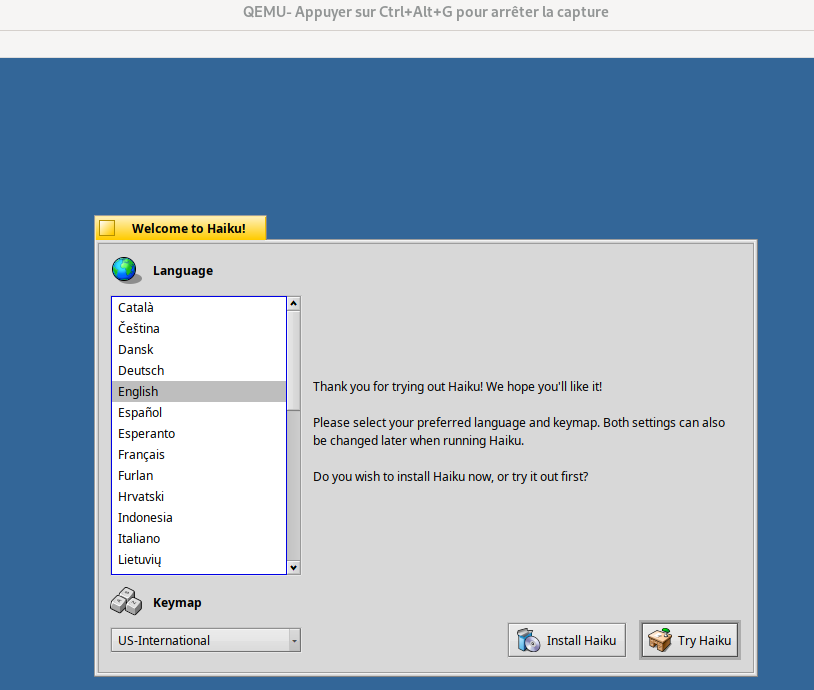
Once done, shut it down.
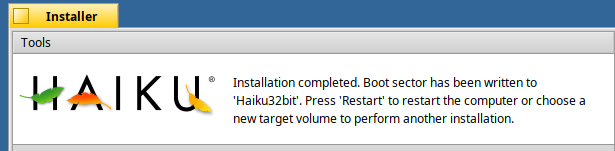
From now on, we will boot without the ISO.
We enable KVM, give the VM more resources, and forward port 2222 to the SSH port of Haiku:
qemu-system-i386 \
  -enable-kvm -cpu host -smp 4 -m 4096 \
  -hda haiku32.qcow2 \
  -netdev user,id=net0,hostfwd=tcp::2222-:22 \
  -device rtl8139,netdev=net0
The port forwarding is what allows us to use `ssh` and `rsync` from Debian in a moment.
Before moving to step 2, you will need to activate ssh and install rsync:
pkgman install rsync_x86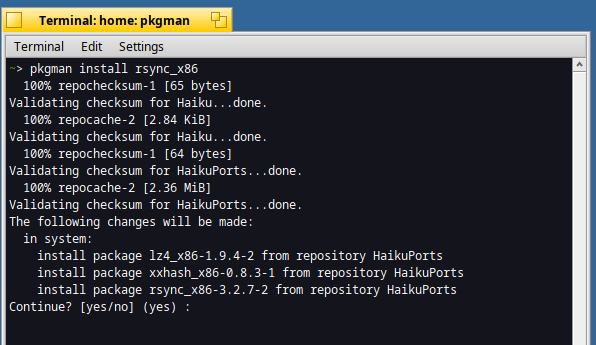
Verify the ssh connection from your Linux machine:
ssh -p 2222 user@localhost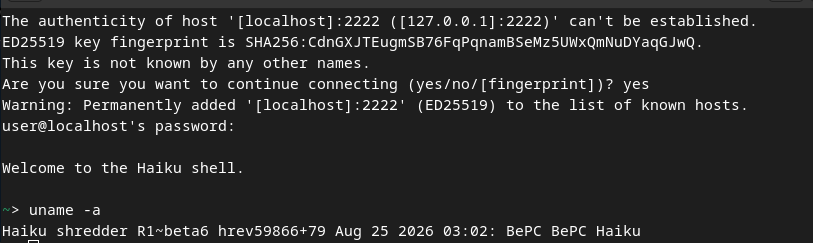
Step 2: Build the cross-compiler
On Debian, get the buildtools and Haiku sources, both at the `r1beta6` tag so that everything matches the system running in QEMU:
cd ~/Documents/C/
git clone --branch r1beta6 https://github.com/haiku/buildtools.git buildtools-r1b6
git clone --branch r1beta6 https://github.com/haiku/haiku.git haiku-r1b6
You will also need to install bison, flex, texinfo, build-essential and other packages on your Linux machine.
For the full list, please check the official Haiku page on the required dependencies: https://www.haiku-os.org/guides/building/pre-reqs
Then launch the build:
cd haiku-r1b6
mkdir generated.x86; cd generated.x86
../configure --cross-tools-source ../../buildtools-r1b6 --build-cross-tools x86
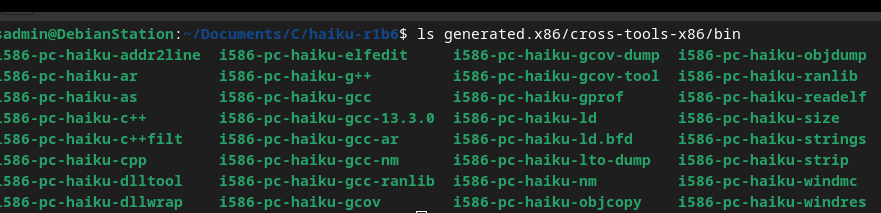
This builds the `i586-pc-haiku` toolchain in `generated.x86/cross-tools-x86/bin` inside the haiku-r1b6 folder.
Please note WebKit needs `cmake`, `ninja`, `gperf`, `perl`, `python3` and `ruby` on the host, so you have to install each of these packages on your Linux system during this step.
For that proceed with "sudo apt install" for each of these packages.
Step 3: Prepare the sysroot
You can now install the required packages in QEMU/Haiku 32bit for the future build of Haiku WebKit .
Boot Haiku in QEMU and install each of them.
The `_x86` suffix is there because on the 32-bit hybrid image, the modern-GCC packages are the secondary architecture packages:
pkgman install cmake_x86 curl_x86_devel gcc_x86 gperf haiku_x86_devel icu74_x86_devel \
libavif_x86_devel libjpeg_turbo_x86_devel libjxl_x86_devel sqlite_x86_devel libpng16_x86_devel \
libxml2_x86_devel libxslt_x86_devel libexecinfo_x86_devel libwebp_x86_devel \
libpsl_x86_devel libidn2_x86_devel libunistring_x86_devel lcms_x86_devel ninja_x86 \
pkgconfig_x86 woff2_x86_devel
Another option is to run the main command from Debian over SSH, which is handy for scripting:
ssh -p 2222 user@localhost "pkgman install cmake_x86 curl_x86_devel gcc_x86 gperf haiku_x86_devel icu74_x86_devel \
libavif_x86_devel libjpeg_turbo_x86_devel libjxl_x86_devel sqlite_x86_devel libpng16_x86_devel \
libxml2_x86_devel libxslt_x86_devel libexecinfo_x86_devel libwebp_x86_devel \
libpsl_x86_devel libidn2_x86_devel libunistring_x86_devel lcms_x86_devel ninja_x86 \
pkgconfig_x86 woff2_x86_devel"
This list comes from the Codeberg Haikuwebit page.
Note : gcc_x86, cmake_x86, ninja_x86 and pkgconfig_x86 are listed on this page, but should not be required on the Haiku 32 bit in QEMU.
Please note GLES2 is also required:
ssh -p 2222 user@localhost "pkgman install mesa_x86_devel"One important point: by default the `haikuwebkit` package is installed in your Haiku system, please remove it before copying the files to the sysroot:
ssh -p 2222 user@localhost "pkgman uninstall haikuwebkit_x86"Otherwise its headers and libraries end up in the sysroot and get mixed with the WebKit you are about to build.
We will now copy Haiku headers and libraries to Debian!
Create the sysroot skeleton:
cd ~/Documents/C/haiku-r1b6
mkdir -p sysroot/boot/system/develop/headers
mkdir -p sysroot/boot/system/develop/lib
mkdir -p sysroot/boot/system/lib
Then pull the three directories from QEMU with `rsync`:
rsync -avz -e "ssh -p 2222" \
user@localhost:/boot/system/develop/headers/ \
  ~/Documents/C/haiku-r1b6/sysroot/boot/system/develop/headers/

rsync -avz -e "ssh -p 2222" \
  user@localhost:/boot/system/develop/lib/ \
  ~/Documents/C/haiku-r1b6/sysroot/boot/system/develop/lib/

rsync -avz -e "ssh -p 2222" \
  user@localhost:/boot/system/lib/ \
  ~/Documents/C/haiku-r1b6/sysroot/boot/system/lib/
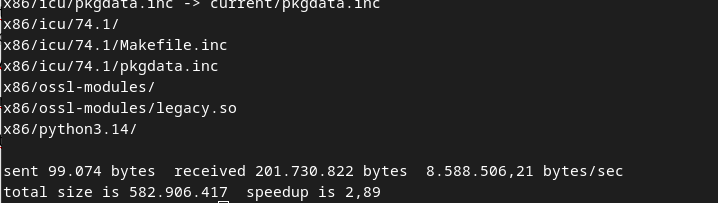
You should end with the below message:
Step 4: Cross-compile WebKit2
Get the Haiku WebKit2 sources:
cd ~/Documents/C/
git clone --branch haiku-webkit2 --depth 1 https://codeberg.org/haiku/haikuwebkit.git haiku-webkit2
Now the build itself.
Start by defining a few variables to keep the command readable:
cd ~/Documents/C/haiku-webkit2

CROSSROOT=$HOME/Documents/C/haiku-r1b6/generated.x86
CROSS_BIN=$CROSSROOT/cross-tools-x86/bin

SYSROOT=$HOME/Documents/C/haiku-r1b6/sysroot
DLIB=$SYSROOT/boot/system/develop/lib/x86
DHDR=$SYSROOT/boot/system/develop/headers/x86
For libEGL, you will need to add the below symlink in Debian :
ln -sf ../../../lib/x86/libEGL.so.1 $DLIB/libEGL.soThen launch the build:
PKG_CONFIG_LIBDIR="$DLIB/pkgconfig" \
PKG_CONFIG_SYSROOT_DIR="$SYSROOT" \
CC="$CROSS_BIN/i586-pc-haiku-gcc" \
CXX="$CROSS_BIN/i586-pc-haiku-g++" \
Tools/Scripts/build-webkit --haiku \
  --cmakeargs="-DCMAKE_SYSTEM_NAME=Haiku -DCMAKE_SYSTEM_PROCESSOR=x86 \
-DCMAKE_SYSROOT=$SYSROOT -DCMAKE_HAIKU_SECONDARY_ARCH=x86 \
-DCMAKE_AR=$CROSS_BIN/i586-pc-haiku-ar -DCMAKE_RANLIB=$CROSS_BIN/i586-pc-haiku-ranlib \
-DRUBY_EXECUTABLE=/usr/bin/ruby3.1 \
-DLIBXML2_LIBRARY=$DLIB/libxml2.so -DLIBXML2_INCLUDE_DIR=$DHDR/libxml2 \
-DLIBXSLT_LIBRARY=$DLIB/libxslt.so -DLIBXSLT_EXSLT_LIBRARY=$DLIB/libexslt.so \
-DLIBXSLT_INCLUDE_DIR=$DHDR \
-DOpenGLES2_LIBRARY=$SYSROOT/boot/system/lib/x86/libGLESv2.so -DOpenGLES2_INCLUDE_DIR=$DHDR \
-DEGL_LIBRARIES=$DLIB/libEGL.so -DEGL_INCLUDE_DIRS=$DHDR \
-DSQLite3_LIBRARY=$DLIB/libsqlite3.so -DSQLite3_INCLUDE_DIR=$DHDR \
-DWebP_LIBRARY=$DLIB/libwebp.so -DWebP_INCLUDE_DIR=$DHDR \
-DAVIF_LIBRARY=$DLIB/libavif.so -DAVIF_INCLUDE_DIR=$DHDR \
-DLCMS2_LIBRARY=$DLIB/liblcms2.so -DLCMS2_INCLUDE_DIR=$DHDR \
-DWOFF2_LIBRARY=$DLIB/libwoff2common.so -DWOFF2_DEC_LIBRARY=$DLIB/libwoff2dec.so \
-DWOFF2_INCLUDE_DIR=$DHDR \
-DCURL_LIBRARY=$DLIB/libcurl.so -DCURL_LIBRARY_RELEASE=$DLIB/libcurl.so -DCURL_INCLUDE_DIR=$DHDR \
-DLibPSL_LIBRARY=$DLIB/libpsl.so -DLibPSL_INCLUDE_DIR=$DHDR \
-DOPENSSL_SSL_LIBRARY=$DLIB/libssl.so -DOPENSSL_CRYPTO_LIBRARY=$DLIB/libcrypto.so \
-DOPENSSL_INCLUDE_DIR=$DHDR \
-DCMAKE_LIBRARY_PATH=$DLIB\;$SYSROOT/boot/system/lib/x86 -DCMAKE_INCLUDE_PATH=$DHDR \
-DCMAKE_CXX_FLAGS='-march=pentium4 -ftrack-macro-expansion=0 --param ggc-min-expand=10' \
-DCMAKE_EXE_LINKER_FLAGS='-L'"$SYSROOT"'/boot/system/lib/x86 -L'"$DLIB"' -L'"$CROSSROOT"'/cross-tools-x86/i586-pc-haiku/lib' \
-DCMAKE_SHARED_LINKER_FLAGS='-L'"$SYSROOT"'/boot/system/lib/x86 -L'"$DLIB"' -L'"$CROSSROOT"'/cross-tools-x86/i586-pc-haiku/lib' \
-DCMAKE_FIND_ROOT_PATH=$SYSROOT/boot/system \
-DCMAKE_FIND_ROOT_PATH_MODE_PROGRAM=NEVER \
-DCMAKE_FIND_ROOT_PATH_MODE_LIBRARY=ONLY \
-DCMAKE_FIND_ROOT_PATH_MODE_INCLUDE=ONLY" \
  --makeargs="-j4" \
  --host=linux \
  --no-fatal-warnings
Now go and grab a coffee, this one takes a while :)

Meanwhile below is what the important parts do:
- `PKG_CONFIG_LIBDIR` / `PKG_CONFIG_SYSROOT_DIR`: make `pkg-config` look inside the Haiku sysroot instead of the Debian system.
- `CMAKE_SYSTEM_NAME=Haiku` and `CMAKE_HAIKU_SECONDARY_ARCH=x86`: tell CMake we target Haiku and its 32-bit secondary architecture.
- One `-D...LIBRARY` / `-D...INCLUDE_DIR` pair per dependency: this points CMake straight at the files we copied, rather than letting it search.
- `CMAKE_FIND_ROOT_PATH_MODE_*`: programs come from the host (`NEVER`), but libraries and headers must come only from the sysroot (`ONLY`).
- `-ftrack-macro-expansion=0` and `--param ggc-min-expand=10`: reduce the compiler's memory usage. The trade-off is a slightly slower compilation, but it avoids the compiler being killed for lack of memory.
- `-march=pentium4`: a safe baseline instruction set for 32-bit x86. It implies SSE2, so CPUs older than the Pentium 4 / Athlon 64 are not supported. This option might be removed but this scenario has not been tested.
- `--host=linux`: the machine the compiler runs on. As target will report i586-pc-haiku from the cross compiler, it makes the script avoid doing some extra tests which are not required
- `-j4`: a conservative number of jobs. Increase it if you have plenty of RAM, decrease it if the linker or compiler gets killed.
Note: next time you rebuild, if you have changed the sysroot content or the toolchain, removing `CMakeCache.txt` and `CMakeFiles` can be needed with the below:
rm -rf WebKitBuild/Release/CMakeCache.txt WebKitBuild/Release/CMakeFilesOnce the build is finished, you should see the below message:

You can check that MiniBrowser is a 32 bit executable:
file WebKitBuild/Release/bin/MiniBrowser
WebKitBuild/Release/bin/MiniBrowser: ELF 32-bit LSB shared object, Intel 80386, version 1 (SYSV), dynamically linked, not stripped
Step 5: Test MiniBrowser in QEMU
We will copy the program and required libraries to the virtual machine.
Boot QEMU again with the same command as before:
qemu-system-i386 \
  -enable-kvm -cpu host -smp 4 -m 4096 \
  -hda haiku32.qcow2 \
  -netdev user,id=net0,hostfwd=tcp::2222-:22 \
  -device rtl8139,netdev=net0
Then copy MiniBrowser and the freshly built libraries from Debian to Haiku 32 bit:
rsync -av -e "ssh -p 2222" --exclude='libTestRunnerInjectedBundle*' --include='*.so*' --exclude='*'   WebKitBuild/Release/lib/ user@localhost:/boot/home/config/non-packaged/lib/
rsync -av -e "ssh -p 2222" WebKitBuild/Release/bin/{MiniBrowser,NetworkProcess,WebProcess} user@localhost:/boot/home/config/non-packaged/bin/
For the WebInspector UI, you need to copy the below files:
ssh -p 2222 user@localhost "mkdir -p /boot/home/config/non-packaged/data/WebKit/inspector"
rsync -av -e "ssh -p 2222" Source/WebInspectorUI/UserInterface/ user@localhost:/boot/home/config/non-packaged/data/WebKit/inspector/
Now let's run MiniBrowser inside QEMU / Haiku !
Open a Terminal and start MiniBrowser :
LIBRARY_PATH=/boot/system/lib/x86:/boot/home/config/non-packaged/lib:$LIBRARY_PATH MiniBrowser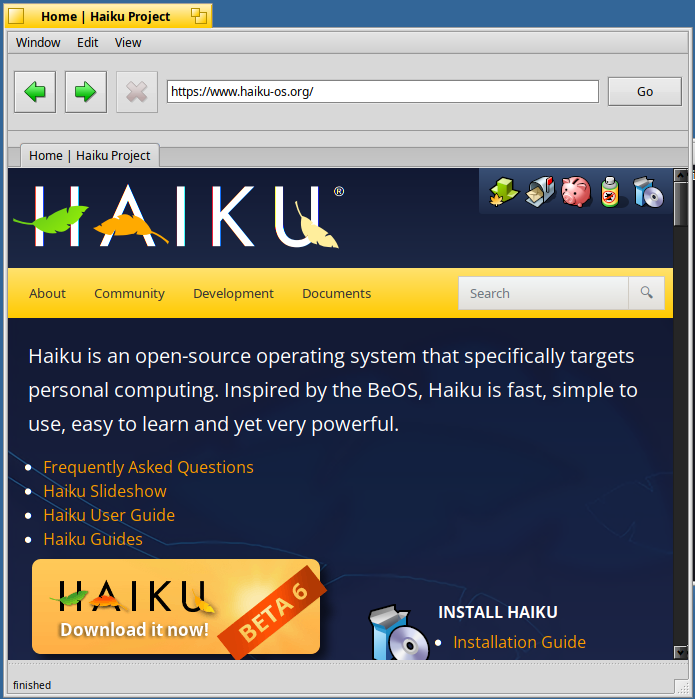
The page loads, congratulations: you have a working cross-compiled WebKit2!
Note : the WebInspector has not been tested on Haiku 32 bit, so it might not be usable for the moment.
Tested with :
Host: Debian 12 (Bookworm)
Haiku: R1/beta6 32-bit, in QEMU with KVM
Buildtools and Haiku sources: tag `r1beta6`
HaikuWebKit: branch `haiku-webkit2`
What's next
This is a first step, and there is still room for improvement.
Copying libraries by hand is fine for testing, but not for everyday use.
The next goal once the cross compilation is done would be to produce a package. It should be possible, as it's possible to build a Haiku ISO including all its package from a Linux machine.
It could be great to have cross-compilation from Linux easier for Haiku packages in general.
I already managed to cross-compile a few packages with a modified version of HaikuPorter from Debian, but for the moment this approach is still experimental.
If you try the procedure for WebKit2 and run into a problem, or find a cleaner way to do it, feel free to discuss this on the haiku forum.
I hope you have found this article useful :)