
Network kit: Download Manager
 DigitalBox
- KitLab
- May 25, 2026
In the previous articles, we explored BNetworkAddress for hostname resolution, TCP communication with BNetEndpoint, and UDP datagrams.
Now, let's put it all together and build a real-world application: a download manager with a graphical interface!
This project will demonstrate:
- HTTP protocol implementation
- Background threading for downloads
- Progress tracking
- File writing with the Storage Kit
- GUI with status updates
Understanding HTTP Basics
HTTP (Hypertext Transfer Protocol) is an application‑level protocol that runs on top of TCP.
From the client’s perspective, an HTTP transaction is essentially a structured exchange of text commands and responses over a reliable byte stream.
A simple HTTP GET request typically looks like this:
GET /path/to/file.html HTTP/1.1
Host: example.com
Connection: close
The server answers with a response header followed by the requested data:
HTTP/1.1 200 OK
Content-Length: 12345
Content-Type: text/html

[content data...]
In our download manager, we will implement just enough of HTTP/1.1 to retrieve files reliably.
The goal is not to replace a full‑featured HTTP library, but to clearly illustrate how the protocol works and how it maps to Haiku’s networking APIs.
Application Architecture
The download manager is deliberately structured into a small set of clearly defined components. Each part has a single responsibility, which makes the code easier to understand and extend.
The application consists of:
-
Main window – The graphical interface that displays downloads and provides user controls
-
Download threads – One background thread per download to keep the UI responsive
-
HTTP client – A minimal client built on top of
BNetEndpoint -
Progress reporting – Messages sent from worker threads back to the GUI
This separation mirrors common patterns in Haiku applications and highlights the importance of message‑based communication between threads.
Core Concepts
HTTP Client Implementation
At the heart of the application is a simple HTTP/1.1 client. Although compact, it performs all the essential steps required for a file download:
-
Parsing the URL to extract the host name, port, and resource path
-
Establishing a TCP connection using
BNetEndpoint -
Sending a properly formatted HTTP GET request
-
Receiving and parsing the HTTP response headers
-
Downloading the response body and writing it to a file
-
Reporting progress back to the graphical interface
By implementing these steps manually, you gain a clear understanding of how higher‑level HTTP libraries operate behind the scenes.
Threading with spawn_thread
Network operations and file downloads can take a significant amount of time. Running them on the main thread would freeze the user interface and result in a poor user experience. To avoid this, Haiku provides spawn_thread(), which allows long‑running tasks to execute in the background.
Each download runs inside its own worker thread.
Once the thread is created with spawn_thread(), it is started using resume_thread().
This design ensures that the main window remains fully responsive, even while large files are being downloaded.
thread_id thread = spawn_thread(
    DownloadThreadFunc,      // Function to run
    "download_thread",       // Thread name
    B_NORMAL_PRIORITY,       // Priority
    data                     // Data passed to thread
);

resume_thread(thread);  // Start the thread
Thread-Safe GUI Updates
One of the most important rules in Haiku application development is that GUI objects must only be accessed from the main thread. Directly calling interface methods from a worker thread can lead to crashes or subtle bugs.
To safely update the interface, worker threads send BMessage objects to the window using BMessenger.
These messages are then handled in MessageReceived(), which runs on the GUI thread.
This message‑passing model is simple, robust, and central to Haiku’s design philosophy.
// From worker thread
BMessenger messenger(window);
BMessage msg(MSG_PROGRESS);
msg.AddInt32("bytes", bytesDownloaded);
messenger.SendMessage(&msg);

// GUI receives in MessageReceived() - thread-safe!
Complete Application: DownloadManager.cpp
Here's the complete download manager:
#include <Application.h>
#include <Window.h>
#include <Button.h>
#include <TextControl.h>
#include <LayoutBuilder.h>
#include <StringView.h>
#include <StatusBar.h>
#include <ListView.h>
#include <ScrollView.h>
#include <FilePanel.h>
#include <Path.h>
#include <Entry.h>
#include <File.h>
#include <NetEndpoint.h>
#include <String.h>
#include <Messenger.h>
#include <stdio.h>
#include <stdlib.h>
#include <string.h>

// Messages
const uint32 MSG_ADD_DOWNLOAD = 'addl';
const uint32 MSG_START_DOWNLOAD = 'strt';
const uint32 MSG_CANCEL_DOWNLOAD = 'cncl';
const uint32 MSG_PROGRESS = 'prog';
const uint32 MSG_COMPLETE = 'cmpl';
const uint32 MSG_ERROR = 'erro';
const uint32 MSG_SAVE_PANEL = 'save';

// Simple HTTP Client
class SimpleHTTPClient {
public:
    SimpleHTTPClient() : fEndpoint(NULL) {}

    ~SimpleHTTPClient() {
        Close();
    }

    status_t DownloadFile(const char* url, const char* savePath,
                         BMessenger* progressTarget = NULL, int32 itemIndex = 0) {
        // Parse URL
        BString host, path;
        int port = 80;

        if (!ParseURL(url, host, path, port)) {
            return B_BAD_VALUE;
        }

        // Connect to server
        fEndpoint = new BNetEndpoint(SOCK_STREAM);
        status_t status = fEndpoint->Connect(host.String(), port);
        if (status != B_OK) {
            delete fEndpoint;
            fEndpoint = NULL;
            return status;
        }

        // Send HTTP request
        BString request;
        request << "GET " << path << " HTTP/1.1\r\n";
        request << "Host: " << host << "\r\n";
        request << "Connection: close\r\n";
        request << "\r\n";

        fEndpoint->Send(request.String(), request.Length());

        // Receive and parse headers
        int32 contentLength = -1;
        if (!ReceiveHeaders(contentLength)) {
            Close();
            return B_ERROR;
        }

        // Download file
        return ReceiveFile(savePath, contentLength, progressTarget, itemIndex);
    }

    void Close() {
        if (fEndpoint) {
            fEndpoint->Close();
            delete fEndpoint;
            fEndpoint = NULL;
        }
    }

private:
    bool ParseURL(const char* url, BString& host, BString& path, int& port) {
        BString urlStr(url);

        // Check for HTTPS (not supported)
        if (urlStr.IFindFirst("https://") == 0) {
            return false;
        }

        // Remove http://
        if (urlStr.IFindFirst("http://") == 0) {
            urlStr.Remove(0, 7);
        }

        // Find path separator
        int32 pathStart = urlStr.FindFirst('/');
        if (pathStart < 0) {
            host = urlStr;
            path = "/";
        } else {
            host.SetTo(urlStr.String(), pathStart);
            path.SetTo(urlStr.String() + pathStart);
        }

        // Check for port
        int32 portStart = host.FindFirst(':');
        if (portStart >= 0) {
            BString portStr;
            portStr.SetTo(host.String() + portStart + 1);
            port = atoi(portStr.String());
            host.Truncate(portStart);
        }

        return host.Length() > 0;
    }

    bool ReceiveHeaders(int32& contentLength) {
        BString headers;
        char buffer[1];

        // Read headers line by line until \r\n\r\n
        while (true) {
            int32 received = fEndpoint->Receive(buffer, 1);
            if (received <= 0) {
                return false;
            }

            headers.Append(buffer, 1);

            // Check for end of headers
            if (headers.IFindLast("\r\n\r\n") >= 0) {
                break;
            }

            // Prevent infinite loop
            if (headers.Length() > 8192) {
                return false;
            }
        }

        // Parse Content-Length
        int32 lengthPos = headers.IFindFirst("Content-Length:");
        if (lengthPos >= 0) {
            int32 lineEnd = headers.FindFirst('\r', lengthPos);
            BString lengthStr;
            lengthStr.SetTo(headers.String() + lengthPos + 15, lineEnd - lengthPos - 15);
            contentLength = atoi(lengthStr.String());
        }

        return true;
    }

    status_t ReceiveFile(const char* savePath, int32 contentLength,
                        BMessenger* progressTarget, int32 itemIndex) {
        BFile file(savePath, B_WRITE_ONLY | B_CREATE_FILE | B_ERASE_FILE);
        if (file.InitCheck() != B_OK) {
            return file.InitCheck();
        }

        char buffer[4096];
        int32 totalReceived = 0;

        while (true) {
            int32 received = fEndpoint->Receive(buffer, sizeof(buffer));

            if (received <= 0) {
                break;  // End of data or error
            }

            // Write to file
            ssize_t written = file.Write(buffer, received);
            if (written != received) {
                return B_ERROR;
            }

            totalReceived += received;

            // Send progress update
            if (progressTarget) {
                BMessage progress(MSG_PROGRESS);
                progress.AddInt32("index", itemIndex);
                progress.AddInt32("bytes", totalReceived);
                if (contentLength > 0) {
                    progress.AddInt32("total", contentLength);
                }
                progressTarget->SendMessage(&progress);
            }
        }

        return B_OK;
    }

    BNetEndpoint* fEndpoint;
};

// Download Item
class DownloadItem : public BStringItem {
public:
    DownloadItem(const char* url, const char* savePath)
        : BStringItem(url),
          fURL(url),
          fSavePath(savePath),
          fThread(-1),
          fBytesDownloaded(0),
          fTotalBytes(0),
          fStatus("Pending")
    {
        UpdateText();
    }

    void SetProgress(int32 bytes, int32 total) {
        fBytesDownloaded = bytes;
        fTotalBytes = total;
        fStatus = "Downloading";
        UpdateText();
    }

    void SetComplete() {
        fStatus = "Complete";
        UpdateText();
    }

    void SetError(const char* error) {
        fStatus = error;
        UpdateText();
    }

    void UpdateText() {
        BString text = fURL;
        text << " - " << fStatus;

        if (fTotalBytes > 0) {
            int percent = (fBytesDownloaded * 100) / fTotalBytes;
            text << " (" << percent << "%)";
        }

        SetText(text.String());
    }

    const char* URL() const { return fURL.String(); }
    const char* SavePath() const { return fSavePath.String(); }
    thread_id Thread() const { return fThread; }
    void SetThread(thread_id thread) { fThread = thread; }

private:
    BString fURL;
    BString fSavePath;
    thread_id fThread;
    int32 fBytesDownloaded;
    int32 fTotalBytes;
    BString fStatus;
};

// Download thread data
struct DownloadThreadData {
    BString url;
    BString savePath;
    BMessenger messenger;
    int32 itemIndex;
};

// Download thread function
int32 DownloadThreadFunc(void* data) {
    DownloadThreadData* threadData = (DownloadThreadData*)data;

    SimpleHTTPClient client;
    status_t status = client.DownloadFile(
        threadData->url.String(),
        threadData->savePath.String(),
        &threadData->messenger,
        threadData->itemIndex
    );

    BMessage msg;
    if (status == B_OK) {
        msg.what = MSG_COMPLETE;
    } else {
        msg.what = MSG_ERROR;
        msg.AddString("error", strerror(status));
    }
    msg.AddInt32("index", threadData->itemIndex);

    threadData->messenger.SendMessage(&msg);

    delete threadData;
    return 0;
}

// Main Window
class DownloadManagerWindow : public BWindow {
public:
DownloadManagerWindow()
    : BWindow(BRect(100, 100, 700, 550), "Download Manager",
              B_TITLED_WINDOW, B_QUIT_ON_WINDOW_CLOSE | B_AUTO_UPDATE_SIZE_LIMITS),
      fSavePanel(NULL)
{
    // Create controls
    fURLInput = new BTextControl("URL:", "http://example.com/", NULL);
    fAddButton = new BButton("add_btn", "Add Download", new BMessage(MSG_ADD_DOWNLOAD));

    // Create list with initial size
    BRect listRect(0, 0, 500, 250);
    fDownloadList = new BListView(listRect, "download_list", B_SINGLE_SELECTION_LIST, B_FOLLOW_ALL_SIDES);
    fDownloadList->SetSelectionMessage(new BMessage('sele'));

    BScrollView* scrollView = new BScrollView("scroll", fDownloadList,
        0, 0, false, true);

    fStartButton = new BButton("start_btn", "Start", new BMessage(MSG_START_DOWNLOAD));
    fStartButton->SetEnabled(false);
    fCancelButton = new BButton("cancel_btn", "Cancel", new BMessage(MSG_CANCEL_DOWNLOAD));
    fCancelButton->SetEnabled(false);

    fStatusBar = new BStatusBar("status_bar", "Progress:");
    fStatusBar->SetMaxValue(100.0);

    // Build layout
    BLayoutBuilder::Group<>(this, B_VERTICAL, B_USE_DEFAULT_SPACING)
        .SetInsets(B_USE_WINDOW_SPACING)
        .AddGroup(B_HORIZONTAL, B_USE_DEFAULT_SPACING)
            .Add(fURLInput->CreateLabelLayoutItem())
            .Add(fURLInput->CreateTextViewLayoutItem())
            .Add(fAddButton)
        .End()
        .Add(scrollView, 10)  // Weight 10 for expansion
        .AddGroup(B_HORIZONTAL, B_USE_DEFAULT_SPACING)
            .AddGlue()
            .Add(fStartButton)
            .Add(fCancelButton)
        .End()
        .Add(fStatusBar)
        .End();

    fAddButton->SetTarget(this);
    fStartButton->SetTarget(this);
    fCancelButton->SetTarget(this);

    Show();
}

    ~DownloadManagerWindow() {
        delete fSavePanel;

        // Clean up list items
        for (int32 i = 0; i < fDownloadList->CountItems(); i++) {
            delete fDownloadList->ItemAt(i);
        }
    }

    void MessageReceived(BMessage* msg) override {
        switch (msg->what) {
            case MSG_ADD_DOWNLOAD: {
                const char* url = fURLInput->Text();
                if (strlen(url) == 0) {
                    break;
                }

                // Extract filename from URL
                BString urlStr(url);

                // Remove protocol
                if (urlStr.IFindFirst("http://") == 0) {
                    urlStr.Remove(0, 7);
                } else if (urlStr.IFindFirst("https://") == 0) {
                    urlStr.Remove(0, 8);
                }

                int32 lastSlash = urlStr.FindLast('/');
                BString filename;

                if (lastSlash >= 0 && lastSlash < urlStr.Length() - 1) {
                    // Il y a du contenu après le dernier /
                    filename.SetTo(urlStr.String() + lastSlash + 1);

                    // Remove query parameters if present
                    int32 queryPos = filename.FindFirst('?');
                    if (queryPos >= 0) {
                        filename.Truncate(queryPos);
                    }
                }

                // Check if filename is empty or looks like a directory (ends with /)
                if (filename.Length() == 0 || urlStr[urlStr.Length() - 1] == '/') {
                    filename = "index.html";
                }

                // Show save panel with default name
                if (!fSavePanel) {
                    fSavePanel = new BFilePanel(B_SAVE_PANEL, new BMessenger(this),
                        NULL, 0, false, new BMessage(MSG_SAVE_PANEL));
                }

                fSavePanel->SetSaveText(filename.String());
                fSavePanel->Show();
                break;
            }

            case MSG_SAVE_PANEL: {
                entry_ref ref;
                const char* name;
                if (msg->FindRef("directory", &ref) == B_OK &&
                    msg->FindString("name", &name) == B_OK) {

                    BPath path(&ref);
                    path.Append(name);

                    DownloadItem* item = new DownloadItem(fURLInput->Text(), path.Path());
                    fDownloadList->AddItem(item);

                    // Sélectionner automatiquement le dernier élément ajouté
                    int32 lastIndex = fDownloadList->CountItems() - 1;
                    fDownloadList->Select(lastIndex);
                    fDownloadList->ScrollToSelection();

                    fDownloadList->Invalidate();

                    fURLInput->SetText("");
                }
                break;
            }

            case MSG_START_DOWNLOAD: {
                int32 index = fDownloadList->CurrentSelection();
                if (index < 0) {
                    break;
                }

                DownloadItem* item = (DownloadItem*)fDownloadList->ItemAt(index);
                StartDownload(item, index);
                break;
            }

            case MSG_PROGRESS: {
                int32 index;
                int32 bytes, total;
                if (msg->FindInt32("index", &index) == B_OK &&
                    msg->FindInt32("bytes", &bytes) == B_OK) {

                    msg->FindInt32("total", &total);

                    DownloadItem* item = (DownloadItem*)fDownloadList->ItemAt(index);
                    if (item) {
                        item->SetProgress(bytes, total);
                        fDownloadList->InvalidateItem(index);

                        if (total > 0) {
                            float percent = (bytes * 100.0f) / total;
                            fStatusBar->Update(percent - fStatusBar->CurrentValue());
                        }
                    }
                }
                break;
            }

            case MSG_COMPLETE: {
                int32 index;
                if (msg->FindInt32("index", &index) == B_OK) {
                    DownloadItem* item = (DownloadItem*)fDownloadList->ItemAt(index);
                    if (item) {
                        item->SetComplete();
                        fDownloadList->InvalidateItem(index);
                        fStatusBar->Reset();
                    }
                }
                break;
            }

            case MSG_ERROR: {
                int32 index;
                const char* error;
                if (msg->FindInt32("index", &index) == B_OK &&
                    msg->FindString("error", &error) == B_OK) {

                    DownloadItem* item = (DownloadItem*)fDownloadList->ItemAt(index);
                    if (item) {
                        item->SetError(error);
                        fDownloadList->InvalidateItem(index);
                        fStatusBar->Reset();
                    }
                }
                break;
            }

            case 'sele': {
                int32 index = fDownloadList->CurrentSelection();
                fStartButton->SetEnabled(index >= 0);
                break;
            }

            default:
                BWindow::MessageReceived(msg);
                break;
        }
    }

    bool QuitRequested() override {
        be_app->PostMessage(B_QUIT_REQUESTED);
        return true;
    }

private:
    void StartDownload(DownloadItem* item, int32 index) {
        fStatusBar->Reset();

        DownloadThreadData* data = new DownloadThreadData;
        data->url = item->URL();
        data->savePath = item->SavePath();
        data->messenger = BMessenger(this);
        data->itemIndex = index;

        thread_id thread = spawn_thread(DownloadThreadFunc, "download_thread",
                                       B_NORMAL_PRIORITY, data);
        if (thread >= 0) {
            item->SetThread(thread);
            resume_thread(thread);
        } else {
            delete data;
        }
    }

    BTextControl*   fURLInput;
    BButton*        fAddButton;
    BListView*      fDownloadList;
    BButton*        fStartButton;
    BButton*        fCancelButton;
    BStatusBar*     fStatusBar;
    BFilePanel*     fSavePanel;
};

class DownloadManagerApp : public BApplication {
public:
    DownloadManagerApp()
        : BApplication("application/x-vnd.demo-downloadmanager") {}

    void ReadyToRun() override {
        new DownloadManagerWindow();
    }
};

int main() {
    DownloadManagerApp app;
    app.Run();
    return 0;
}
Compile and Run
Once the source file is complete, compiling the application is straightforward. Link against the Be API and the Network Kit:
g++ DownloadManager.cpp -o DownloadManager -lbe -lbnetapiAfter compilation, run the application directly from the terminal:
./DownloadManagerYou should now see the download manager window appear on your desktop.
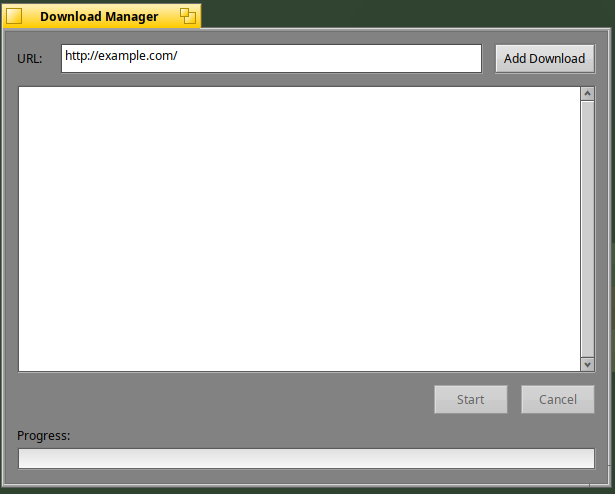
To use the application:
- Enter a URL (e.g.,
http://beos.chez.com/xcalc_int.htm) and click "Add Download":

- Choose where to save the file
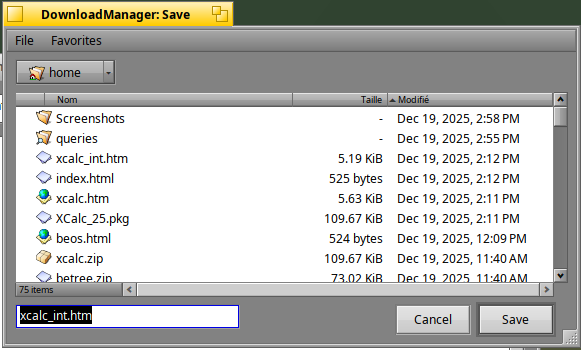
- The download is added in the list:
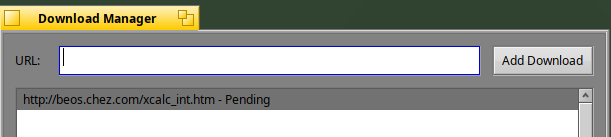
- Enter a second URL (e.g.,
http://beos.chez.com/beware/XCalc_25.pkg) and click "Add Download":

- Choose where to save this file:
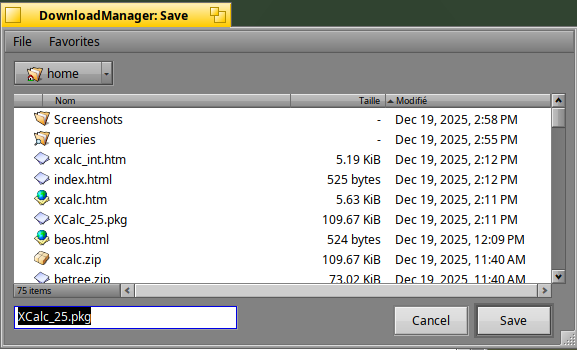
- The download list is updated accordingly:
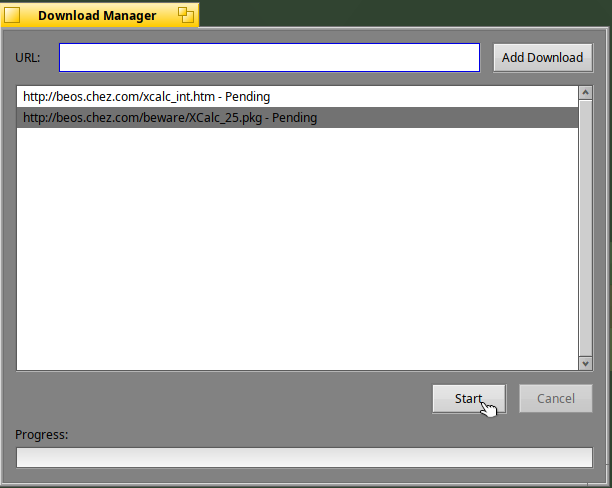
- Select a downloadable file in the list if the default one doesn't fit your need, and click "Start":
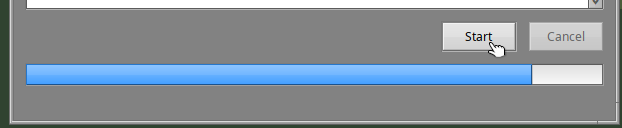
- Watch the progress bar fill as the file downloads:
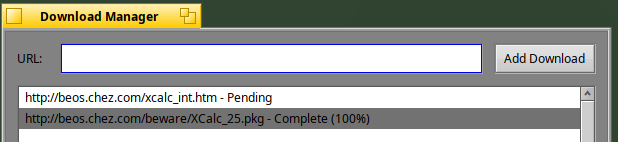
- Select the other downloadable file in the list and click "Start":
- Go into your folder where the files were downloaded:
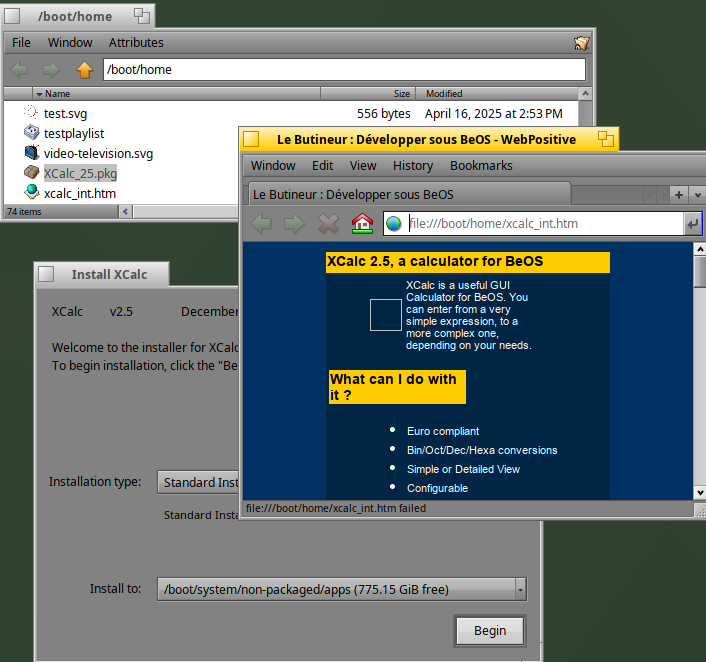
As you can see, both files are available : an HTML page plus a BeOS package :)
How It Works
Application Flow
The overall flow of the application can be summarized as follows:
-
Add download
The user enters a URL and clicks Add Download. ABFilePanelopens, allowing the user to choose where the file will be saved. A newDownloadItemis then added to the list. -
Start download
When the user clicks Start, the application spawns a new background thread usingspawn_thread(). This thread is responsible for the entire download process. -
Download thread
The worker thread creates aSimpleHTTPClient, connects to the remote server, sends the HTTP request, and downloads the file in small chunks. Each chunk is written to disk usingBFile. -
Progress updates
As data is received, the thread sends progress messages back to the window. The GUI updates the list item text and the progress bar accordingly. -
Completion
When the download finishes—or an error occurs—the thread notifies the GUI and exits cleanly.
This clear separation of responsibilities makes the code easier to follow and safer to maintain.
Important Notes
HTTP limitations: this is a minimal HTTP/1.1 client.
It doesn't support:
- HTTPS (would need
BSecureSocketor OpenSSL) - Redirects (301, 302)
- Authentication
- Chunked transfer encoding
- Resumable downloads
For production use, consider using Haiku's higher-level BUrlRequest or libcurl.
Note on "Multi-threaded": This application uses threading to keep the GUI responsive while downloading. Each download runs in its own background thread, preventing the interface from freezing. However, only one download can be active at a time. To download multiple files simultaneously, see the "Try this" suggestions below.
Why It Matters
This project demonstrates:
- Real-world networking: HTTP is the foundation of the web
- Multi-threading: Essential for responsive applications
- Message passing: Haiku's thread-safe communication pattern
- Kit integration: Network Kit + Storage Kit + Interface Kit working together
- Responsive UI: Progress tracking and user feedback
Try This
Now that you have a working download manager, here are some experiments or possible improvements:
- Multiple simultaneous downloads: Modify the application to allow starting several downloads at once. Add multiple selection to the BListView, spawn multiple threads, and optionally limit concurrent downloads to 3-5 to avoid overloading the network.
- Add download speed: Calculate and display KB/s by tracking bytes and time between updates.
- Cancel support: Add a flag that the thread checks periodically to allow cancellation.
- Retry on failure: Automatically retry failed downloads.
- Save download history: Store completed downloads in a settings file using
BMessage::Flatten(). - HTTPS support: Integrate OpenSSL/libcurl for secure downloads.
- Redirect handling: Parse 301/302 responses and follow redirects automatically.
What you've learned
Throughout this Network kit series, we covered:
BNetworkAddressfor hostname resolution and address management- TCP client-server communication with
BNetEndpointfor reliable data exchange - UDP datagrams for fast, connectionless communication and network debugging techniques
- Building a complete application that combines networking, threading, file I/O, and GUI programming
You now have the foundation to build:
- Chat applications
- File transfer tools
- Network games
- Web clients and scrapers
- Server applications
- IoT device communication
- Remote monitoring tools
- And much more!
Keep Exploring!
The Network kit is powerful and there's always more to learn:
- Explore
BUrlRequestfor higher-level HTTP/HTTPS - Study multicast and broadcast protocols in depth
- Implement custom network protocols
- Build peer-to-peer applications
- Create network monitoring and analysis tools
- Integrate with web APIs and services
Thank you for following this Network kit series, keep coding and keep exploring Haiku!