
Network kit: TCP client and server
 DigitalBox
- KitLab
- April 27, 2026
BNetworkAddress to resolve hostnames and work with network addresses.Now, let's take the next step: establishing TCP connections and exchanging data between clients and servers using BNetEndpoint!
Understanding BNetEndpoint
BNetEndpoint is Haiku's class for TCP and UDP network communication.
It wraps socket operations in a clean, object-oriented API.
Think of BNetEndpoint as a communication channel:
- For clients: Connect to a remote server and exchange data
- For servers: Listen for incoming connections and handle multiple clients
The class handles the low-level socket management, making network programming much simpler.
Core Concepts
Creating an Endpoint
You need to write the below code:
#include <NetEndpoint.h>

// Create a TCP endpoint
BNetEndpoint endpoint(SOCK_STREAM);
Client Workflow
The basic client workflow follows these steps:
- Create a
BNetEndpoint - Connect to the server using
Connect() - Send data with
Send() - Receive data with
Receive() - Close the connection with
Close()
BNetEndpoint client(SOCK_STREAM);

// Connect using hostname and port
status_t status = client.Connect("127.0.0.1", 3000);
if (status != B_OK) {
    // Handle connection error
}

// Send data
const char* message = "Hello!";
int32 sent = client.Send(message, strlen(message));

// Receive response
char buffer[1024];
int32 received = client.Receive(buffer, sizeof(buffer) - 1);
if (received > 0) {
    buffer[received] = '\0';
    // Process response
}

// Close
client.Close();
Server Workflow
The server workflow is slightly different:
- Create a
BNetEndpoint - Bind to a local port with
Bind() - Listen for connections with
Listen() - Accept incoming connections with
Accept() - Communicate with the client
- Close the connection
BNetEndpoint server(SOCK_STREAM);

// Bind to port 3000 on all interfaces
server.Bind(3000);

// Start listening (backlog of 5)
server.Listen(5);

// Accept a connection (returns a new BNetEndpoint*)
BNetEndpoint* client = server.Accept();

// Communicate
char buffer[1024];
int32 received = client->Receive(buffer, sizeof(buffer));
client->Send(buffer, received);  // Echo back

// Cleanup
delete client;
server.Close();
Methods
BNetEndpoint proposes these essential methods:
Connect(const char* host, int port)- Connect to remote serverBind(int port)- Bind to local port on all interfacesListen(int backlog)- Start listening for connectionsAccept()- Accept incoming connection, returns newBNetEndpoint*Send(const void* data, size_t length)- Send dataReceive(void* buffer, size_t length)- Receive dataClose()- Close connectionLocalAddr()- Get local address (returnsBNetAddress)RemoteAddr()- Get remote address (returnsBNetAddress)
Error Handling
Always check return values for network operations:
// Check connection
status_t status = endpoint.Connect("example.com", 80);
if (status != B_OK) {
    // Handle error: host unreachable, refused, timeout, etc.
}

// Check send
int32 sent = endpoint.Send(data, length);
if (sent < 0) {
    // Send failed: connection lost, etc.
}

// Check receive
int32 received = endpoint.Receive(buffer, size);
if (received == 0) {
    // Connection closed gracefully
} else if (received < 0) {
    // Receive error
}
Client example: TCP Echo Client (GUI)
Let's build a complete graphical TCP client that connects to an echo server and exchanges messages:
EchoClient.cpp
#include <Application.h>
#include <Window.h>
#include <Button.h>
#include <TextControl.h>
#include <TextView.h>
#include <ScrollView.h>
#include <StringView.h>
#include <LayoutBuilder.h>
#include <NetEndpoint.h>
#include <NetworkAddress.h>
#include <String.h>
#include <stdio.h>
#include <stdlib.h>
#include <string.h>

class EchoClientWindow : public BWindow {
public:
    EchoClientWindow()
        : BWindow(BRect(100, 100, 600, 450), "TCP Echo Client",
                  B_TITLED_WINDOW, B_QUIT_ON_WINDOW_CLOSE | B_AUTO_UPDATE_SIZE_LIMITS),
          fEndpoint(NULL),
          fConnected(false)
    {
        fHostInput = new BTextControl("Host:", "127.0.0.1", NULL);
        fPortInput = new BTextControl("Port:", "3000", NULL);
        fConnectButton = new BButton("connect_btn", "Connect", new BMessage('conn'));
        fStatusLabel = new BStringView("status", "Not connected");

        fMessageInput = new BTextControl("Message:", "", NULL);
        fMessageInput->SetEnabled(false);
        fSendButton = new BButton("send_btn", "Send", new BMessage('send'));
        fSendButton->SetEnabled(false);

        // Log text view
        BRect textRect(0, 0, 400, 200);
        fLogView = new BTextView(textRect, "log_view", textRect, B_FOLLOW_ALL);
        fLogView->MakeEditable(false);
        fLogView->SetWordWrap(true);
        BScrollView* scrollView = new BScrollView("scroll", fLogView,
            B_FOLLOW_ALL, 0, false, true);

        BLayoutBuilder::Group<>(this, B_VERTICAL, B_USE_DEFAULT_SPACING)
            .SetInsets(B_USE_WINDOW_SPACING)
            .AddGroup(B_HORIZONTAL, B_USE_DEFAULT_SPACING)
                .Add(fHostInput)
                .Add(fPortInput)
                .Add(fConnectButton)
            .End()
            .Add(fStatusLabel)
            .AddGroup(B_HORIZONTAL, B_USE_DEFAULT_SPACING)
                .Add(fMessageInput)
                .Add(fSendButton)
            .End()
            .Add(scrollView)
            .End();

        fConnectButton->SetTarget(this);
        fSendButton->SetTarget(this);
        fMessageInput->SetTarget(this);

        Show();
    }

    ~EchoClientWindow() {
        Disconnect();
    }

    void MessageReceived(BMessage* msg) override {
        switch (msg->what) {
            case 'conn':
                if (fConnected) {
                    Disconnect();
                } else {
                    Connect();
                }
                break;

            case 'send':
            case B_KEY_DOWN: {
                int32 key;
                if (msg->what == B_KEY_DOWN && msg->FindInt32("key", &key) == B_OK) {
                    if (key == B_ENTER && fMessageInput->IsFocus()) {
                        SendMessage();
                    }
                } else if (msg->what == 'send') {
                    SendMessage();
                }
                break;
            }

            default:
                BWindow::MessageReceived(msg);
                break;
        }
    }

    bool QuitRequested() override {
        be_app->PostMessage(B_QUIT_REQUESTED);
        return true;
    }

private:
    void Connect() {
        const char* host = fHostInput->Text();
        const char* portStr = fPortInput->Text();
        int port = atoi(portStr);

        if (port <= 0 || port > 65535) {
            LogMessage("Invalid port number\n");
            return;
        }

        fEndpoint = new BNetEndpoint(SOCK_STREAM);

        LogMessage(BString() << "Connecting to " << host << ":" << port << "...\n");

        // Connect using hostname and port directly
        status_t status = fEndpoint->Connect(host, port);
        if (status != B_OK) {
            LogMessage(BString() << "Connection failed: " << strerror(status) << "\n");
            delete fEndpoint;
            fEndpoint = NULL;
            return;
        }

        fConnected = true;
        fStatusLabel->SetText("Connected");
        fConnectButton->SetLabel("Disconnect");
        fMessageInput->SetEnabled(true);
        fSendButton->SetEnabled(true);
        fHostInput->SetEnabled(false);
        fPortInput->SetEnabled(false);

        LogMessage("Connected successfully!\n");
    }

    void Disconnect() {
        if (fEndpoint) {
            fEndpoint->Close();
            delete fEndpoint;
            fEndpoint = NULL;
        }

        fConnected = false;
        fStatusLabel->SetText("Not connected");
        fConnectButton->SetLabel("Connect");
        fMessageInput->SetEnabled(false);
        fSendButton->SetEnabled(false);
        fHostInput->SetEnabled(true);
        fPortInput->SetEnabled(true);

        LogMessage("Disconnected\n");
    }

    void SendMessage() {
        if (!fConnected || !fEndpoint) {
            return;
        }

        const char* message = fMessageInput->Text();
        if (strlen(message) == 0) {
            return;
        }

        LogMessage(BString() << "Sending: " << message << "\n");

        int32 sent = fEndpoint->Send(message, strlen(message));
        if (sent < 0) {
            LogMessage("Failed to send message\n");
            Disconnect();
            return;
        }

        // Receive echo response
        char buffer[1024];
        int32 received = fEndpoint->Receive(buffer, sizeof(buffer) - 1);

        if (received > 0) {
            buffer[received] = '\0';
            LogMessage(BString() << "Received: " << buffer << "\n");
        } else if (received == 0) {
            LogMessage("Server closed connection\n");
            Disconnect();
        } else {
            LogMessage("Receive error\n");
            Disconnect();
        }

        fMessageInput->SetText("");
    }

    void LogMessage(const BString& message) {
        fLogView->Insert(fLogView->TextLength(), message.String(), message.Length());
        fLogView->ScrollToOffset(fLogView->TextLength());
    }

    BTextControl*   fHostInput;
    BTextControl*   fPortInput;
    BButton*        fConnectButton;
    BStringView*    fStatusLabel;
    BTextControl*   fMessageInput;
    BButton*        fSendButton;
    BTextView*      fLogView;
    BNetEndpoint*   fEndpoint;
    bool            fConnected;
};

class EchoClientApp : public BApplication {
public:
    EchoClientApp()
        : BApplication("application/x-vnd.demo-echoclient") {}

    void ReadyToRun() override {
        new EchoClientWindow();
    }
};

int main() {
    EchoClientApp app;
    app.Run();
    return 0;
}
Server example: TCP Echo Server
Here's a complete standalone echo server to test with the client:
EchoServer.cpp
#include <NetEndpoint.h>
#include <NetAddress.h>
#include <stdio.h>
#include <string.h>
#include <signal.h>

static bool running = true;

void SignalHandler(int signal) {
    running = false;
}

int main() {
    signal(SIGINT, SignalHandler);

    BNetEndpoint server(SOCK_STREAM);

    // Bind to port 3000 on all interfaces
    if (server.Bind(3000) != B_OK) {
        printf("Failed to bind to port 3000\n");
        return 1;
    }

    if (server.Listen(5) != B_OK) {
        printf("Failed to listen\n");
        return 1;
    }

    printf("Echo server listening on port 3000...\n");
    printf("Press Ctrl+C to stop\n\n");

    while (running) {
        BNetEndpoint* client = server.Accept();
        if (!client) {
            continue;
        }

        // Get client address info
        const BNetAddress& remoteAddr = client->RemoteAddr();
        char addrStr[64];
        remoteAddr.GetAddr(addrStr);
        printf("Client connected from %s\n", addrStr);

        char buffer[1024];
        while (running) {
            int32 received = client->Receive(buffer, sizeof(buffer) - 1);

            if (received <= 0) {
                printf("Client disconnected\n");
                break;
            }

            buffer[received] = '\0';
            printf("Received: %s\n", buffer);

            // Echo back
            client->Send(buffer, received);
        }

        delete client;
    }

    server.Close();
    printf("\nServer stopped\n");
    return 0;
}
Compile and Run
Compile the server:
g++ EchoServer.cpp -o EchoServer -lbnetapiThen compile the client:
g++ EchoClient.cpp -o EchoClient -lbe -lbnetapiRun the server first:
./EchoServerYou should see:
Echo server listening on port 3000...

Press Ctrl+C to stop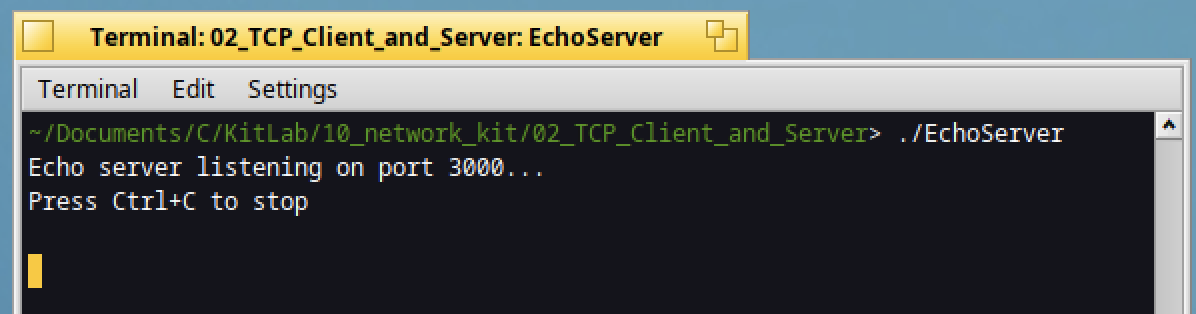
Then run the client in another Terminal:
./EchoClientThe client window appears.
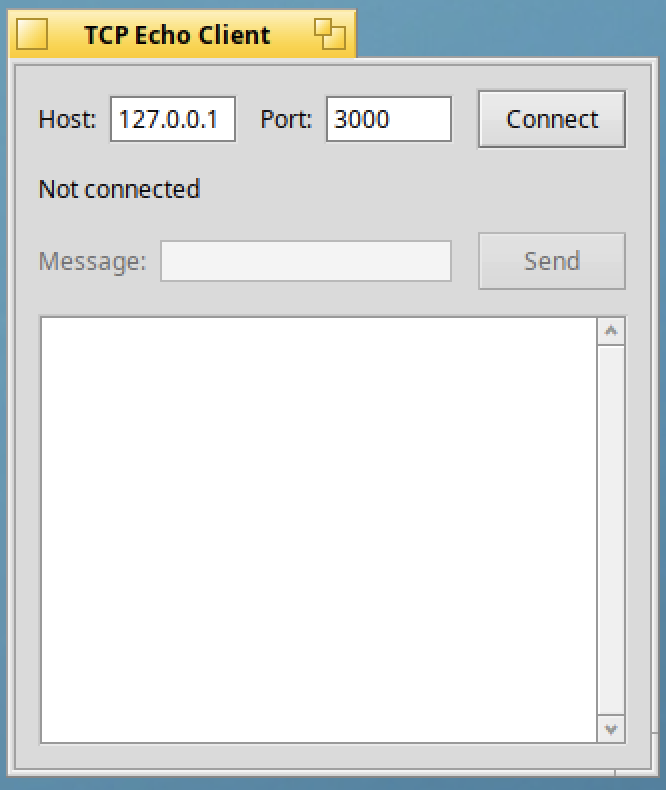
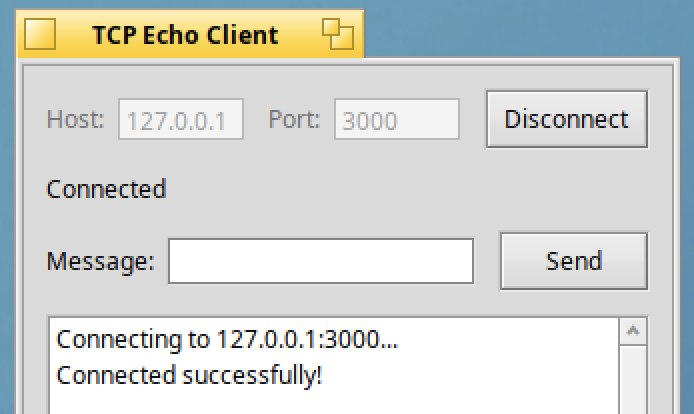
Click "Connect":
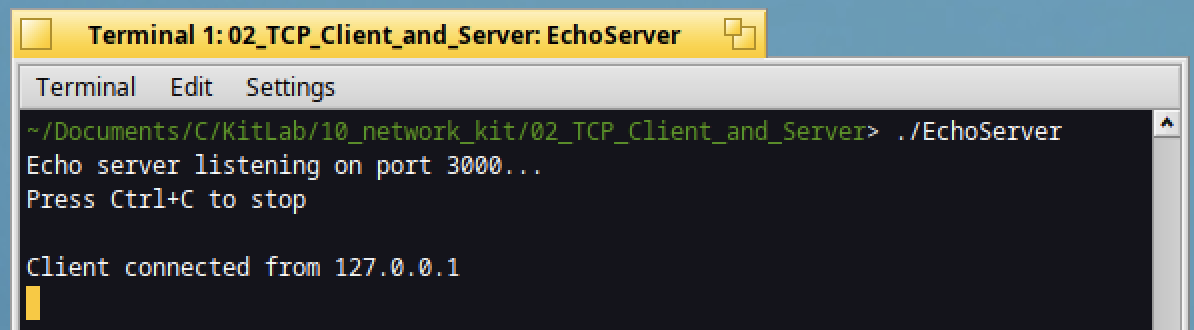
As you can see the server detects the client connection:
Type a message like "Haiku is great!", and press Send or Enter.
The server echoes it back:
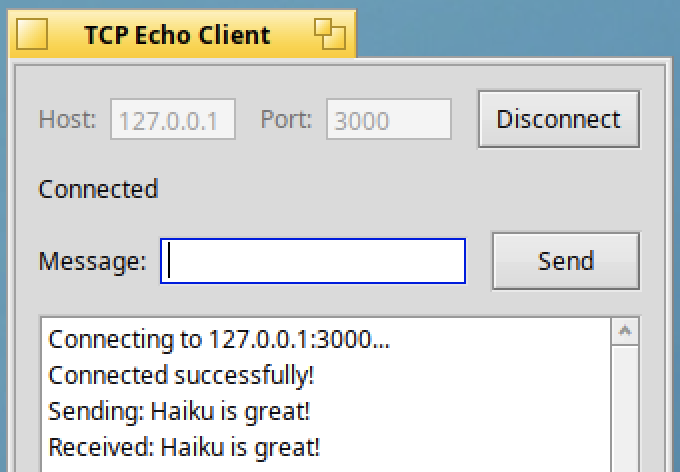
And you see it in the log:
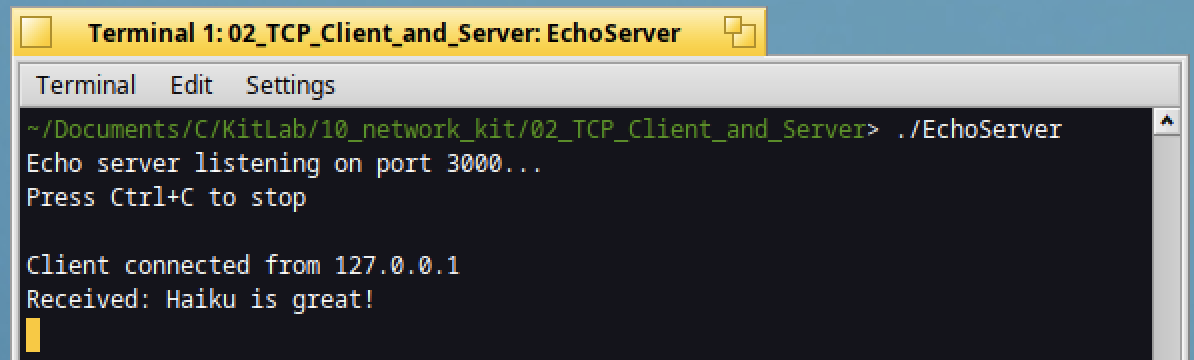
You can now disconnect by clicking on the Disconnect button:
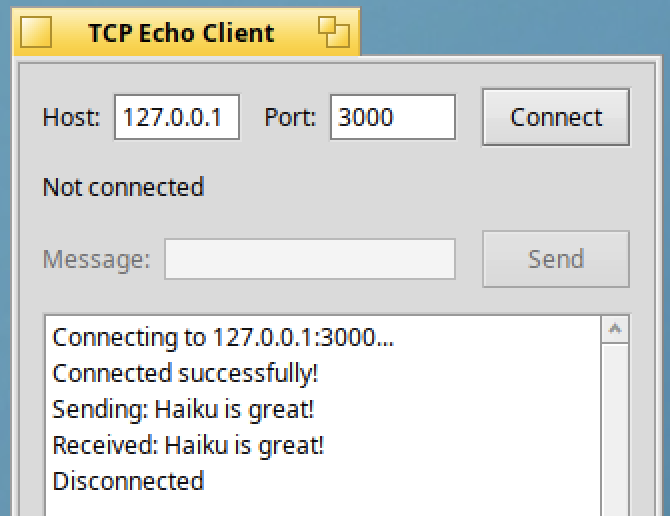
The disconnection appears in the server log:
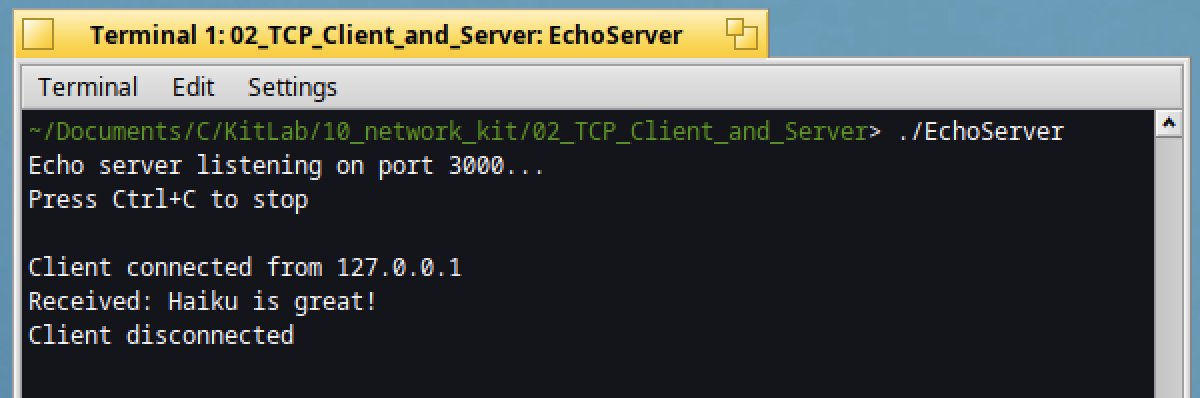
How It Works
On the client Side:
- User enters host and port (defaults to 127.0.0.1:3000)
- Clicking "Connect" creates a
BNetEndpointand callsConnect(host, port) - On success, the message input and Send button are enabled
- User types a message and presses Send or Enter
- Client calls
Send()to transmit the message - Client immediately calls
Receive()to wait for the echo response - All activity is logged in the scrolling text view
- Clicking "Disconnect" closes the connection
On the server Side:
- Server binds to port 3000 on all network interfaces using
Bind(3000) - Calls
Listen(5)to allow up to 5 pending connections - Calls
Accept()which blocks until a client connects Accept()returns a newBNetEndpoint*for that specific client- Gets client address using
RemoteAddr()and displays it - Enters a loop:
Receive()data, thenSend()it back (echo) - When client disconnects,
Receive()returns 0 - Server deletes the client endpoint and waits for next connection
- Ctrl+C stops the server gracefully
Important Notes
The server handles one client at a time: This simple server is sequential — it handles one client completely before accepting the next. For multiple simultaneous clients, you'd need to use threads.
Blocking operations: Both Accept() and Receive() are blocking calls — they wait until data arrives. For responsive GUIs, consider using threads or non-blocking I/O.
Memory management: The server is responsible for deleting the BNetEndpoint* returned by Accept(). Always clean up!
Port numbers: Ports below 1024 require root privileges. Use ports 1024-65535 for your applications.
Why It Matters
Understanding TCP communication in Haiku opens doors to building real-world networked applications:
- Foundation: This client-server pattern is used everywhere: web browsers, email clients, chat apps, games, file transfer
- Simple API:
BNetEndpointmakes network programming accessible - Real protocols: Understanding TCP fundamentals helps you work with HTTP, FTP, SMTP, and other protocols
- Building block: Once you master basic TCP, you can build complex networked applications
Try This
Now that you have a working client and server, here are some experiments:
- Add timestamps: Log the time with each message using
BDateTimeortime(). - Connection info: Display the local port being used by the client with
LocalAddr(). - Message counter: Track how many messages have been sent/received in the session.
- File transfer: Extend the protocol to send file contents between client and server.
- Multiple clients: Research how to use threads (
spawn_thread()) to handle multiple clients simultaneously on the server. - Error recovery: Add automatic reconnection when the connection is lost.
What's Next?
In the next KitLab article, we'll explore UDP Communication and Network Debugging.
We'll see how UDP differs from TCP, when to use it, and how to debug network issues.
Stay tuned — and keep on exploring!