
Network kit: UDP Communication
 DigitalBox
- KitLab
- May 11, 2026
In the previous article, we built TCP client-server applications using BNetEndpoint to establish reliable, connection-oriented communication.
Now, let's explore UDP — a connectionless protocol that's faster but less reliable — and learn how to debug network applications effectively.
Understanding UDP
UDP (User Datagram Protocol) is fundamentally different from TCP:
In TCP you have the below characteristics:
- Connection-oriented (handshake required)
- Reliable (guarantees delivery and order)
- Stream-based (continuous flow of bytes)
- Higher overhead
Where in UDP you have the below:
- Connectionless (no handshake)
- Unreliable (packets may be lost or arrive out of order)
- Message-based (discrete datagrams)
- Lower overhead, faster
When to use UDP:
- Real-time applications (gaming, video streaming, VoIP)
- Broadcast/multicast scenarios
- DNS queries, DHCP
- When speed matters more than reliability
- When you can handle packet loss at application level
Core Concepts:
To create a UDP Endpoint, write the below code:
#include <NetEndpoint.h>

// Create a UDP endpoint
BNetEndpoint udpEndpoint(SOCK_DGRAM);
Unlike TCP, UDP doesn't use Connect(), Accept(), or maintain connections.
Instead, you send individual datagrams directly to destinations—think of it like sending postcards rather than having a phone conversation:
BNetEndpoint client(SOCK_DGRAM);

// No Connect() needed for UDP!
// Send directly to a destination
BNetAddress dest("192.168.1.100", 5000);
const char* message = "Hello!";
client.SendTo(message, strlen(message), dest);

// Receive response
char buffer[1024];
BNetAddress from;
int32 received = client.ReceiveFrom(buffer, sizeof(buffer), from);
The server is equally straightforward.
It binds to a port and waits for incoming datagrams from any sender:
BNetEndpoint server(SOCK_DGRAM);

// Bind to a port
server.Bind(5000);

// Receive from any sender
char buffer[1024];
BNetAddress from;
int32 received = server.ReceiveFrom(buffer, sizeof(buffer), from);

// Reply to sender
server.SendTo(buffer, received, from);
Key UDP Methods
The BNetEndpoint main UDP methods are:
SendTo(const void* data, size_t length, const BNetAddress& to)- Send datagram to specific addressReceiveFrom(void* buffer, size_t length, BNetAddress& from)- Receive datagram and get sender addressBind(int port)- Bind to local port to receive datagramsSetOption(int level, int option, const void* data, size_t length)- Set socket options (broadcast, etc.)
Error Handling
UDP operations can fail silently.
Always check return values:
// Check send
int32 sent = endpoint.SendTo(data, length, dest);
if (sent < 0) {
    // Send failed
}

// Check receive
int32 received = endpoint.ReceiveFrom(buffer, size, from);
if (received < 0) {
    // Receive error
} else if (received == 0) {
    // No data (shouldn't happen with UDP typically)
}
Client example: UDP Ping-Pong Client (GUI)
Let's build a UDP client that sends messages and receives responses:
UDPClient.cpp
#include <Application.h>
#include <Window.h>
#include <Button.h>
#include <TextControl.h>
#include <TextView.h>
#include <ScrollView.h>
#include <StringView.h>
#include <LayoutBuilder.h>
#include <NetEndpoint.h>
#include <NetAddress.h>
#include <String.h>
#include <stdio.h>
#include <stdlib.h>
#include <string.h>

class UDPClientWindow : public BWindow {
public:
    UDPClientWindow()
        : BWindow(BRect(100, 100, 600, 450), "UDP Ping-Pong Client",
                  B_TITLED_WINDOW, B_QUIT_ON_WINDOW_CLOSE | B_AUTO_UPDATE_SIZE_LIMITS)
    {
        fEndpoint = new BNetEndpoint(SOCK_DGRAM);

        fHostInput = new BTextControl("Host:", "127.0.0.1", NULL);
        fPortInput = new BTextControl("Port:", "5000", NULL);

        fMessageInput = new BTextControl("Message:", "Ping!", NULL);
        fSendButton = new BButton("send_btn", "Send", new BMessage('send'));

        // Log text view
        BRect textRect(0, 0, 400, 200);
        fLogView = new BTextView(textRect, "log_view", textRect, B_FOLLOW_ALL);
        fLogView->MakeEditable(false);
        fLogView->SetWordWrap(true);
        BScrollView* scrollView = new BScrollView("scroll", fLogView,
            B_FOLLOW_ALL, 0, false, true);

        BLayoutBuilder::Group<>(this, B_VERTICAL, B_USE_DEFAULT_SPACING)
            .SetInsets(B_USE_WINDOW_SPACING)
            .AddGroup(B_HORIZONTAL, B_USE_DEFAULT_SPACING)
                .Add(fHostInput)
                .Add(fPortInput)
            .End()
            .AddGroup(B_HORIZONTAL, B_USE_DEFAULT_SPACING)
                .Add(fMessageInput)
                .Add(fSendButton)
            .End()
            .Add(scrollView)
            .End();

        fSendButton->SetTarget(this);
        fMessageInput->SetTarget(this);

        LogMessage("UDP client ready. Enter host, port, and message to send.\n");

        Show();
    }

    ~UDPClientWindow() {
        delete fEndpoint;
    }

    void MessageReceived(BMessage* msg) override {
        switch (msg->what) {
            case 'send':
            case B_KEY_DOWN: {
                int32 key;
                if (msg->what == B_KEY_DOWN && msg->FindInt32("key", &key) == B_OK) {
                    if (key == B_ENTER && fMessageInput->IsFocus()) {
                        SendMessage();
                    }
                } else if (msg->what == 'send') {
                    SendMessage();
                }
                break;
            }

            default:
                BWindow::MessageReceived(msg);
                break;
        }
    }

    bool QuitRequested() override {
        be_app->PostMessage(B_QUIT_REQUESTED);
        return true;
    }

private:
    void SendMessage() {
        const char* host = fHostInput->Text();
        const char* portStr = fPortInput->Text();
        int port = atoi(portStr);

        if (port <= 0 || port > 65535) {
            LogMessage("Invalid port number\n");
            return;
        }

        const char* message = fMessageInput->Text();
        if (strlen(message) == 0) {
            return;
        }

        // Create destination address
        BNetAddress destAddr;
        destAddr.SetTo(host, port);

        LogMessage(BString() << "Sending to " << host << ":" << port << " - " << message << "\n");

        // Send UDP datagram
        int32 sent = fEndpoint->SendTo(message, strlen(message), destAddr);
        if (sent < 0) {
            LogMessage("Failed to send message\n");
            return;
        }

        LogMessage(BString() << "Sent " << sent << " bytes\n");

        // Try to receive response (with timeout)
        // Set receive timeout to 2 seconds
        struct timeval timeout;
        timeout.tv_sec = 2;
        timeout.tv_usec = 0;
        fEndpoint->SetOption(SOL_SOCKET, SO_RCVTIMEO, &timeout, sizeof(timeout));

        char buffer[1024];
        BNetAddress from;
        int32 received = fEndpoint->ReceiveFrom(buffer, sizeof(buffer) - 1, from);

        if (received > 0) {
            buffer[received] = '\0';

            char fromAddr[64];
            from.GetAddr(fromAddr);

            LogMessage(BString() << "Received from " << fromAddr << ": " << buffer << "\n");
        } else if (received == 0) {
            LogMessage("No response received (timeout)\n");
        } else {
            LogMessage("Receive error\n");
        }

        fMessageInput->SetText("");
    }

    void LogMessage(const BString& message) {
        fLogView->Insert(fLogView->TextLength(), message.String(), message.Length());
        fLogView->ScrollToOffset(fLogView->TextLength());
    }

    BTextControl*   fHostInput;
    BTextControl*   fPortInput;
    BTextControl*   fMessageInput;
    BButton*        fSendButton;
    BTextView*      fLogView;
    BNetEndpoint*   fEndpoint;
};

class UDPClientApp : public BApplication {
public:
    UDPClientApp()
        : BApplication("application/x-vnd.demo-udpclient") {}

    void ReadyToRun() override {
        new UDPClientWindow();
    }
};

int main() {
    UDPClientApp app;
    app.Run();
    return 0;
}
Server example: UDP Echo Server
Here's a simple UDP echo server:
UDPServer.cpp
#include <NetEndpoint.h>
#include <NetAddress.h>
#include <stdio.h>
#include <string.h>
#include <signal.h>

static bool running = true;

void SignalHandler(int signal) {
    running = false;
}

int main() {
    signal(SIGINT, SignalHandler);

    BNetEndpoint server(SOCK_DGRAM);

    // Bind to port 5000
    if (server.Bind(5000) != B_OK) {
        printf("Failed to bind to port 5000\n");
        return 1;
    }

    printf("UDP echo server listening on port 5000...\n");
    printf("Press Ctrl+C to stop\n\n");

    char buffer[1024];
    BNetAddress from;

    while (running) {
        // Receive datagram
        int32 received = server.ReceiveFrom(buffer, sizeof(buffer) - 1, from);

        if (received <= 0) {
            continue;
        }

        buffer[received] = '\0';

        char fromAddr[64];
        from.GetAddr(fromAddr);

        printf("Received from %s: %s\n", fromAddr, buffer);

        // Echo back to sender
        int32 sent = server.SendTo(buffer, received, from);
        if (sent > 0) {
            printf("Echoed %d bytes back\n", sent);
        }
    }

    printf("\nServer stopped\n");
    return 0;
}
Compile and Run
Compile the server:
g++ UDPServer.cpp -o UDPServer -lbnetapiCompile the client:
g++ UDPClient.cpp -o UDPClient -lbe -lbnetapiRun the server first:
./UDPServerYou should see:
UDP echo server listening on port 5000...

Press Ctrl+C to stop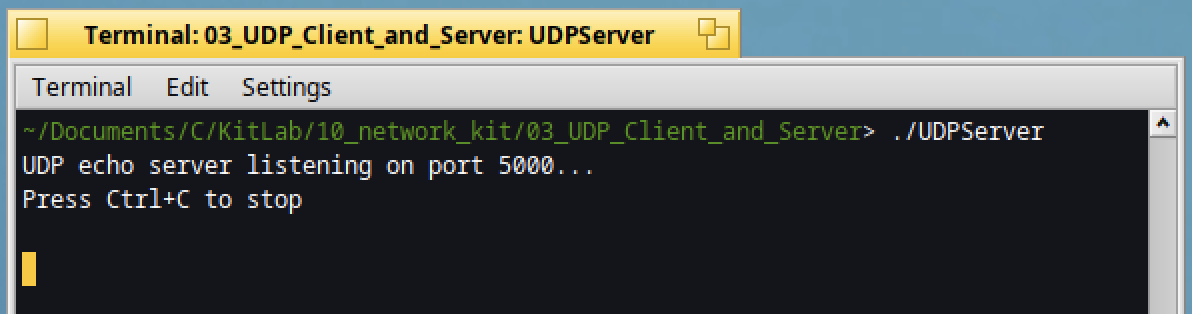
Then run the client:
./UDPClient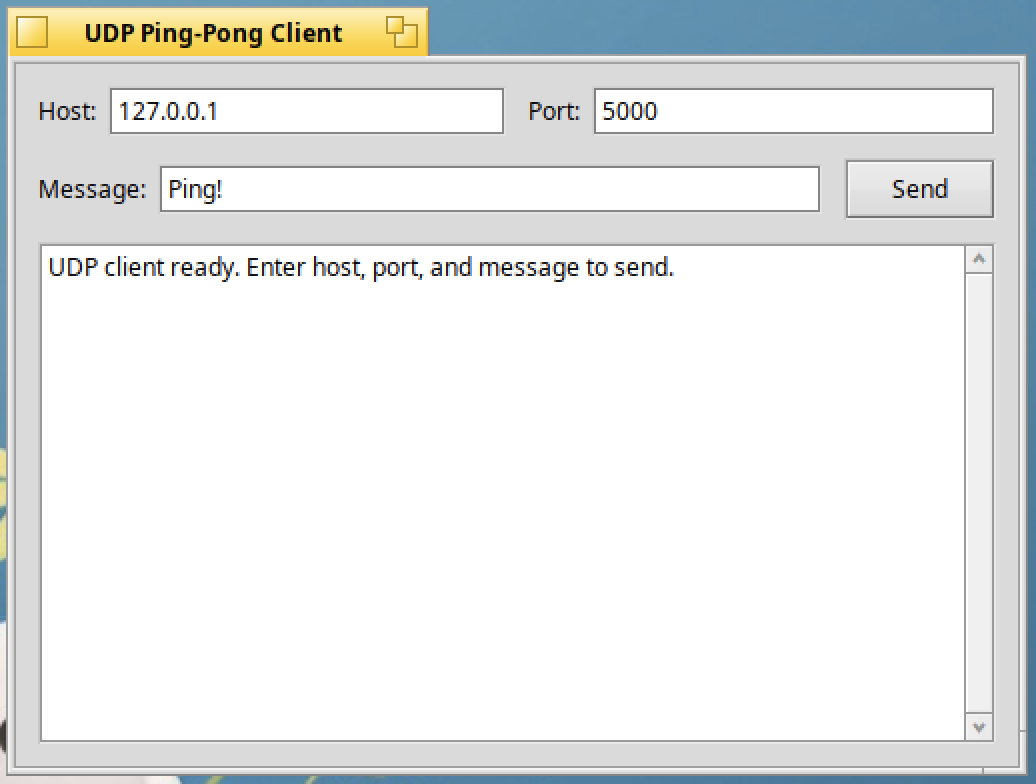
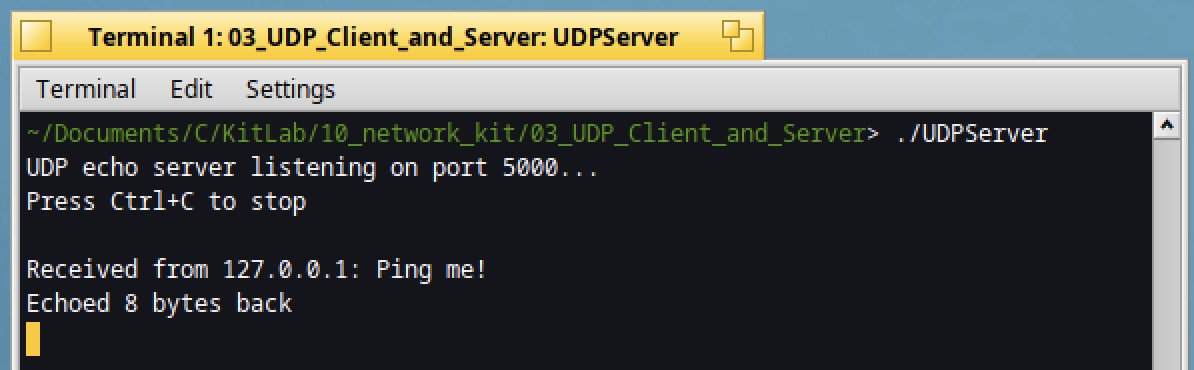
Type a message like "Ping me!" and click Send.
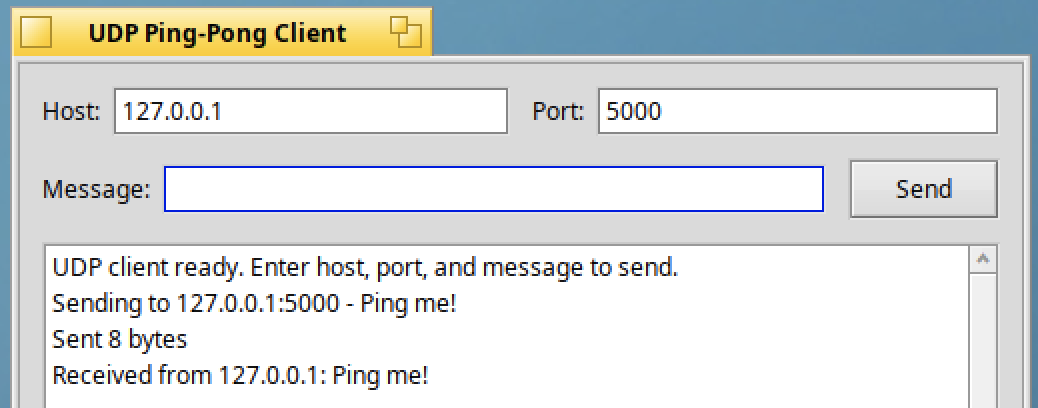
The server echoes it back!
Broadcasting with UDP
One powerful feature of UDP is broadcasting — sending to all devices on the network:
// Enable broadcast on the endpoint
int broadcast = 1;
endpoint.SetOption(SOL_SOCKET, SO_BROADCAST, &broadcast, sizeof(broadcast));

// Send to broadcast address
BNetAddress broadcastAddr;
broadcastAddr.SetTo("255.255.255.255", 5000);
endpoint.SendTo(message, length, broadcastAddr);
Use broadcasting responsibly. It generates network traffic for all devices.
Network Debugging Techniques
Logging and Tracing
Always log network operations for debugging:
void LogNetworkActivity(const char* operation, int32 bytes, const BNetAddress& addr) {
    char addrStr[64];
    addr.GetAddr(addrStr);
    printf("[%s] %d bytes - %s:%d\n", operation, bytes, addrStr, addr.Port());
}

// Usage
int32 sent = endpoint.SendTo(data, length, dest);
LogNetworkActivity("SEND", sent, dest);
Address Validation
Always verify addresses before use:
BNetAddress addr;
addr.SetTo(hostname, port);

if (addr.InitCheck() != B_OK) {
    printf("Invalid address\n");
    return;
}

// Check address family
if (addr.Family() == AF_INET) {
    printf("IPv4 address\n");
} else if (addr.Family() == AF_INET6) {
    printf("IPv6 address\n");
}
Timeout Handling
Set timeouts to prevent indefinite blocking:
// Set 5 second timeout
struct timeval timeout;
timeout.tv_sec = 5;
timeout.tv_usec = 0;

endpoint.SetOption(SOL_SOCKET, SO_RCVTIMEO, &timeout, sizeof(timeout));
endpoint.SetOption(SOL_SOCKET, SO_SNDTIMEO, &timeout, sizeof(timeout));
Using Command-Line Tools
Haiku supports standard network debugging tools:
# Monitor network traffic
tcpdump -i any port 5000

# Test connectivity
ping 192.168.1.100

# Check open ports
netstat -an | grep 5000

# DNS lookup
nslookup example.com
Common UDP Pitfalls
Assuming delivery: UDP doesn't guarantee delivery. Implement acknowledgments if needed.
Ignoring packet order: Packets may arrive out of order. Add sequence numbers if order matters.
Forgetting to bind: Servers must Bind() to receive. Clients typically don't need to.
Why It Matters
Understanding UDP unlocks capabilities that TCP simply can't provide:
- Speed: UDP's low overhead makes it ideal for real-time applications
- Simplicity: No connection management, just send and receive
- Broadcasting: Reach multiple recipients simultaneously
Try This
Now that you understand UDP, here are some experiments:
- Packet loss simulation: Randomly drop some received packets to simulate unreliable networks.
- Sequence numbers: Add a sequence number to each message to detect lost or reordered packets.
- Multicast groups: Research and implement multicast communication (one sender, multiple specific receivers).
What's Next?
In the final Network Kit article, we'll build a practical multi-threaded download manager that combines everything we've learned:
We'll cover:
- HTTP requests using TCP
- Multiple simultaneous downloads with threads
- Progress tracking and cancellation
- Error recovery and resumable downloads
- GUI integration with BStatusBar
- File I/O with the Storage Kit
This will be a complete, real-world application showcasing the Network Kit's capabilities!
Stay tuned — and keep on exploring!