
Repair a broken Haiku
 DigitalBox
- System
- September 14, 2026
A few days ago, a routine package install turned my Haiku system into a machine that simply refused to boot.
It just wouldn't come back up.
Rather than reaching for a fresh install, I remembered that Haiku has a rollback mechanism built directly into its package management system, accessible right from the boot loader.
Ten minutes later, my system was back, package removed, lesson learned.
If you've never had to use it, here's how to do when you're staring at a system that won't start, what that feature is and how it works under the hood.
How to actually do it
The feature is "select boot volume/state" from the Haiku bootloader: to access it type "space" during the boot of your system.
You should then see the below menu:
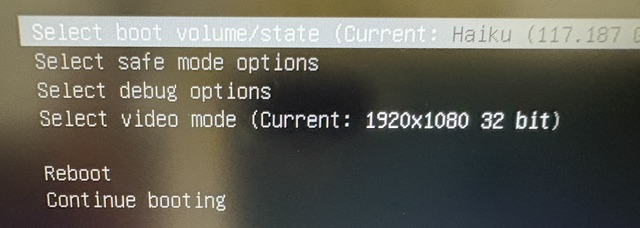
In my case I just indicated to use the state of the day before:
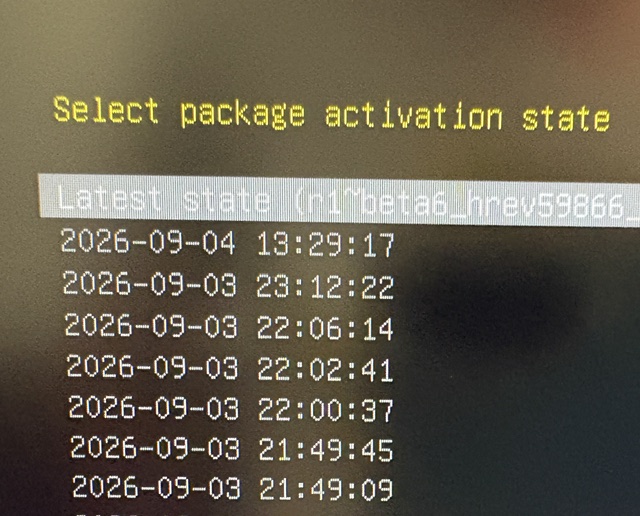
Pressing Enter boot into that specific version.
The last step was to uninstall the bad packages involved:
pkgman uninstall <my_bad_packages>
The next time the system rebooted, the issue was resolved!
What it is ?
Haiku's package management is fundamentally different from what you'd find on most Linux distributions.
Installed packages aren't unpacked file by file into /boot/system — instead, each .hpkg file is mounted read-only through packagefs, and the contents of /boot/system are effectively a live, computed view of whichever packages are currently activated.
That architecture has a very useful side effect: every time you install, update, or remove a package — whether through HaikuDepot, SoftwareUpdater, or pkgman in the Terminal - Haiku doesn't just overwrite the old state. It saves it.
Each of these snapshots is called a state, and they live in:
/boot/system/packages/administrative/
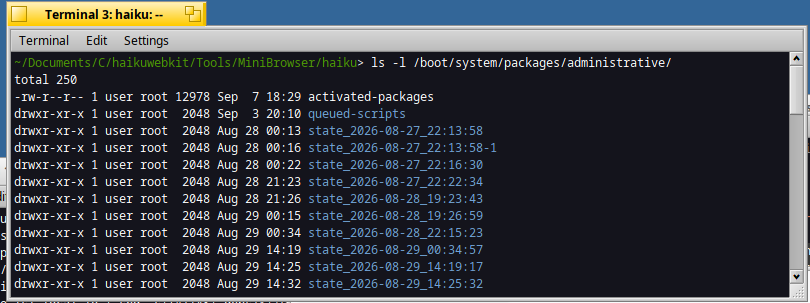
Every state folder holds an activated packages file listing exactly which packages were active at that point in time.
Boot into an old state, and the system reconstructs /boot/system exactly as it looked back then — packages that no longer exist in the current package folder are pulled from the relevant state directories going back in time.
In other words, Haiku keeps a rollback point every time your package set changes, without you ever asking it to.
Why this matters
Most of the time you'll never think about this.
But it becomes essential the moment something goes wrong after a package operation:
- The system won't boot at all after installing or updating a package — a kernel panic, a KDL screen, or just a hang partway through startup.
- A pkgman operation in the Terminal left dependencies in a broken state.
In every one of these cases, the fix isn't a reinstall — it's booting one step back, removing the offending package, and moving forward again.
A quick word on cleanup
There's a trade-off worth knowing about: because every state keeps copies of replaced or removed packages, /boot/system/packages/administrative/ can grow over time
The good news is that, as of beta6, this is largely handled for you.
SoftwareUpdater will automatically delete all states older than 30 days, except for the last 10 — there's a setting to disable this if you'd rather keep everything.
If you prefer to do it manually, running "pkgman cleanup" from the Terminal applies the same logic on demand.
Final word
If you're running Haiku and haven't needed this yet, you probably will eventually.
Now you'll know exactly what to do :)