
Storage Kit: exploring files and directories
 DigitalBox
- KitLab
- December 22, 2025
In the previous KitLab article, we learned how to create and read a single file using BFile and BPath.
Now we’ll go one level higher — exploring how Haiku represents and navigates the filesystem itself.
In this article, we’ll learn how to:
-
Walk through directories with
BDirectory -
Identify filesystem entries with
BEntry -
Use
entry_ref— a lightweight reference used throughout the Storage Kit
This is the foundation for file discovery, metadata handling, and queries.
What is a BEntry?
A BEntry represents a single item in the filesystem — a file, folder, or symbolic link.
It describes the name and location of an object, but not its contents.
Think of it as the directory entry — the visible name in a folder that points to the actual data node (BNode).
It gives you access to information about the object (its name, type, or path), without opening it or reading its data.
What is a BDirectory?
A BDirectory represents a folder.
It allows you to:
-
List all entries inside
-
Iterate through files and subdirectories
-
Create or remove entries (optional)
Together with BEntry, it provides a clean, object-oriented way to navigate the filesystem.
Source Code: ListHome.cpp
This example lists all files and folders in your home directory.
#include <Application.h>
#include <Directory.h>
#include <Entry.h>
#include <FindDirectory.h>
#include <Path.h>
#include <stdio.h>

class ListHomeApp : public BApplication
{
public:
    ListHomeApp()
        :
        BApplication("application/x-vnd.kitlab-listhome")
    {
        ListEntries();
        PostMessage(B_QUIT_REQUESTED);  // Quit application
    }

    void ListEntries()
    {
        BPath homePath;
        if (find_directory(B_USER_DIRECTORY, &homePath) != B_OK) {
            printf("Failed to find home directory.\n");
            return;
        }

        BDirectory homeDir(homePath.Path());
        if (homeDir.InitCheck() != B_OK) {
            printf("Failed to open home directory.\n");
            return;
        }

        BEntry entry;
        while (homeDir.GetNextEntry(&entry) == B_OK) {
            char name[B_FILE_NAME_LENGTH];
            entry.GetName(name);

            if (entry.IsDirectory())
                printf("[DIR]  %s\n", name);
            else
                printf("[FILE] %s\n", name);
        }
    }
};

int
main()
{
    ListHomeApp app;
    app.Run();
    return 0;
}
How it works
-
find_directory(B_USER_DIRECTORY, &homePath)finds your home folder. -
BDirectory homeDir(homePath.Path())opens that folder. -
GetNextEntry(&entry)retrieves each item (file or directory) in it. -
entry.GetName()returns its name. -
entry.IsDirectory()checks if it’s a folder.
Unlike BFile, we’re not reading or writing any file content here — this is pure filesystem traversal.
Using entry_ref
Every BEntry can also be represented by an entry_ref, a lightweight structure that uniquely identifies a file or folder in the filesystem.
An entry_ref doesn’t open the file — it simply stores:
-
the device (volume) ID
-
the directory inode
-
and the entry name
Together, these three values uniquely locate any object on disk.
You can use an entry_ref to pass file references between different parts of your program, or to other Storage Kit classes like BFile, BNode, or BQuery.
entry_ref ref;
entry.GetRef(&ref);
printf("entry_ref name: %s\n", ref.name);
This makes entry_ref perfect for bookmarks, drag-and-drop operations, or inter-application messages — all without touching the actual file contents.
Compile & run
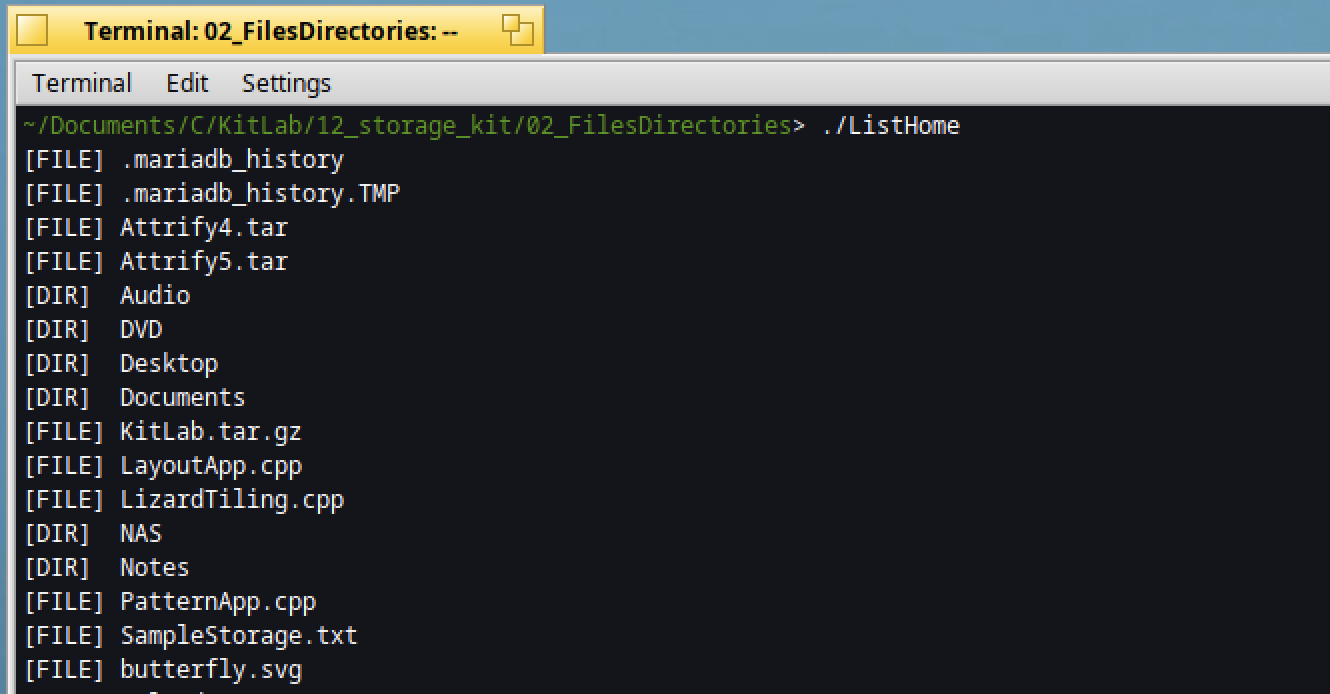
Run it from Terminal:
You’ll see a list of files and directories in /boot/home, for example:
Try this
-
List a different folder using
B_DESKTOP_DIRECTORY. -
Count how many files and folders you have by adding simple counters.
-
Use
entry_refto create a simple bookmark system for files, without opening them.
What’s Next?
With BEntry, BDirectory, and entry_ref, you can now explore Haiku’s filesystem safely and efficiently.
These classes give you read-only access to the structure of the file tree — the perfect foundation before diving into metadata and file attributes.
In the next KitLab article, we’ll explore BNode and BNodeInfo, where the real magic happens: attaching custom attributes and reading structured file metadata.