
Storage Kit: working with attributes
 DigitalBox
- KitLab
- December 29, 2025
In the previous KitLab article, we explored files and directories using BEntry and BDirectory.
Now it’s time to dive into one of Haiku’s most powerful features: file attributes.
The Be File System (BFS) allows every file and folder to carry extended metadata — not just its content.
Attributes can store:
-
simple data (strings, integers, floats)
-
file type information (MIME type)
-
custom application data
This is made possible by the BNode class and its related helpers.
What is a BNode?
A BNode is the fundamental class for accessing a filesystem object’s metadata.
Every file or folder in BFS is represented as a node.
BNode lets you:
-
read and write attributes
-
remove attributes
-
query attribute info (size, type, etc.)
Source Code: NodeAttributes.cpp
This example creates a file and adds a custom attribute called "Comment". It then reads the attribute back and displays its information.
#include <Application.h>
#include <Entry.h>
#include <Node.h>
#include <File.h>
#include <Path.h>
#include <FindDirectory.h>
#include <fs_attr.h>        // for attr_info
#include <stdio.h>
#include <string.h>

class NodeAttributesApp : public BApplication
{
public:
    NodeAttributesApp()
        :
        BApplication("application/x-vnd.kitlab-nodeattributes")
    {
        RunExample();
        PostMessage(B_QUIT_REQUESTED);  // Quit the application
    }

    void RunExample()
    {
        // Find the user's home directory
        BPath homePath;
        if (find_directory(B_USER_DIRECTORY, &homePath) != B_OK) {
            printf("Failed to find home directory.\n");
            return;
        }

        // Complete file path
        homePath.Append("NodeFile.txt");

        // Display where the file will be created
        printf("File location: %s\n", homePath.Path());

        // Create the file if it doesn’t exist
        BEntry entry(homePath.Path(), true);
        if (!entry.Exists()) {
            BFile file(homePath.Path(), B_READ_WRITE | B_CREATE_FILE);
            if (file.InitCheck() != B_OK) {
                printf("Failed to create file.\n");
                return;
            }
        }

        // Get a valid entry_ref
        entry_ref ref;
        entry.GetRef(&ref);

        // Create a BNode to manipulate attributes
        BNode node(&ref);
        if (node.InitCheck() != B_OK) {
            printf("Failed to initialize BNode.\n");
            return;
        }

        // Write an attribute
        const char* comment = "This is a BFS attribute example.";
        ssize_t bytesWritten = node.WriteAttr("Comment", B_STRING_TYPE, 0, comment, strlen(comment) + 1);
        if (bytesWritten < 0) {
            printf("Failed to write attribute.\n");
            return;
        } else {
            printf("Wrote %zd bytes to attribute.\n", bytesWritten);
        }

        // Read the attribute
        char buffer[256];
        ssize_t bytesRead = node.ReadAttr("Comment", B_STRING_TYPE, 0, buffer, sizeof(buffer) - 1);
        if (bytesRead > 0) {
            buffer[bytesRead] = '\0';
            printf("Comment attribute: %s\n", buffer);
        } else {
            printf("Failed to read attribute.\n");
        }

        // Get attribute information
        attr_info info;
        if (node.GetAttrInfo("Comment", &info) == B_OK) {
            printf("Attribute size: %lld, type code: %c%c%c%c\n",
                   info.size,
                   (info.type >> 24) & 0xFF,
                   (info.type >> 16) & 0xFF,
                   (info.type >> 8) & 0xFF,
                   info.type & 0xFF);
        }
    }
};

int main()
{
    NodeAttributesApp app;
    app.Run();
    return 0;
}
How It Works
-
BNode node(&ref)wraps the file as a node, allowing attribute access. -
WriteAttr()writes an attribute:-
name→ attribute name ("Comment") -
type→ data type (B_STRING_TYPE) -
offset→ where to start writing -
bufferandlength→ data to write
-
-
ReadAttr()retrieves the attribute’s value. -
GetAttrInfo()provides metadata (size and type).
BNodeInfo and BAppFileInfo
BNodeInfo is a helper for standard file attributes such as MIME type or icon:
BNodeInfo info(&node);
info.SetType("text/plain");
BAppFileInfo is used for applications and executable files:
BAppFileInfo appInfo(&file);
char signature[B_MIME_TYPE_LENGTH];
if (appInfo.GetSignature(signature) == B_OK)
    printf("App signature: %s\n", signature);
These classes allow applications to store and read structured metadata without touching the actual file content.
Compile and run
Run from the Terminal:
The output result will be:
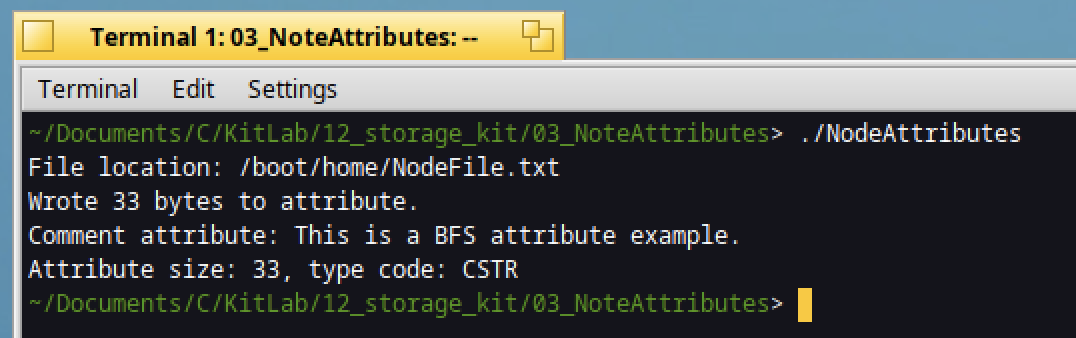
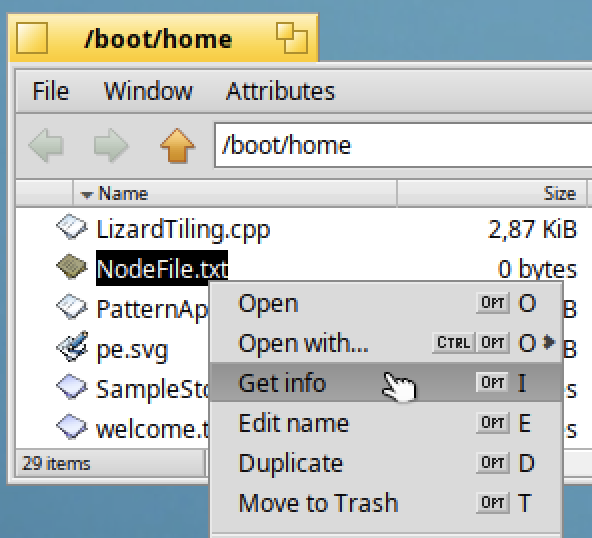
If you open the /boot/home/ folder in the Tracker, you will notice the file's size is 0.
Right click on the file and select "Get info":
Click on the "Attributes" tab and as you can see, the Comment attribute is visible:)
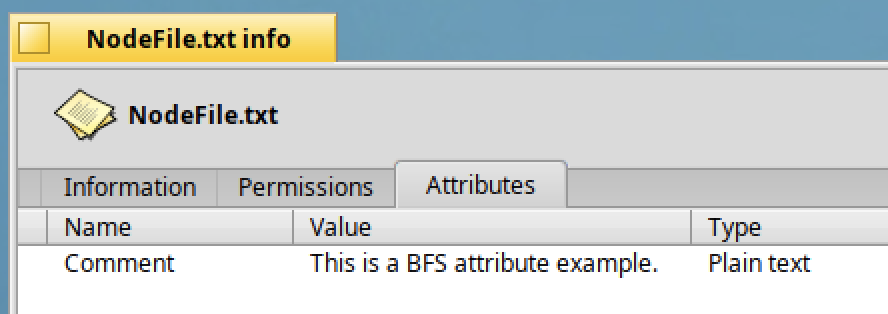
Nice, isn't ?
Try This
-
Add a numeric attribute:
int value = 42;
node.WriteAttr("Answer", B_INT32_TYPE, 0, &value, sizeof(value));-
Enumerate all attributes with
GetNextAttrName()in a loop. -
Change the MIME type using
BNodeInfo::SetType(). -
Use
BAppFileInfoto read an application’s signature or version info.
What’s Next?
After mastering attributes with BNode, the next logical step is searching files using attributes with BQuery.
In the next KitLab article, we’ll explore:
-
Setting up a
BQuery -
Filtering files by attributes
-
Iterating query results efficiently
This will let you build indexed searches, just like a desktop search engine.
Conclusion
With BNode and its helpers, Haiku allows you to attach, read, and manipulate structured metadata directly within the filesystem.
This is what makes BFS and the Storage Kit unique — the filesystem itself understands not only your files, but also the rich data that describes them.