
Support kit: dynamic lists
 DigitalBox
- KitLab
- March 23, 2026
In the previous KitLab article, we explored the simple and powerful BString class.
Now let's continue with the Support Kit and discover BList—Haiku's dynamic list container for managing collections of objects.
BList is one of the fundamental data structures in Haiku, used throughout the system for storing and manipulating ordered collections of pointers.
Understanding BList is essential for any serious Haiku developer.
What is BList?
BList is a dynamic array that stores void* pointers.
Think of it as a resizable container that grows automatically as you add items.
Key features:
- Dynamic sizing - automatically grows as needed
- Fast access - direct index-based access like arrays
- Flexible ordering - insert, remove, or swap items at any position
- Memory efficient - grows in blocks to minimize reallocations
- Type-agnostic - stores any pointer type (you handle the casting)
Common use cases:
- Managing lists of objects (windows, views, custom data)
- Building collections that change size at runtime
- Implementing stacks, queues, or custom data structures
- Tracking application state across multiple items
Why Use BList?
Before BList, you'd need to:
- Manually allocate arrays
- Track capacity and count separately
- Implement growth logic yourself
- Handle reallocation and copying
BList handles all this complexity for you, letting you focus on your application logic.
The Demo: Task Manager
We'll create a task management application that demonstrates:
- Adding items - dynamically growing the list
- Removing items - with proper memory management
- Iterating - looping through all items
- Searching - finding items by criteria
- Sorting - reordering based on priorities
- Statistics - analyzing list contents
This shows real-world BList usage with custom objects.
Source Code: TaskManager.cpp
#include <Application.h>
#include <Window.h>
#include <View.h>
#include <Button.h>
#include <TextControl.h>
#include <ListView.h>
#include <ScrollView.h>
#include <StringItem.h>
#include <Alert.h>
#include <String.h>
#include <List.h>
#include <stdio.h>

const uint32 MSG_ADD_TASK = 'ADDT';
const uint32 MSG_REMOVE_TASK = 'REMT';
const uint32 MSG_CLEAR_ALL = 'CLRA';
const uint32 MSG_SORT_TASKS = 'SORT';
const uint32 MSG_SEARCH_TASKS = 'SRCH';
const uint32 MSG_SHOW_STATS = 'STAT';

// Custom Task class to store in BList
class Task {
public:
    Task(const char* description, int32 priority = 5)
        : fDescription(description),
          fPriority(priority),
          fCompleted(false)
    {
    }

    ~Task() {
    }

    const char* Description() const { return fDescription.String(); }
    int32 Priority() const { return fPriority; }
    bool IsCompleted() const { return fCompleted; }

    void SetCompleted(bool completed) { fCompleted = completed; }
    void SetPriority(int32 priority) { fPriority = priority; }

    // Format task for display
    BString Format() const {
        BString formatted;
        formatted << "[P" << fPriority << "] ";
        if (fCompleted)
            formatted << "✓ ";
        formatted << fDescription;
        return formatted;
    }

private:
    BString fDescription;
    int32 fPriority;
    bool fCompleted;
};

class TaskManagerView : public BView {
public:
    TaskManagerView(BRect frame)
        : BView(frame, "task_view", B_FOLLOW_ALL, B_WILL_DRAW)
    {
        SetViewColor(245, 245, 245);

        BRect bounds = Bounds();

        // Task input field
        fTaskInput = new BTextControl(
            BRect(10, 10, bounds.right - 10, 35),
            "input", "New Task:",
            "Buy groceries",
            NULL,
            B_FOLLOW_LEFT_RIGHT | B_FOLLOW_TOP);
        AddChild(fTaskInput);

        // Add button
        fAddButton = new BButton(
            BRect(10, 45, 110, 75),
            "add", "Add Task",
            new BMessage(MSG_ADD_TASK),
            B_FOLLOW_LEFT | B_FOLLOW_TOP);
        AddChild(fAddButton);

        // Remove button
        fRemoveButton = new BButton(
            BRect(120, 45, 220, 75),
            "remove", "Remove",
            new BMessage(MSG_REMOVE_TASK),
            B_FOLLOW_LEFT | B_FOLLOW_TOP);
        AddChild(fRemoveButton);

        // Sort button
        fSortButton = new BButton(
            BRect(230, 45, 330, 75),
            "sort", "Sort by Priority",
            new BMessage(MSG_SORT_TASKS),
            B_FOLLOW_LEFT | B_FOLLOW_TOP);
        AddChild(fSortButton);

        // Task list view
        BRect listRect(10, 85, bounds.right - B_V_SCROLL_BAR_WIDTH - 10,
                       bounds.bottom - 110);
        fTaskListView = new BListView(listRect, "tasklist",
                                      B_SINGLE_SELECTION_LIST,
                                      B_FOLLOW_ALL);

        BScrollView* scrollView = new BScrollView("scrollview",
                                                   fTaskListView,
                                                   B_FOLLOW_ALL,
                                                   0, false, true);
        AddChild(scrollView);

        // Search field
        fSearchInput = new BTextControl(
            BRect(10, bounds.bottom - 95, bounds.right - 110, bounds.bottom - 70),
            "search", "Search:",
            "",
            NULL,
            B_FOLLOW_LEFT_RIGHT | B_FOLLOW_BOTTOM);
        AddChild(fSearchInput);

        // Search button
        fSearchButton = new BButton(
            BRect(bounds.right - 100, bounds.bottom - 95, bounds.right - 10, bounds.bottom - 65),
            "searchbtn", "Search",
            new BMessage(MSG_SEARCH_TASKS),
            B_FOLLOW_RIGHT | B_FOLLOW_BOTTOM);
        AddChild(fSearchButton);

        // Clear all button
        fClearButton = new BButton(
            BRect(10, bounds.bottom - 55, 110, bounds.bottom - 25),
            "clear", "Clear All",
            new BMessage(MSG_CLEAR_ALL),
            B_FOLLOW_LEFT | B_FOLLOW_BOTTOM);
        AddChild(fClearButton);

        // Stats button
        fStatsButton = new BButton(
            BRect(120, bounds.bottom - 55, 220, bounds.bottom - 25),
            "stats", "Show Stats",
            new BMessage(MSG_SHOW_STATS),
            B_FOLLOW_LEFT | B_FOLLOW_BOTTOM);
        AddChild(fStatsButton);
    }

    ~TaskManagerView() {
        ClearTasks();
    }

    void AttachedToWindow() override {
        BView::AttachedToWindow();

        fAddButton->SetTarget(this);
        fRemoveButton->SetTarget(this);
        fClearButton->SetTarget(this);
        fSortButton->SetTarget(this);
        fSearchButton->SetTarget(this);
        fStatsButton->SetTarget(this);

        // Add some sample tasks
        AddTask("Write article about BList", 8);
        AddTask("Review pull requests", 6);
        AddTask("Fix bug #1234", 9);
        AddTask("Update documentation", 4);
    }

    void MessageReceived(BMessage* message) override {
        switch (message->what) {
            case MSG_ADD_TASK:
                HandleAddTask();
                break;

            case MSG_REMOVE_TASK:
                HandleRemoveTask();
                break;

            case MSG_CLEAR_ALL:
                HandleClearAll();
                break;

            case MSG_SORT_TASKS:
                HandleSortTasks();
                break;

            case MSG_SEARCH_TASKS:
                HandleSearchTasks();
                break;

            case MSG_SHOW_STATS:
                HandleShowStats();
                break;

            default:
                BView::MessageReceived(message);
                break;
        }
    }

private:
    void AddTask(const char* description, int32 priority = 5) {
        if (strlen(description) == 0)
            return;

        Task* task = new Task(description, priority);

        // Add to BList
        fTaskList.AddItem(task);

        // Add to visual list
        BStringItem* item = new BStringItem(task->Format().String());
        fTaskListView->AddItem(item);
    }

    void HandleAddTask() {
        const char* text = fTaskInput->Text();

        if (strlen(text) == 0) {
            BAlert* alert = new BAlert("Error",
                "Please enter a task description!",
                "OK", NULL, NULL,
                B_WIDTH_AS_USUAL, B_WARNING_ALERT);
            alert->Go();
            return;
        }

        AddTask(text, 5);
        fTaskInput->SetText("");
        fTaskInput->MakeFocus();
    }

    void HandleRemoveTask() {
        int32 selection = fTaskListView->CurrentSelection();

        if (selection < 0) {
            BAlert* alert = new BAlert("Error",
                "Please select a task to remove!",
                "OK", NULL, NULL,
                B_WIDTH_AS_USUAL, B_INFO_ALERT);
            alert->Go();
            return;
        }

        // Remove from BList and delete
        Task* task = (Task*)fTaskList.RemoveItem(selection);
        delete task;

        // Remove from visual list
        delete fTaskListView->RemoveItem(selection);
    }

    void HandleClearAll() {
        BAlert* alert = new BAlert("Confirm",
            "Remove all tasks?",
            "Cancel", "Clear All", NULL,
            B_WIDTH_AS_USUAL, B_WARNING_ALERT);

        if (alert->Go() == 1) {
            ClearTasks();
        }
    }

    void ClearTasks() {
        // Delete all Task objects in BList
        for (int32 i = 0; i < fTaskList.CountItems(); i++) {
            Task* task = (Task*)fTaskList.ItemAt(i);
            delete task;
        }
        fTaskList.MakeEmpty();

        // Clear visual list
        fTaskListView->MakeEmpty();
    }

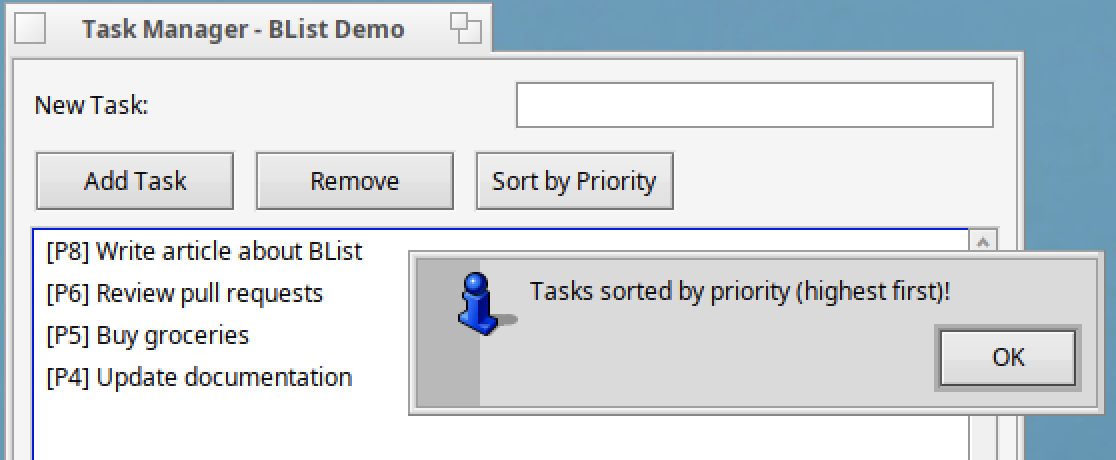
    void HandleSortTasks() {
        // Simple bubble sort by priority (descending)
        int32 count = fTaskList.CountItems();

        for (int32 i = 0; i < count - 1; i++) {
            for (int32 j = 0; j < count - i - 1; j++) {
                Task* task1 = (Task*)fTaskList.ItemAt(j);
                Task* task2 = (Task*)fTaskList.ItemAt(j + 1);

                if (task1->Priority() < task2->Priority()) {
                    fTaskList.SwapItems(j, j + 1);
                }
            }
        }

        // Rebuild visual list
        RefreshDisplay();

        BAlert* alert = new BAlert("Info",
            "Tasks sorted by priority (highest first)!",
            "OK", NULL, NULL,
            B_WIDTH_AS_USUAL, B_INFO_ALERT);
        alert->Go();
    }

    void HandleSearchTasks() {
        const char* keyword = fSearchInput->Text();

        if (strlen(keyword) == 0) {
            BAlert* alert = new BAlert("Error",
                "Please enter a search keyword!",
                "OK", NULL, NULL,
                B_WIDTH_AS_USUAL, B_INFO_ALERT);
            alert->Go();
            return;
        }

        // Search through BList
        BList foundTasks;
        for (int32 i = 0; i < fTaskList.CountItems(); i++) {
            Task* task = (Task*)fTaskList.ItemAt(i);
            BString desc(task->Description());
            desc.ToLower();

            BString search(keyword);
            search.ToLower();

            if (desc.FindFirst(search) != B_ERROR) {
                foundTasks.AddItem(task);
            }
        }

        // Show results
        BString message;
        message << "Found " << foundTasks.CountItems() << " task(s) matching \""
                << keyword << "\":\n\n";

        for (int32 i = 0; i < foundTasks.CountItems(); i++) {
            Task* task = (Task*)foundTasks.ItemAt(i);
            message << "• " << task->Description() << "\n";
        }

        if (foundTasks.CountItems() == 0) {
            message << "No matches found.";
        }

        BAlert* alert = new BAlert("Search Results",
            message.String(),
            "OK", NULL, NULL,
            B_WIDTH_AS_USUAL, B_INFO_ALERT);
        alert->Go();
    }

    void HandleShowStats() {
        int32 count = fTaskList.CountItems();

        if (count == 0) {
            BAlert* alert = new BAlert("Stats",
                "No tasks in the list!",
                "OK", NULL, NULL,
                B_WIDTH_AS_USUAL, B_INFO_ALERT);
            alert->Go();
            return;
        }

        // Calculate statistics
        int32 highPriority = 0;
        int32 mediumPriority = 0;
        int32 lowPriority = 0;
        int32 totalPriority = 0;

        for (int32 i = 0; i < count; i++) {
            Task* task = (Task*)fTaskList.ItemAt(i);
            int32 priority = task->Priority();
            totalPriority += priority;

            if (priority >= 8)
                highPriority++;
            else if (priority >= 5)
                mediumPriority++;
            else
                lowPriority++;
        }

        float avgPriority = (float)totalPriority / count;

        BString message;
        message << "Task Statistics:\n\n";
        message << "Total tasks: " << count << "\n";
        message << "High priority (8-10): " << highPriority << "\n";
        message << "Medium priority (5-7): " << mediumPriority << "\n";
        message << "Low priority (1-4): " << lowPriority << "\n";
        message << "Average priority: " << avgPriority << "\n\n";
        message << "Memory usage: ~" << (count * sizeof(Task)) << " bytes";

        BAlert* alert = new BAlert("Statistics",
            message.String(),
            "OK", NULL, NULL,
            B_WIDTH_AS_USUAL, B_INFO_ALERT);
        alert->Go();
    }

    void RefreshDisplay() {
        // Clear and rebuild visual list from BList
        fTaskListView->MakeEmpty();

        for (int32 i = 0; i < fTaskList.CountItems(); i++) {
            Task* task = (Task*)fTaskList.ItemAt(i);
            BStringItem* item = new BStringItem(task->Format().String());
            fTaskListView->AddItem(item);
        }
    }

    BList fTaskList;  // Our BList of Task objects

    BTextControl* fTaskInput;
    BTextControl* fSearchInput;
    BListView* fTaskListView;
    BButton* fAddButton;
    BButton* fRemoveButton;
    BButton* fClearButton;
    BButton* fSortButton;
    BButton* fSearchButton;
    BButton* fStatsButton;
};

class TaskManagerWindow : public BWindow {
public:
    TaskManagerWindow(BRect frame)
        : BWindow(frame, "Task Manager - BList Demo",
                  B_TITLED_WINDOW,
                  B_QUIT_ON_WINDOW_CLOSE | B_AUTO_UPDATE_SIZE_LIMITS)
    {
        BRect viewRect = Bounds();
        TaskManagerView* view = new TaskManagerView(viewRect);
        AddChild(view);
    }
};

class TaskManagerApp : public BApplication {
public:
    TaskManagerApp()
        : BApplication("application/x-vnd.example-TaskManager")
    {
        BRect rect(100, 100, 600, 550);
        TaskManagerWindow* window = new TaskManagerWindow(rect);
        window->Show();
    }
};

int main() {
    TaskManagerApp app;
    app.Run();
    return 0;
}
The complete source code is available in the artifact above.
Here are the key concepts:
Custom Task Class
class Task {
public:
    Task(const char* description, int32 priority = 5)
        : fDescription(description),
          fPriority(priority),
          fCompleted(false)
    {
    }

    const char* Description() const { return fDescription.String(); }
    int32 Priority() const { return fPriority; }

    BString Format() const {
        BString formatted;
        formatted << "[P" << fPriority << "] " << fDescription;
        return formatted;
    }

private:
    BString fDescription;
    int32 fPriority;
    bool fCompleted;
};
This custom class represents a task with description, priority, and completion status.
How It Works
Declaring a BList
BList fTaskList; // Member variable to store Task pointersBList is ready to use immediately—no explicit initialization needed.
Adding Items
void AddTask(const char* description, int32 priority = 5) {
    Task* task = new Task(description, priority);
    fTaskList.AddItem(task);  // Add to end of list
}
Key point: BList stores pointers, not objects. You're responsible for allocating the object with new.
Accessing Items
int32 count = fTaskList.CountItems();

for (int32 i = 0; i < count; i++) {
    Task* task = (Task*)fTaskList.ItemAt(i);
    // Use task...
}Important: ItemAt() returns void*, so you must cast to the correct type.
Removing Items
void HandleRemoveTask() {
    int32 selection = fTaskListView->CurrentSelection();

    // Remove from list and get pointer
    Task* task = (Task*)fTaskList.RemoveItem(selection);

    // Delete the object - critical for memory management!
    delete task;
}Critical: RemoveItem() only removes the pointer from the list. You must delete the object to free memory.
Clearing the List
void ClearTasks() {
    // Delete all objects first
    for (int32 i = 0; i < fTaskList.CountItems(); i++) {
        Task* task = (Task*)fTaskList.ItemAt(i);
        delete task;
    }

    // Then clear the list
    fTaskList.MakeEmpty();
}
Memory management rule: If you allocated with new, you must delete. BList doesn't do this automatically.
Sorting
void HandleSortTasks() {
    int32 count = fTaskList.CountItems();

    // Bubble sort by priority
    for (int32 i = 0; i < count - 1; i++) {
        for (int32 j = 0; j < count - i - 1; j++) {
            Task* task1 = (Task*)fTaskList.ItemAt(j);
            Task* task2 = (Task*)fTaskList.ItemAt(j + 1);

            if (task1->Priority() < task2->Priority()) {
                fTaskList.SwapItems(j, j + 1);  // Swap positions
            }
        }
    }
}
SwapItems() efficiently swaps two elements without copying objects.
Searching
void HandleSearchTasks() {
    const char* keyword = fSearchInput->Text();
    BList foundTasks;

    for (int32 i = 0; i < fTaskList.CountItems(); i++) {
        Task* task = (Task*)fTaskList.ItemAt(i);
        BString desc(task->Description());
        desc.ToLower();

        BString search(keyword);
        search.ToLower();

        if (desc.FindFirst(search) != B_ERROR) {
            foundTasks.AddItem(task);  // Build results list
        }
    }

    // Display found tasks...
}
This demonstrates using a second BList named "foundTasks" to collect search results.
The FindFirst() method is used to search for a task description.
Compilation
gcc -o TaskManager TaskManager.cpp -lbeRunning the Demo
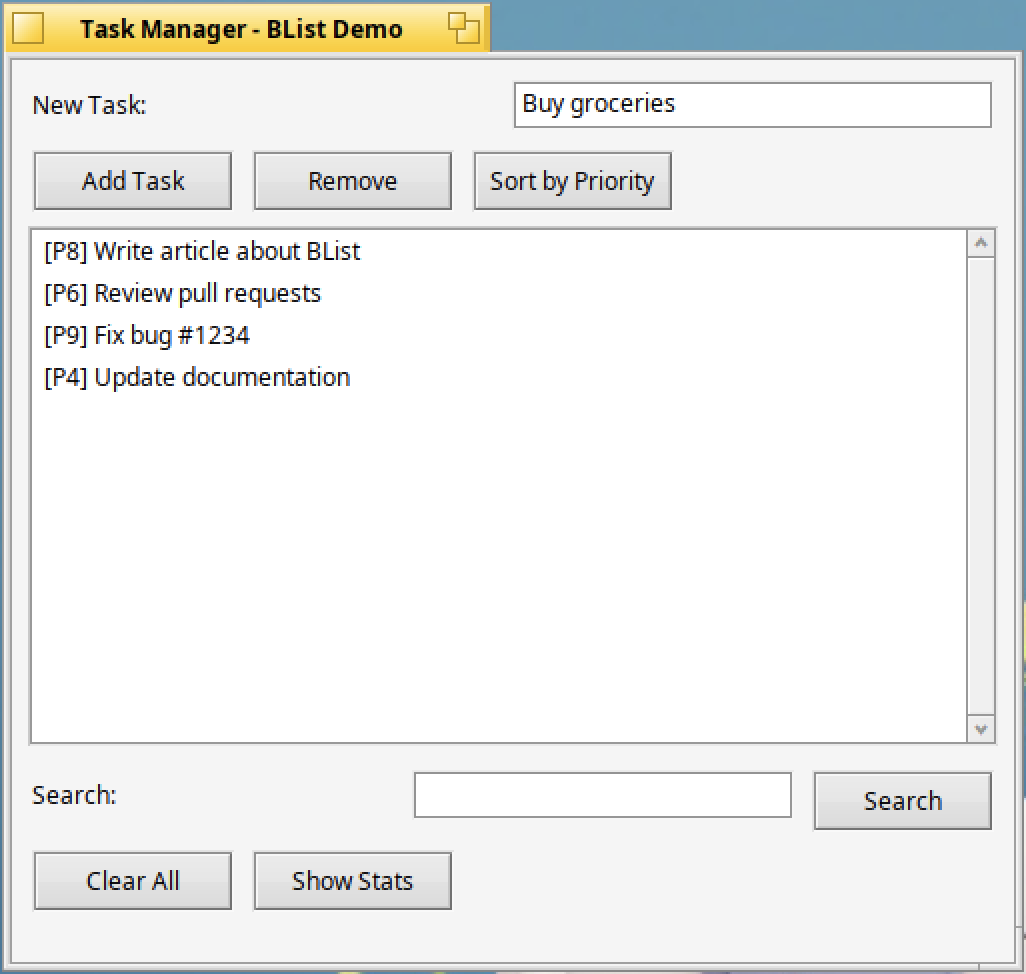
./TaskManagerYou'll see:
- A list of sample tasks with priorities
- Input field to add new tasks
- Buttons for remove, sort, search, and statistics
- Real-time task management
Try this:
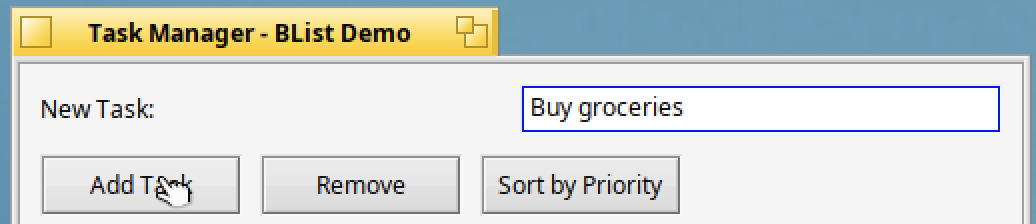
- Add a task "Buy groceries" and confirm with "Add Task":
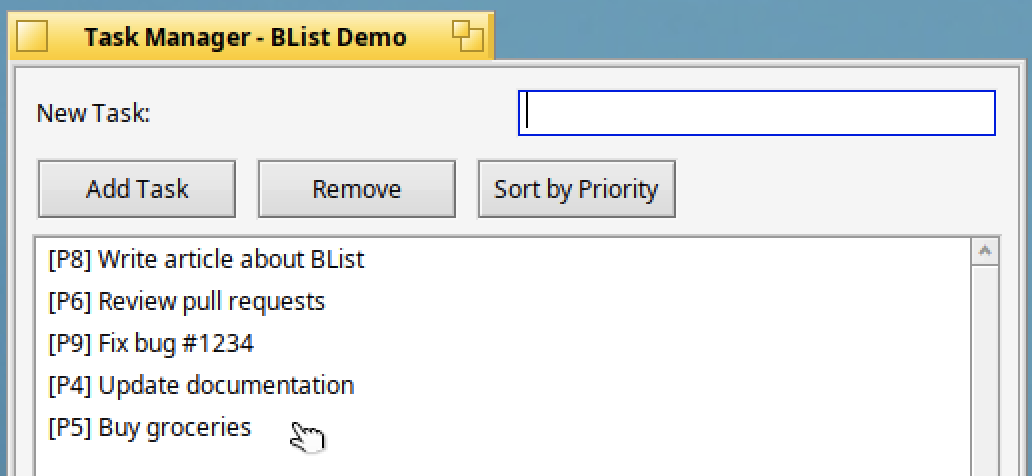
The corresponding task is added in the list with a default priority P5:
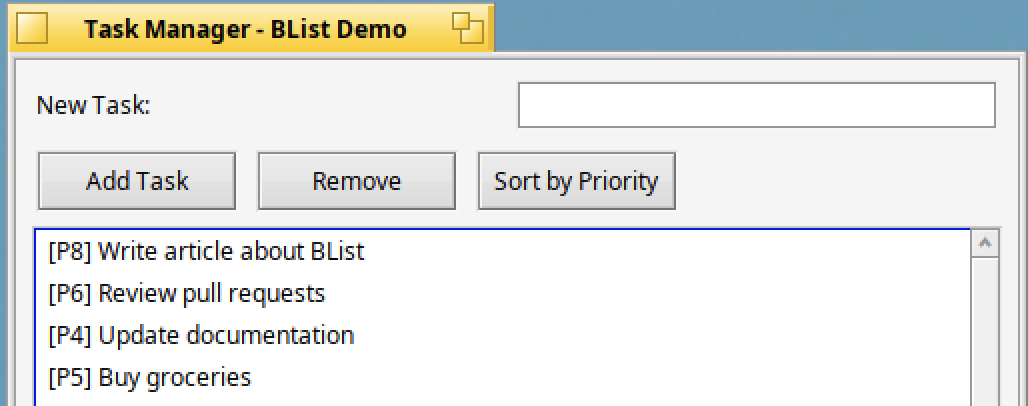
- Select the "Fix bug #1234" task and click on the "Remove" button:
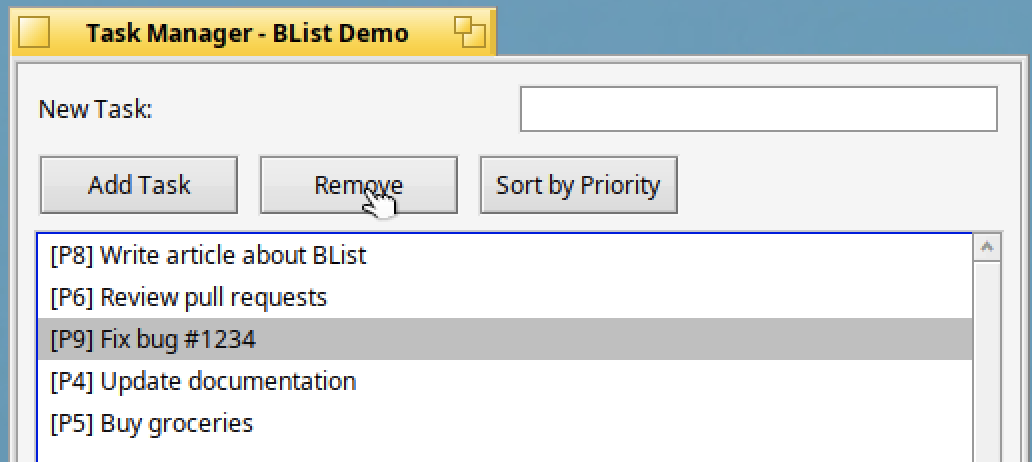
The selected task has been removed from the list:
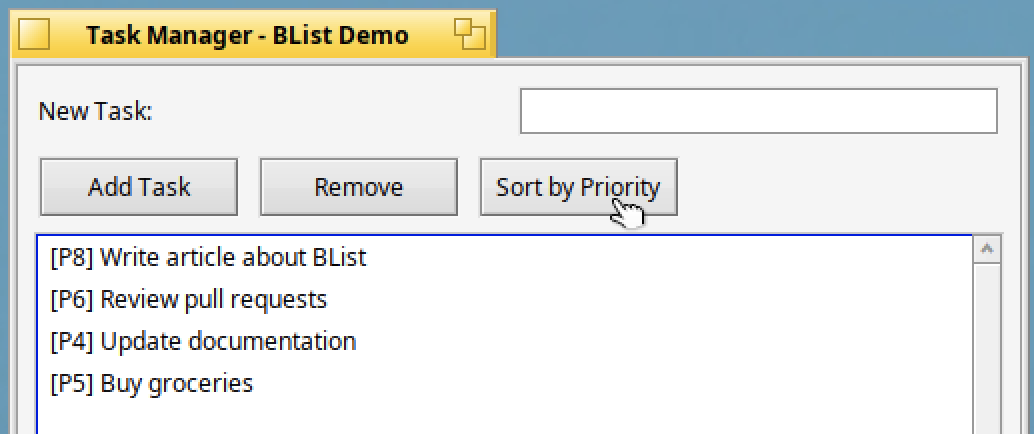
- Click "Sort by Priority" to reorder:
The list is now ordered by priority:
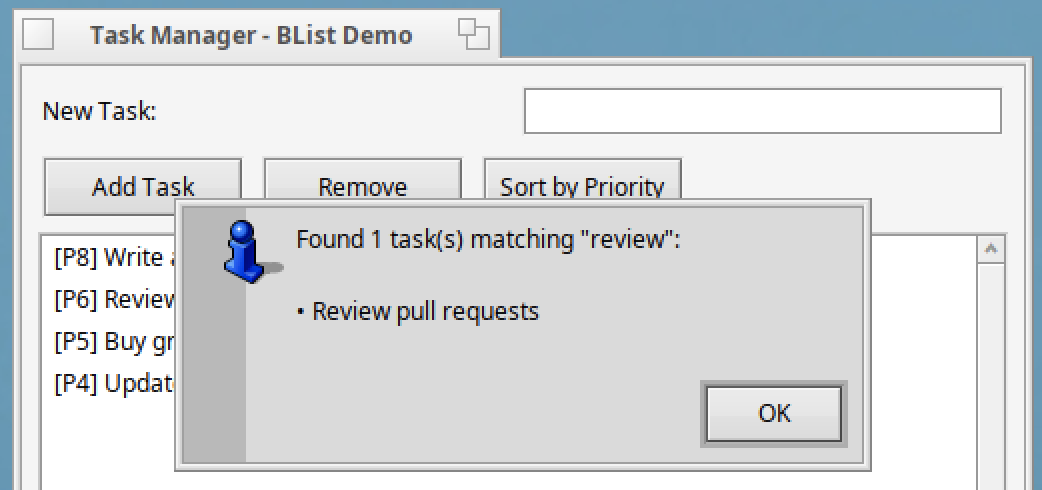
- Look for keywords like "article" or "review" with the "Search" button:

An alert message will identify the corresponding task(s):
- View statistics to see list analysis by clicking "Show Stats":
An alert message will indicate the total number of tasks and for each priority the number of tasks:
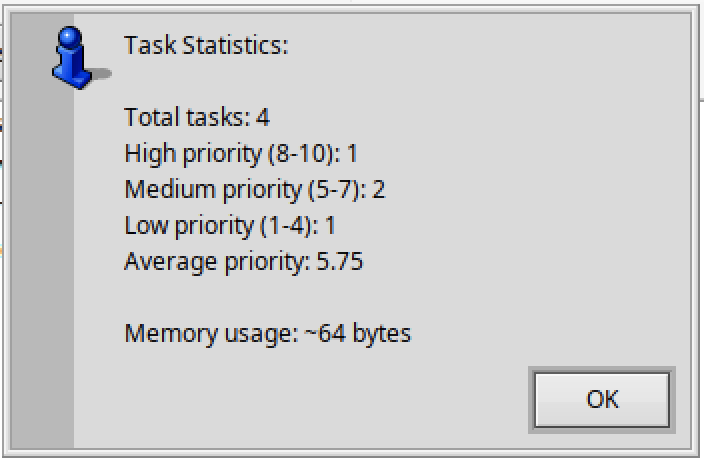
The average priority and memory usage will be computed as well:)
Try This
- Priority colors: Draw high-priority tasks in red
- Persistence: Save tasks to a file and reload on startup
- Due dates: Add a timestamp field to Task
- Categories: Add a category field and filter by category
- Undo/Redo: Keep a separate BList of deleted tasks
- Multiple lists: Separate "Active" and "Completed" lists
What's Next?
Now that you understand BList, the next KitLab article will explore Haiku’s stream I/O system with BDataIO— the foundation for reading and writing data across files, memory, and custom streams.
Conclusion
BList is a fundamental building block in Haiku development.
While simple in concept—just a list of pointers—it's incredibly versatile and used throughout the system.
The key to mastering BList is understanding memory management. You allocate, you delete. BList manages the list structure, but you manage the objects.
This task manager demonstrates real-world BList usage: dynamic growth, searching, sorting, and proper cleanup. These patterns apply to countless Haiku applications, from managing windows to tracking network connections to building document structures.
Master BList, and you've mastered one of the core skills of Haiku programming.
Stay tuned for the next KitLab article!