
Support kit: object serialization and persistence
 DigitalBox
- KitLab
- April 6, 2026
In the previous KitLab article, we explored streams with BDataIO and memory buffers.
Now let's discover BArchivable—Haiku's elegant system for serializing objects to persistent storage.
BArchivable provides a standardized way to save and restore object state, making it trivial to implement settings persistence, document saving, undo/redo systems, and inter-process object transfer.
Understanding archiving is essential for any application that needs to preserve state across sessions.
What is BArchivable?
BArchivable is a mixin class that adds serialization capabilities to any object.
Rather than forcing you to define a rigid file format, it allows objects to describe themselves using a BMessage, Haiku’s universal, typed container.
This design encourages loose coupling: objects decide what they archive, while storage and transport mechanisms remain generic.
BArchivable defines two key operations:
Archive - Save object state to a BMessage:
virtual status_t Archive(BMessage* archive, bool deep = true) const;Instantiate - Recreate object from a BMessage:
static BArchivable* Instantiate(BMessage* archive);The Archiving Pattern
Archiving in Haiku follows a very consistent and explicit pattern.
Once you understand these four steps, you can archive almost any object—from simple settings to complex document models—using the same mental model every time.
Step 1: Derive from BArchivable
class AppSettings : public BArchivable {
public:
    AppSettings();
    AppSettings(BMessage* archive);  // Unarchiving constructor

    static BArchivable* Instantiate(BMessage* archive);
    virtual status_t Archive(BMessage* archive, bool deep = true) const;

private:
    int32 fWindowWidth;
    rgb_color fBackgroundColor;
    BString fDefaultText;
};
Step 2: Implement Archive()
status_t AppSettings::Archive(BMessage* archive, bool deep) const {
    // Call parent implementation
    status_t status = BArchivable::Archive(archive, deep);
    if (status != B_OK)
        return status;

    // Add class name for instantiation
    archive->AddString("class", "AppSettings");

    // Store all member variables
    archive->AddInt32("width", fWindowWidth);
    archive->AddInt32("bg_color", *((int32*)&fBackgroundColor));
    archive->AddString("text", fDefaultText.String());

    return B_OK;
}
The Archive() method is responsible for translating the object’s internal state into a portable representation.
Calling BArchivable::Archive() first ensures that any inherited data is preserved, while adding the "class" field allows Haiku’s instantiation system to safely recreate the correct object type later.
Each field added to the message is fully typed, making the archive self-describing and resilient to future changes.
Step 3: Implement Unarchiving Constructor
AppSettings::AppSettings(BMessage* archive)
    : BArchivable(archive)
{
    // Extract data with defaults
    if (archive->FindInt32("width", &fWindowWidth) != B_OK)
        fWindowWidth = 600;

    int32 colorValue;
    if (archive->FindInt32("bg_color", &colorValue) == B_OK)
        fBackgroundColor = *((rgb_color*)&colorValue);

    const char* text;
    if (archive->FindString("text", &text) == B_OK)
        fDefaultText = text;
}
The unarchiving constructor is where robustness really matters.
By providing sensible defaults when fields are missing, your class becomes backward-compatible automatically.
Older archives can still be loaded even after new fields are introduced—a crucial feature for long-lived applications.
Step 4: Implement Instantiate()
BArchivable* AppSettings::Instantiate(BMessage* archive) {
    if (!validate_instantiation(archive, "AppSettings"))
        return NULL;
    return new AppSettings(archive);
}
validate_instantiation() acts as a safety net.
It ensures that the archive actually represents the expected class before creating an instance, protecting your application from corrupted files, incompatible versions, or accidental misuse of archived data.
Why Use BArchivable?
Manual serialization quickly becomes fragile as applications evolve.
Adding a single new field often requires version checks, conditional parsing, and defensive code scattered across the application.
Before BArchivable:
void SaveSettings() {
    FILE* f = fopen("settings", "w");
    fprintf(f, "%d\n", width);
    fprintf(f, "%d\n", height);
    fprintf(f, "%s\n", text);
    fclose(f);
    // Fragile, error-prone, not extensible
}
BArchivable centralizes this logic, keeping persistence concerns localized and predictable.
With BArchivable:
void SaveSettings() {
    BMessage archive;
    settings->Archive(&archive);
    BFile file("settings", B_WRITE_ONLY | B_CREATE_FILE);
    archive.Flatten(&file);
    // Robust, type-safe, extensible
}
The benefits are :
- Type safety -
BMessageenforces strict typing at runtime, eliminating ambiguity. - Extensibility - New fields can be added without breaking older archives.
- Versioning - Missing fields can be detected and defaulted gracefully.
- Portability - Archives are endian-safe and architecture-independent.
- Integration - The same mechanism is used across preferences, messages, drag & drop, and clipboard data.
The Demo: Settings Manager
This settings manager demonstrates:
- Custom archivable class - AppSettings with multiple data types
- Saving to disk - Flatten to a file in the settings directory
- Loading from disk - Unflatten and instantiate
- UI binding - MVC pattern with settings and interface
- Archive inspection - View the serialized data structure
This demo goes beyond a trivial example.
It shows how BArchivable fits naturally into a real application architecture, where a model object is shared between the UI, persistence layer, and runtime behavior—without duplicating logic.
Source Code: SettingsManager.cpp
// SettingsManager.cpp - Demonstrates BArchivable serialization

#include <Application.h>
#include <Window.h>
#include <View.h>
#include <Button.h>
#include <TextControl.h>
#include <CheckBox.h>
#include <StringView.h>
#include <ColorControl.h>
#include <Slider.h>
#include <File.h>
#include <Path.h>
#include <FindDirectory.h>
#include <Alert.h>
#include <Message.h>
#include <String.h>
#include <stdio.h>

const uint32 MSG_SAVE_SETTINGS = 'SAVE';
const uint32 MSG_LOAD_SETTINGS = 'LOAD';
const uint32 MSG_RESET_SETTINGS = 'RSET';
const uint32 MSG_APPLY_SETTINGS = 'APLY';
const uint32 MSG_SHOW_ARCHIVE = 'SHOW';

// Custom settings class using BArchivable
class AppSettings : public BArchivable {
public:
    AppSettings()
        : BArchivable(),
          fWindowWidth(600),
          fWindowHeight(450),
          fBackgroundColor(make_color(245, 245, 245)),
          fFontSize(12),
          fAutoSave(true),
          fDefaultText("Welcome to Settings Manager!")
    {
    }

    // Constructor for unarchiving
    AppSettings(BMessage* archive)
        : BArchivable(archive)
    {
        // Extract data from archive
        if (archive->FindInt32("width", &fWindowWidth) != B_OK)
            fWindowWidth = 600;

        if (archive->FindInt32("height", &fWindowHeight) != B_OK)
            fWindowHeight = 450;

        // Color is stored as int32 (rgb_color packed)
        int32 colorValue;
        if (archive->FindInt32("bg_color", &colorValue) == B_OK) {
            fBackgroundColor = *((rgb_color*)&colorValue);
        } else {
            fBackgroundColor = make_color(245, 245, 245);
        }

        if (archive->FindInt32("font_size", &fFontSize) != B_OK)
            fFontSize = 12;

        if (archive->FindBool("auto_save", &fAutoSave) != B_OK)
            fAutoSave = true;

        const char* text;
        if (archive->FindString("default_text", &text) == B_OK)
            fDefaultText = text;
        else
            fDefaultText = "Welcome!";
    }

    // Required: Create instance from archive
    static BArchivable* Instantiate(BMessage* archive) {
        if (!validate_instantiation(archive, "AppSettings"))
            return NULL;
        return new AppSettings(archive);
    }

    // Required: Save to archive
    status_t Archive(BMessage* archive, bool deep = true) const {
        status_t status = BArchivable::Archive(archive, deep);
        if (status != B_OK)
            return status;

        // Add class name for instantiation
        archive->AddString("class", "AppSettings");

        // Store all settings
        archive->AddInt32("width", fWindowWidth);
        archive->AddInt32("height", fWindowHeight);

        // Pack rgb_color into int32
        int32 colorValue = *((int32*)&fBackgroundColor);
        archive->AddInt32("bg_color", colorValue);

        archive->AddInt32("font_size", fFontSize);
        archive->AddBool("auto_save", fAutoSave);
        archive->AddString("default_text", fDefaultText.String());

        return B_OK;
    }

    // Getters
    int32 WindowWidth() const { return fWindowWidth; }
    int32 WindowHeight() const { return fWindowHeight; }
    rgb_color BackgroundColor() const { return fBackgroundColor; }
    int32 FontSize() const { return fFontSize; }
    bool AutoSave() const { return fAutoSave; }
    const char* DefaultText() const { return fDefaultText.String(); }

    // Setters
    void SetWindowWidth(int32 width) { fWindowWidth = width; }
    void SetWindowHeight(int32 height) { fWindowHeight = height; }
    void SetBackgroundColor(rgb_color color) { fBackgroundColor = color; }
    void SetFontSize(int32 size) { fFontSize = size; }
    void SetAutoSave(bool autoSave) { fAutoSave = autoSave; }
    void SetDefaultText(const char* text) { fDefaultText = text; }

    // Debug: Print settings
    void PrintToStream() const {
        printf("AppSettings:\n");
        printf("  Window: %ldx%ld\n", fWindowWidth, fWindowHeight);
        printf("  Color: RGB(%d, %d, %d)\n",
               fBackgroundColor.red,
               fBackgroundColor.green,
               fBackgroundColor.blue);
        printf("  Font Size: %ld\n", fFontSize);
        printf("  Auto-Save: %s\n", fAutoSave ? "Yes" : "No");
        printf("  Default Text: %s\n", fDefaultText.String());
    }

private:
    int32 fWindowWidth;
    int32 fWindowHeight;
    rgb_color fBackgroundColor;
    int32 fFontSize;
    bool fAutoSave;
    BString fDefaultText;
};

class SettingsView : public BView {
public:
    SettingsView(BRect frame)
        : BView(frame, "settings_view", B_FOLLOW_ALL, B_WILL_DRAW),
          fSettings(new AppSettings())
    {
        SetViewColor(245, 245, 245);

        BRect bounds = Bounds();
        float top = 10;
        float left = 10;
        float right = bounds.right - 10;

        // Title
        BStringView* title = new BStringView(
            BRect(left, top, right, top + 20),
            "title", "Settings Manager - BArchivable Demo",
            B_FOLLOW_LEFT_RIGHT | B_FOLLOW_TOP);
        title->SetFont(be_bold_font);
        AddChild(title);
        top += 35;

        // Window width
        fWidthControl = new BTextControl(
            BRect(left, top, right, top + 25),
            "width", "Window Width:",
            "600",
            NULL,
            B_FOLLOW_LEFT_RIGHT | B_FOLLOW_TOP);
        AddChild(fWidthControl);
        top += 35;

        // Window height
        fHeightControl = new BTextControl(
            BRect(left, top, right, top + 25),
            "height", "Window Height:",
            "450",
            NULL,
            B_FOLLOW_LEFT_RIGHT | B_FOLLOW_TOP);
        AddChild(fHeightControl);
        top += 35;

        // Font size slider
        fFontSizeSlider = new BSlider(
            BRect(left, top, right, top + 50),
            "fontsize", "Font Size:",
            NULL,
            8, 24,
            B_BLOCK_THUMB,
            B_FOLLOW_LEFT_RIGHT | B_FOLLOW_TOP);
        fFontSizeSlider->SetValue(12);
        fFontSizeSlider->SetHashMarks(B_HASH_MARKS_BOTTOM);
        fFontSizeSlider->SetHashMarkCount(9);
        AddChild(fFontSizeSlider);
        top += 60;

        // Color control
        fColorControl = new BColorControl(
            BPoint(left, top),
            B_CELLS_32x8,
            4.0,
            "bgcolor",
            NULL);
        fColorControl->SetValue(make_color(245, 245, 245));
        AddChild(fColorControl);
        top += fColorControl->Bounds().Height() + 15;

        // Default text
        fTextControl = new BTextControl(
            BRect(left, top, right, top + 25),
            "text", "Default Text:",
            "Welcome to Settings Manager!",
            NULL,
            B_FOLLOW_LEFT_RIGHT | B_FOLLOW_TOP);
        AddChild(fTextControl);
        top += 35;

        // Auto-save checkbox
        fAutoSaveCheck = new BCheckBox(
            BRect(left, top, right, top + 25),
            "autosave", "Enable Auto-Save",
            NULL,
            B_FOLLOW_LEFT | B_FOLLOW_TOP);
        fAutoSaveCheck->SetValue(B_CONTROL_ON);
        AddChild(fAutoSaveCheck);
        top += 35;

        // Status text
        fStatusView = new BStringView(
            BRect(left, top, right, top + 20),
            "status", "Ready - Configure settings and save",
            B_FOLLOW_LEFT_RIGHT | B_FOLLOW_TOP);
        AddChild(fStatusView);
        top += 30;

        // Buttons row 1
        fSaveButton = new BButton(
            BRect(left, top, left + 100, top + 30),
            "save", "Save",
            new BMessage(MSG_SAVE_SETTINGS),
            B_FOLLOW_LEFT | B_FOLLOW_TOP);
        AddChild(fSaveButton);

        fLoadButton = new BButton(
            BRect(left + 110, top, left + 210, top + 30),
            "load", "Load",
            new BMessage(MSG_LOAD_SETTINGS),
            B_FOLLOW_LEFT | B_FOLLOW_TOP);
        AddChild(fLoadButton);

        fApplyButton = new BButton(
            BRect(left + 220, top, left + 320, top + 30),
            "apply", "Apply",
            new BMessage(MSG_APPLY_SETTINGS),
            B_FOLLOW_LEFT | B_FOLLOW_TOP);
        AddChild(fApplyButton);
        top += 40;

        // Buttons row 2
        fResetButton = new BButton(
            BRect(left, top, left + 100, top + 30),
            "reset", "Reset",
            new BMessage(MSG_RESET_SETTINGS),
            B_FOLLOW_LEFT | B_FOLLOW_TOP);
        AddChild(fResetButton);

        fShowButton = new BButton(
            BRect(left + 110, top, left + 210, top + 30),
            "show", "Show Archive",
            new BMessage(MSG_SHOW_ARCHIVE),
            B_FOLLOW_LEFT | B_FOLLOW_TOP);
        AddChild(fShowButton);
    }

    ~SettingsView() {
        delete fSettings;
    }

    void AttachedToWindow() override {
        BView::AttachedToWindow();

        fSaveButton->SetTarget(this);
        fLoadButton->SetTarget(this);
        fResetButton->SetTarget(this);
        fApplyButton->SetTarget(this);
        fShowButton->SetTarget(this);

        // Try to load existing settings
        LoadSettings(false);
    }

    void MessageReceived(BMessage* message) override {
        switch (message->what) {
            case MSG_SAVE_SETTINGS:
                SaveSettings();
                break;

            case MSG_LOAD_SETTINGS:
                LoadSettings(true);
                break;

            case MSG_RESET_SETTINGS:
                ResetSettings();
                break;

            case MSG_APPLY_SETTINGS:
                ApplySettings();
                break;

            case MSG_SHOW_ARCHIVE:
                ShowArchive();
                break;

            default:
                BView::MessageReceived(message);
                break;
        }
    }

private:
    void UpdateUIFromSettings() {
        BString text;
        text << fSettings->WindowWidth();
        fWidthControl->SetText(text.String());

        text = "";
        text << fSettings->WindowHeight();
        fHeightControl->SetText(text.String());

        fFontSizeSlider->SetValue(fSettings->FontSize());
        fColorControl->SetValue(fSettings->BackgroundColor());
        fTextControl->SetText(fSettings->DefaultText());
        fAutoSaveCheck->SetValue(fSettings->AutoSave() ? B_CONTROL_ON : B_CONTROL_OFF);
    }

    void UpdateSettingsFromUI() {
        fSettings->SetWindowWidth(atoi(fWidthControl->Text()));
        fSettings->SetWindowHeight(atoi(fHeightControl->Text()));
        fSettings->SetFontSize(fFontSizeSlider->Value());
        fSettings->SetBackgroundColor(fColorControl->ValueAsColor());
        fSettings->SetDefaultText(fTextControl->Text());
        fSettings->SetAutoSave(fAutoSaveCheck->Value() == B_CONTROL_ON);
    }

    void SaveSettings() {
        // Update settings object from UI
        UpdateSettingsFromUI();

        // Create archive message
        BMessage archive;
        if (fSettings->Archive(&archive) != B_OK) {
            ShowError("Failed to archive settings!");
            return;
        }

        // Get settings file path
        BPath path;
        if (find_directory(B_USER_SETTINGS_DIRECTORY, &path) != B_OK) {
            ShowError("Failed to find settings directory!");
            return;
        }
        path.Append("SettingsManager_config");

        // Save to file
        BFile file(path.Path(), B_WRITE_ONLY | B_CREATE_FILE | B_ERASE_FILE);
        if (file.InitCheck() != B_OK) {
            ShowError("Failed to create settings file!");
            return;
        }

        // Flatten the message to file
        if (archive.Flatten(&file) != B_OK) {
            ShowError("Failed to write settings!");
            return;
        }

        BString status;
        status << "Settings saved to: " << path.Path();
        fStatusView->SetText(status.String());

        // Debug output
        printf("\n=== Saved Settings ===\n");
        fSettings->PrintToStream();
        printf("Flattened size: %ld bytes\n", archive.FlattenedSize());
    }

    void LoadSettings(bool showMessage) {
        // Get settings file path
        BPath path;
        if (find_directory(B_USER_SETTINGS_DIRECTORY, &path) != B_OK) {
            if (showMessage)
                ShowError("Failed to find settings directory!");
            return;
        }
        path.Append("SettingsManager_config");

        // Open file
        BFile file(path.Path(), B_READ_ONLY);
        if (file.InitCheck() != B_OK) {
            if (showMessage) {
                fStatusView->SetText("No saved settings found - using defaults");
            }
            return;
        }

        // Unflatten message from file
        BMessage archive;
        if (archive.Unflatten(&file) != B_OK) {
            ShowError("Failed to read settings file!");
            return;
        }

        // Instantiate settings object from archive
        AppSettings* newSettings = (AppSettings*)AppSettings::Instantiate(&archive);
        if (!newSettings) {
            ShowError("Failed to unarchive settings!");
            return;
        }

        // Replace current settings
        delete fSettings;
        fSettings = newSettings;

        // Update UI
        UpdateUIFromSettings();

        BString status;
        status << "Settings loaded from: " << path.Path();
        fStatusView->SetText(status.String());

        // Debug output
        printf("\n=== Loaded Settings ===\n");
        fSettings->PrintToStream();
    }

    void ResetSettings() {
        delete fSettings;
        fSettings = new AppSettings();
        UpdateUIFromSettings();
        fStatusView->SetText("Settings reset to defaults");
    }

    void ApplySettings() {
        UpdateSettingsFromUI();

        // Apply to window
        BWindow* window = Window();
        if (window) {
            window->ResizeTo(fSettings->WindowWidth(), fSettings->WindowHeight());
            SetViewColor(fSettings->BackgroundColor());
            Invalidate();
        }

        fStatusView->SetText("Settings applied to window");
    }

    void ShowArchive() {
        UpdateSettingsFromUI();

        // Create archive
        BMessage archive;
        fSettings->Archive(&archive);

        // Build display string
        BString info;
        info << "Archived Message Contents:\n\n";

        char* name;
        type_code type;
        int32 count;

        for (int32 i = 0; archive.GetInfo(B_ANY_TYPE, i, &name, &type, &count) == B_OK; i++) {
            info << "Field: \"" << name << "\"\n";
            info << "  Type: 0x" << B_HOST_TO_BENDIAN_INT32(type) << "\n";

            // Show values
            if (type == B_INT32_TYPE) {
                int32 value;
                archive.FindInt32(name, &value);
                info << "  Value: " << value << "\n";
            } else if (type == B_BOOL_TYPE) {
                bool value;
                archive.FindBool(name, &value);
                info << "  Value: " << (value ? "true" : "false") << "\n";
            } else if (type == B_STRING_TYPE) {
                const char* value;
                archive.FindString(name, &value);
                info << "  Value: \"" << value << "\"\n";
            }
            info << "\n";
        }

        info << "Total flattened size: " << archive.FlattenedSize() << " bytes";

        BAlert* alert = new BAlert("Archive Contents",
            info.String(),
            "OK", NULL, NULL,
            B_WIDTH_AS_USUAL, B_INFO_ALERT);
        alert->Go();
    }

    void ShowError(const char* message) {
        BAlert* alert = new BAlert("Error",
            message,
            "OK", NULL, NULL,
            B_WIDTH_AS_USUAL, B_WARNING_ALERT);
        alert->Go();
    }

    AppSettings* fSettings;

    BTextControl* fWidthControl;
    BTextControl* fHeightControl;
    BTextControl* fTextControl;
    BSlider* fFontSizeSlider;
    BColorControl* fColorControl;
    BCheckBox* fAutoSaveCheck;
    BStringView* fStatusView;

    BButton* fSaveButton;
    BButton* fLoadButton;
    BButton* fResetButton;
    BButton* fApplyButton;
    BButton* fShowButton;
};

class SettingsWindow : public BWindow {
public:
    SettingsWindow(BRect frame)
        : BWindow(frame, "Settings Manager",
                  B_TITLED_WINDOW,
                  B_QUIT_ON_WINDOW_CLOSE | B_AUTO_UPDATE_SIZE_LIMITS)
    {
        BRect viewRect = Bounds();
        SettingsView* view = new SettingsView(viewRect);
        AddChild(view);
    }
};

class SettingsApp : public BApplication {
public:
    SettingsApp()
        : BApplication("application/x-vnd.example-SettingsManager")
    {
        BRect rect(100, 100, 600, 550);
        SettingsWindow* window = new SettingsWindow(rect);
        window->Show();
    }
};

int main() {
    SettingsApp app;
    app.Run();
    return 0;
}
The complete source code is available in the artifact above.
Here are the key concepts
This section ties together all the pieces of the demo and explains how BArchivable, BMessage, and file I/O work together to provide a complete persistence solution.
The AppSettings Class
The AppSettings class represents the model of our application.
It contains all user-configurable data in a single, self-contained object, completely independent from the UI and file system.
By inheriting from BArchivable, AppSettings gains the ability to describe its own state and recreate itself from that description, without external serialization code.
class AppSettings : public BArchivable {
public:
    // Default constructor
    AppSettings()
        : fWindowWidth(600),
          fWindowHeight(450),
          fBackgroundColor(make_color(245, 245, 245)),
          fFontSize(12),
          fAutoSave(true),
          fDefaultText("Welcome!")
    {
    }

    // Unarchiving constructor
    AppSettings(BMessage* archive);

    // Required methods
    static BArchivable* Instantiate(BMessage* archive);
    status_t Archive(BMessage* archive, bool deep = true) const;
};
Saving Settings
Saving settings is a two-step process:
archive the object → write the archive to disk.
void SaveSettings() {
    // Create archive
    BMessage archive;
    fSettings->Archive(&archive);

    // Get settings file path
    BPath path;
    find_directory(B_USER_SETTINGS_DIRECTORY, &path);
    path.Append("SettingsManager_config");

    // Write to file
    BFile file(path.Path(), B_WRITE_ONLY | B_CREATE_FILE | B_ERASE_FILE);
    archive.Flatten(&file);
}
What happens here:
-
Archive()converts the current state ofAppSettingsinto aBMessage. -
The message is written to a file using
BMessage::Flatten(). -
The resulting file contains a complete, typed snapshot of the settings.
Key point:BMessage::Flatten() writes the entire message structure, including field names and types, to the stream—no manual parsing required.
Loading Settings
Loading is the exact reverse operation:
read the archive → recreate the object.
void LoadSettings() {
    BPath path;
    find_directory(B_USER_SETTINGS_DIRECTORY, &path);
    path.Append("SettingsManager_config");

    BFile file(path.Path(), B_READ_ONLY);

    // Read archive from file
    BMessage archive;
    archive.Unflatten(&file);

    // Recreate object
    AppSettings* newSettings = (AppSettings*)AppSettings::Instantiate(&archive);

    delete fSettings;
    fSettings = newSettings;
}
What happens here:
-
Unflatten()reconstructs theBMessagefrom the file. -
Instantiate()validates the archive and creates a newAppSettingsobject. -
The old settings object is replaced with the restored one.
Key point:Instantiate() ensures the correct class is created and centralizes all validation logic.
How It Works
BMessage as Container
At the heart of the system is BMessage.
It acts as a typed, self-describing container that maps field names to values.
BMessage archive;
archive.AddInt32("width", 600);
archive.AddInt32("height", 450);
archive.AddString("text", "Hello");
archive.AddBool("flag", true);
Retrieval is type-safe and explicit:
int32 width;
archive.FindInt32("width", &width);

const char* text;
archive.FindString("text", &text);
Each field retains its type information, making errors easier to detect and preventing ambiguous parsing.
Flattening and Unflattening
Flattening converts a BMessage into a binary stream:
BFile file("data.msg", B_WRITE_ONLY | B_CREATE_FILE);
message.Flatten(&file);

// Or to memory
BMallocIO buffer;
message.Flatten(&buffer);
Unflattening reverses the process:
BFile file("data.msg", B_READ_ONLY);
BMessage message;
message.Unflatten(&file);
This flexibility allows the same archive to be:
-
Written to disk
-
Stored in memory
-
Sent over a socket
-
Copied to the clipboard
—all without changing the serialization code.
The Archive Format
BMessage archives are:
- Binary format - compact and fast to read/write
- Self-describing - field names and types are embedded
- Endian-safe - works across architectures
- Extensible - older archives can be read by newer versions
This makes them ideal for long-term persistence.
validate_instantiation()
Checks if archive is compatible:
if (!validate_instantiation(archive, "AppSettings"))
    return NULL;
This function ensures that the archive:
- Contains a
"class"field - Matches the expected class name
It protects your application from corrupted files, incompatible versions, or invalid input before creating an object.
Compilation
gcc SettingsManager.cpp -o SettingsManager -lbeRunning the Demo
./SettingsManagerYou'll see:
- Controls for window size, colors, font, text
- Save/Load buttons for persistence
- Apply button to see settings in action
- Show Archive button to inspect the data
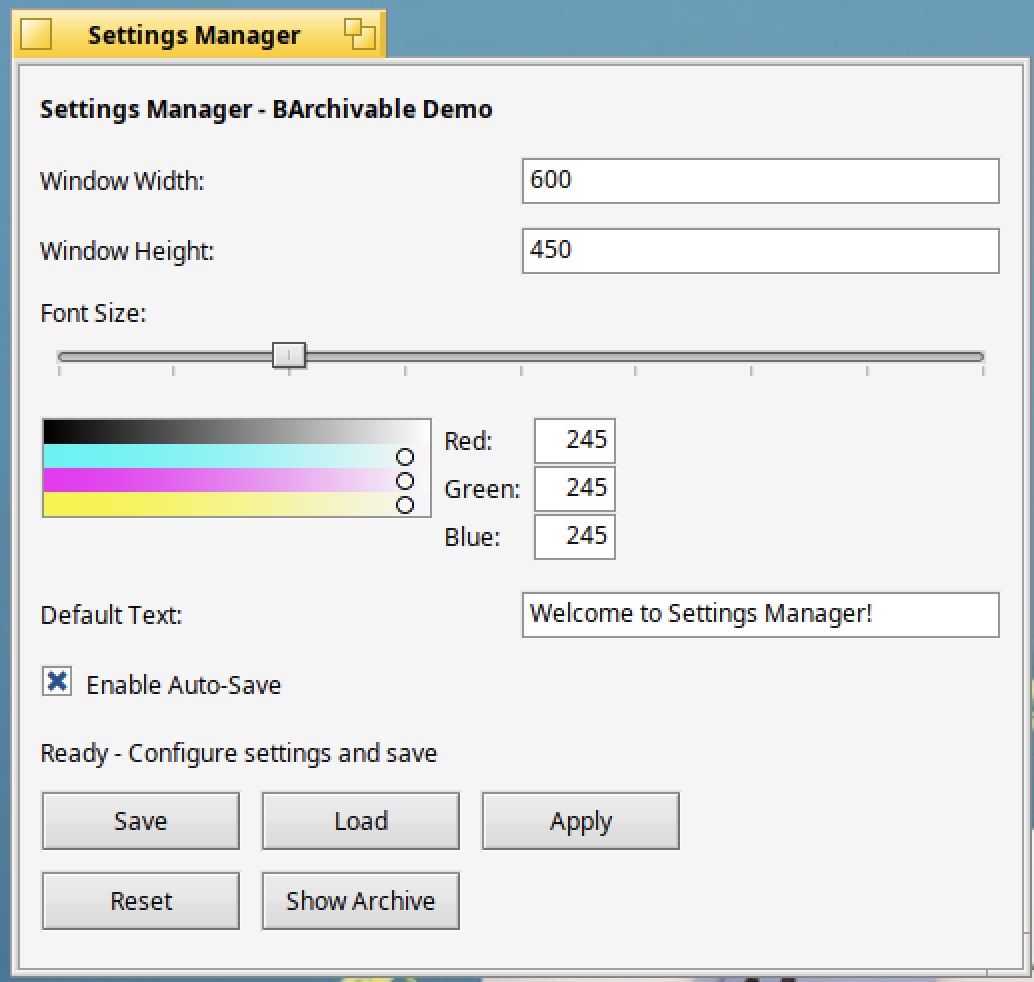
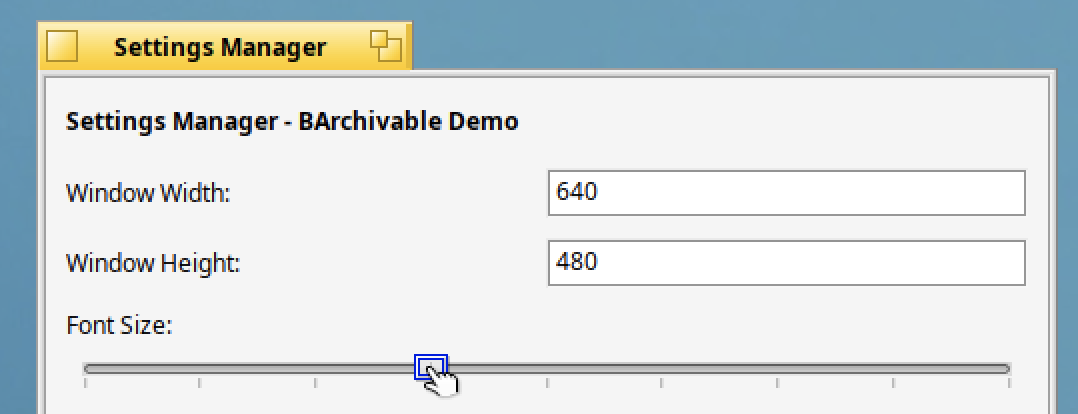
Modify the settings (size, color, text)
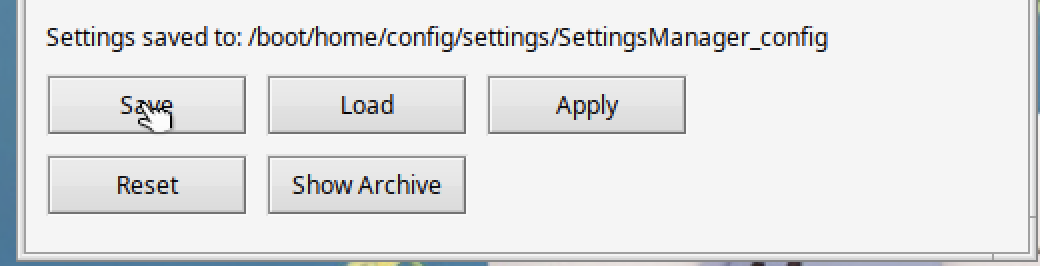
Click "Save" - writes to ˜/config/settings/SettingsManager_config
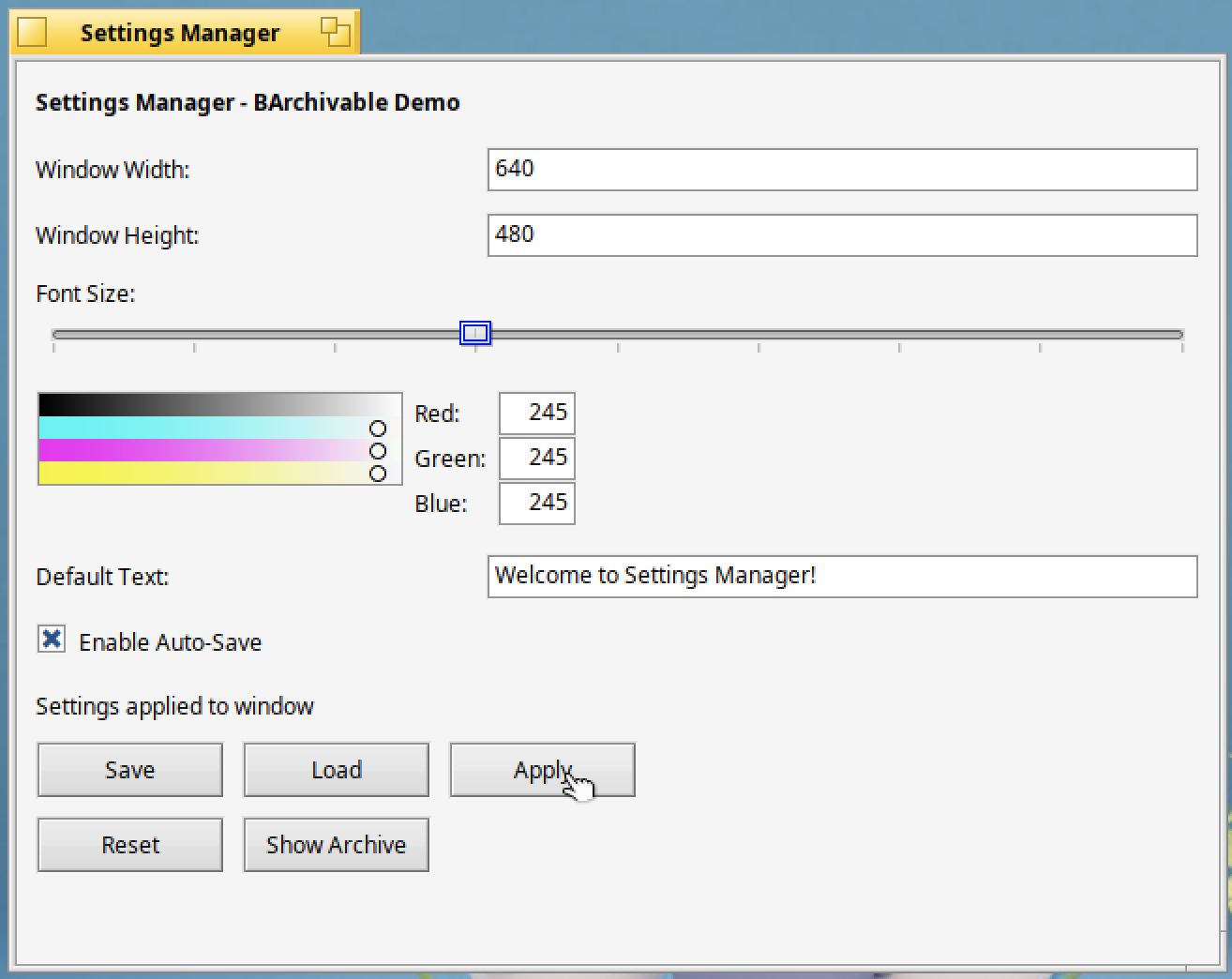
Click "Apply" - see window resize and color change
Close and reopen the app
Click "Load" - settings are restored!
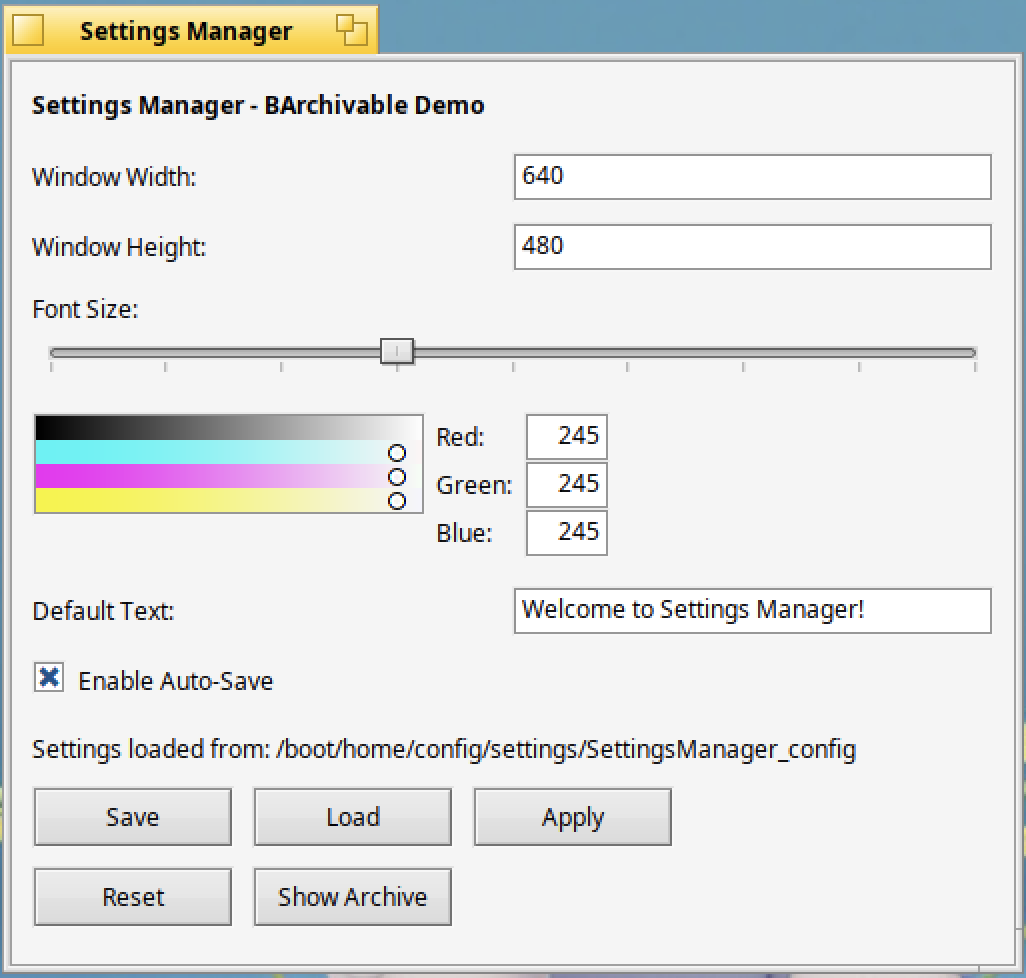
Click "Show Archive" - see the serialized data
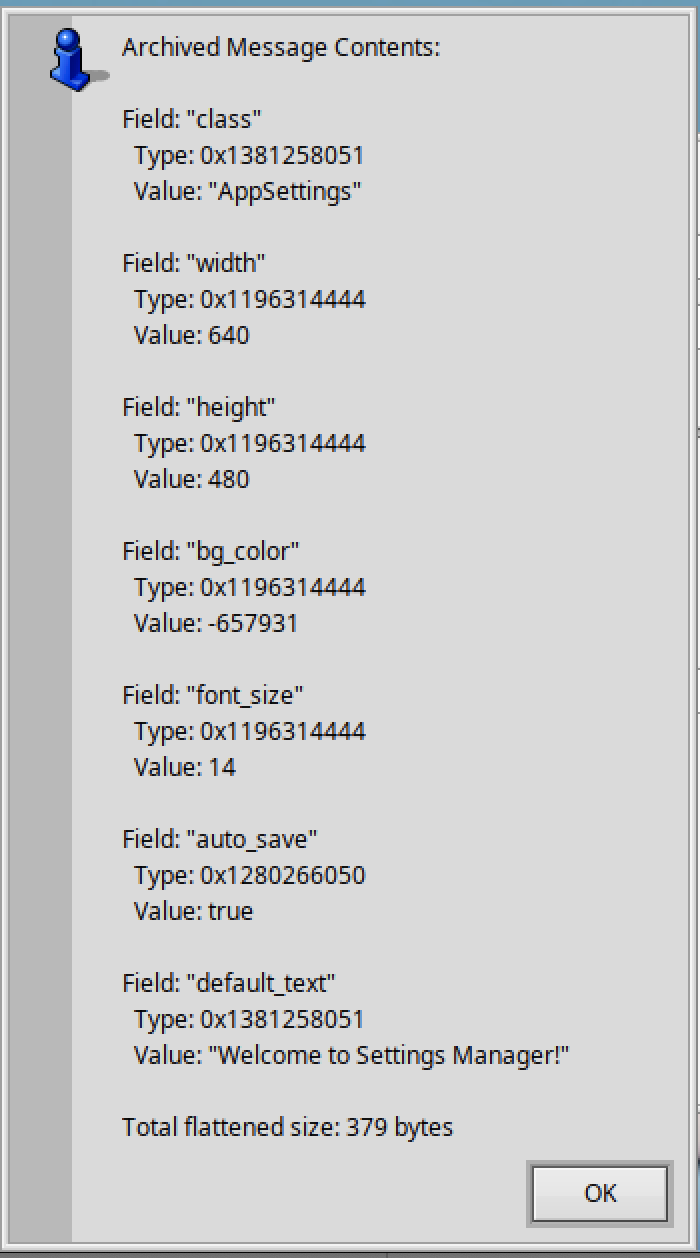
Try This
- Preferences window: Save window position and size
- Recent files list: Archive a list of BPath objects
- Theme system: Save and load UI themes
- Clipboard: Copy objects between applications
Conclusion
BArchivable is one of Haiku's most elegant designs.
By standardizing object serialization through BMessage, it enables powerful features with minimal code.
The pattern is simple: implement Archive() to save state, implement the unarchiving constructor to restore it, and provide Instantiate() to create instances. That's all you need for persistent settings, document saving, undo/redo, and more.
The settings manager we built demonstrates a complete MVC pattern: the AppSettings model is independent of the UI, using archiving to bridge between persistence and presentation. This separation makes your code more maintainable and testable.
Master BArchivable, and you've mastered one of the fundamental patterns that makes Haiku applications feel polished and professional.
Stay tuned for the next KitLab article!