
Translation kit: writing a simple translator
 DigitalBox
- KitLab
- December 1, 2025
In this article, we’ll go one step further with Haiku’s Translation Kit by writing our own translator add-on.
You’ve seen how Haiku uses translators to import and export images or text.
This article is a bit long and dense, but bear with us!
We’ll break it into two clear parts:
- First, we’ll walk through writing our own Markdown translator add-on
- Then we’ll show how to use it in practice with Haiku’s Translation Kit
By the end, you’ll understand both how to create and how to leverage custom translators.
Now, let’s explore what happens under the hood — and how you can extend the system yourself.
What’s a translator add-on?
A translator in Haiku is a small program stored in /boot/system/add-ons/Translators/.
Each translator knows how to:
-
Identifysupported file formats: the translator must return eitherB_OKto confirm support, orB_NO_TRANSLATORif the format is not handled.
-
Translatedata from or to these formats -
Offer configuration settings(optional)
When Haiku needs to import or export a file, it asks the Translator Roster to pick the right translator.
Our goal
We’ll create a Markdown Translator that:
-
Recognizes
.mdor.markdownfiles (Markdown text) -
Converts them into plain text (
text/plain) -
Offers a minimal configuration window showing the translator version
This translator is simple but fully functional, showing how Haiku’s Translation Kit handles custom formats.
The translator code
#include <NodeInfo.h>
#include <Path.h>
#include <TranslatorAddOn.h>
#include <TranslationKit.h>
#include <TranslatorFormats.h>
#include <Application.h>
#include <Window.h>
#include <View.h>
#include <Alert.h>
#include <algorithm>
#include <iomanip>
#include <iostream>
#include <sstream>
#include <string>
#include <syslog.h>
#include <cstring>

#define MARKDOWN_TYPE 'MDWN'

// Translator info
char translatorName[] = "MarkdownTranslator";
char translatorInfo[] = "Markdown -> Plain Text Translator";
int32 translatorVersion = 100;

// Input and output formats
translation_format inputFormats[] = {
    { MARKDOWN_TYPE, B_TRANSLATOR_TEXT, 0.5, 0.8, "text/markdown", "Markdown text" },
    { 0,0,0,0,"\0","\0" }
};

translation_format outputFormats[] = {
    { B_TRANSLATOR_TEXT, B_TRANSLATOR_TEXT, 0.5, 0.8, "text/plain", "Plain text" },
    { 0,0,0,0,"\0","\0" }
};

// ---------------------------
// Check file extension
// ---------------------------
bool hasMarkdownExtension(const char* filename) {
    if (!filename) return false;
    std::string name(filename);
    auto pos = name.rfind('.');
    if (pos == std::string::npos) return false;
    std::string ext = name.substr(pos + 1);
    std::transform(ext.begin(), ext.end(), ext.begin(), ::tolower);
    return ext == "md" || ext == "markdown";
}

// ---------------------------
// Check MIME type
// ---------------------------
bool hasMarkdownMime(const char* filename) {
    if (!filename) return false;
    BPath path(filename);
    BNode node(path.Path());
    if (node.InitCheck() != B_OK) return false;

    BNodeInfo ninfo(&node);
    char type[B_MIME_TYPE_LENGTH];
    if (ninfo.GetType(type) != B_OK) return false;

    return strcmp(type, "text/markdown") == 0 || strcmp(type, "text/x-markdown") == 0;
}

// ---------------------------
// Identify function
// ---------------------------
status_t Identify(BPositionIO*, const translation_format*, BMessage* ioExtension,
                  translator_info* outInfo, uint32)
{
    syslog(LOG_INFO, "MarkdownTranslator Identify called");

    const char* filename = nullptr;
    if (ioExtension)
        ioExtension->FindString("name", &filename);

    if (!filename || (!hasMarkdownExtension(filename) && !hasMarkdownMime(filename))) {
        return B_NO_TRANSLATOR;
    }

    // Fill output info
    outInfo->group = B_TRANSLATOR_TEXT;
    outInfo->type = B_TRANSLATOR_TEXT;
    outInfo->quality = 0.9;
    outInfo->capability = 1.0;

    std::strncpy(outInfo->name, translatorName, sizeof(outInfo->name)-1);
    outInfo->name[sizeof(outInfo->name)-1] = '\0';

    std::strncpy(outInfo->MIME, "text/markdown", sizeof(outInfo->MIME)-1);
    outInfo->MIME[sizeof(outInfo->MIME)-1] = '\0';

    return B_OK;
}

// ---------------------------
// Translate Markdown -> Plain Text
// ---------------------------
status_t Translate(BPositionIO* inSource, const translator_info*, BMessage*, uint32 outType, BPositionIO* outDestination) {
    if (!outType) outType = B_TRANSLATOR_TEXT;

    inSource->Seek(0, SEEK_SET);
    std::string line;
    char c;

    while (inSource->Read(&c, 1) == 1) {
        if (c == '\n') {
            // Remove Markdown headers
            if (line.rfind("## ", 0) == 0) line = line.substr(3);
            else if (line.rfind("# ", 0) == 0) line = line.substr(2);

            // Remove bold and italic marks
            size_t pos;
            while ((pos = line.find("**")) != std::string::npos) line.erase(pos, 2);
            while ((pos = line.find("*")) != std::string::npos) line.erase(pos, 1);

            line += "\n";
            outDestination->Write(line.c_str(), line.size());
            line.clear();
        } else {
            line += c;
        }
    }

    if (!line.empty()) {
        outDestination->Write(line.c_str(), line.size());
    }

    return B_OK;
}

// ---------------------------
// Minimal config window
// ---------------------------
class MDWindow : public BWindow {
public:
    MDWindow(BRect frame)
        : BWindow(frame, "Markdown Translator", B_TITLED_WINDOW, B_NOT_RESIZABLE|B_NOT_ZOOMABLE) {}
    ~MDWindow() { be_app->PostMessage(B_QUIT_REQUESTED); }
};

class MDView : public BView {
public:
    MDView(BRect frame)
        : BView(frame, "MDView", B_FOLLOW_ALL, B_WILL_DRAW)
    { SetViewColor(220,220,220); }

    void Draw(BRect) override {
        std::ostringstream text;
        double versionFloat = translatorVersion / 100.0;
        text << "Markdown -> Plain Text " << std::fixed << std::setprecision(2) << versionFloat;
        DrawString(text.str().c_str(), BPoint(5,20));
    }
};

// ---------------------------
// Create config view
// ---------------------------
status_t MakeConfig(BMessage*, BView** outView, BRect* outExtent) {
    MDView* v = new MDView(BRect(0,0,300,50));
    *outView = v;
    *outExtent = v->Bounds();
    return B_OK;
}

// ---------------------------
// Main application
// ---------------------------
int main() {
    BApplication app("application/x-vnd.hplus-md-translator");

    BView* v = nullptr;
    BRect r;
    if (MakeConfig(nullptr, &v, &r) != B_OK) {
        BAlert* err = new BAlert("Error", "Cannot create configuration view!", "OK");
        err->Go();
        return 1;
    }

    MDWindow* w = new MDWindow(r);
    v->ResizeTo(r.Width(), r.Height());
    w->AddChild(v);
    w->MoveTo(BPoint(100,100));
    w->Show();

    app.Run();
    return 0;
}
How It Works
-
Identify() checks if this translator can handle the file format (check file extension and MIME type)
-
Translate() performs the actual conversion from Markdown to plain text.
-
MakeConfig() to propose a view on the translator's settings
Haiku loads all translators add-ons at startup via the Translator Roster.
Declaring supported formats
Before Haiku can use a translator, it needs to know what formats it can read (inputFormats) and what formats it can write (outputFormats).
This is done using two arrays of translation_format structures:
translation_format inputFormats[] = {
    { MARKDOWN_TYPE, B_TRANSLATOR_TEXT, 0.5, 0.8, "text/markdown", "Markdown text" },
    { 0,0,0,0,"\0","\0" }
};

translation_format outputFormats[] = {
    { B_TRANSLATOR_TEXT, B_TRANSLATOR_TEXT, 0.5, 0.8, "text/plain", "Plain text" },
    { 0,0,0,0,"\0","\0" }
};
Each entry follows this structure:
{ type, group, quality, capability, MIME, description }
Here’s what each field means:
| Field | Purpose | Example in the Markdown translator |
|---|---|---|
type |
Internal format identifier used by the translator | MARKDOWN_TYPE |
group |
Format category (B_TRANSLATOR_TEXT, B_TRANSLATOR_BITMAP, etc.) |
B_TRANSLATOR_TEXT indicates this is text-based |
quality |
Confidence level that this translator is a good match (0.0–1.0) | 0.5 — moderate accuracy |
capability |
Efficiency rating (speed or completeness of conversion) | 0.8 — relatively capable |
MIME |
Public MIME type announced to other apps | "text/markdown" |
description |
Human-readable format name shown in apps | "Markdown text" |
The last { 0,0,0,0,"\0","\0" } entry is a terminator — it marks the end of the array.
In this simple example, our translator:
-
Accepts only one input format: Markdown (
text/markdown) -
Produces only one output format: Plain text (
text/plain)
More advanced translators (like the RTF one) advertise multiple combinations, which allows full bidirectional conversions.
Understanding the Translate() method
The Translate() function is where the actual data conversion happens.
Its signature may look intimidating at first, but each parameter serves a very clear purpose:
status_t Translate(
    BPositionIO* inSource,
    const translator_info* inInfo,
    BMessage* ioExtension,
    uint32 outType,
    BPositionIO* outDestination
)
Here’s what each parameter does:
| Parameter | Purpose | Typical Usage |
|---|---|---|
inSource |
Input data stream (file, buffer, or memory-backed object) | Read characters or blocks from the source Markdown file |
inInfo |
Metadata about the source format as detected by Identify() |
Often unused in simple translators, but useful if multiple input formats are supported |
ioExtension |
Optional message containing extra context — such as the filename, MIME type override, or user configuration | Retrieve name or BEOS:TYPE to influence how the translator behaves |
outType |
The requested output format (e.g. B_TRANSLATOR_TEXT, B_STYLED_TEXT_FORMAT) |
Used to decide whether to emit plain text, styled text, or another supported type |
outDestination |
Output data stream where the translated result will be written | Call Write() to append converted text |
Most translators ignore inInfo and ioExtension for basic conversions, but supporting them enables smarter behavior — such as reacting differently depending on file extension or user settings.
Also note that inSource should be rewound to the beginning (Seek(0, SEEK_SET)) before reading, as the Translation Kit may have already peeked at it during identification.
Compile and Install
Save the code as MarkdownTranslator.cpp, then compile it:
g++ MarkdownTranslator.cpp -o MarkdownTranslator -ltranslation -lbeThen install it to Haiku’s translators folder for non-packaged:
cp MarkdownTranslator /system/non-packaged/add-ons/Translators/Your markdown translator is now part of Haiku’s modular conversion system — just like the PNG, JPEG, and RTF translators!
You can launch it in a Terminal to view the config settings:
./MarkdownTranslator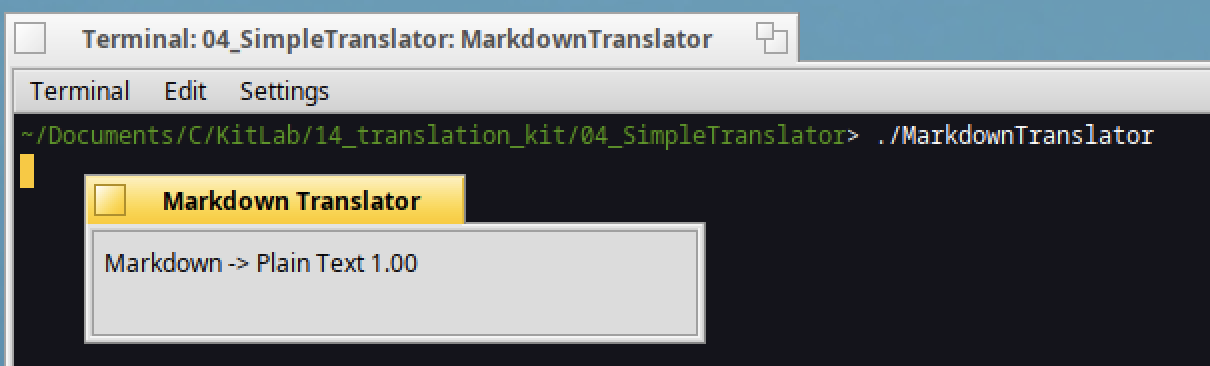
It's a simple window which displays the version of the translator.
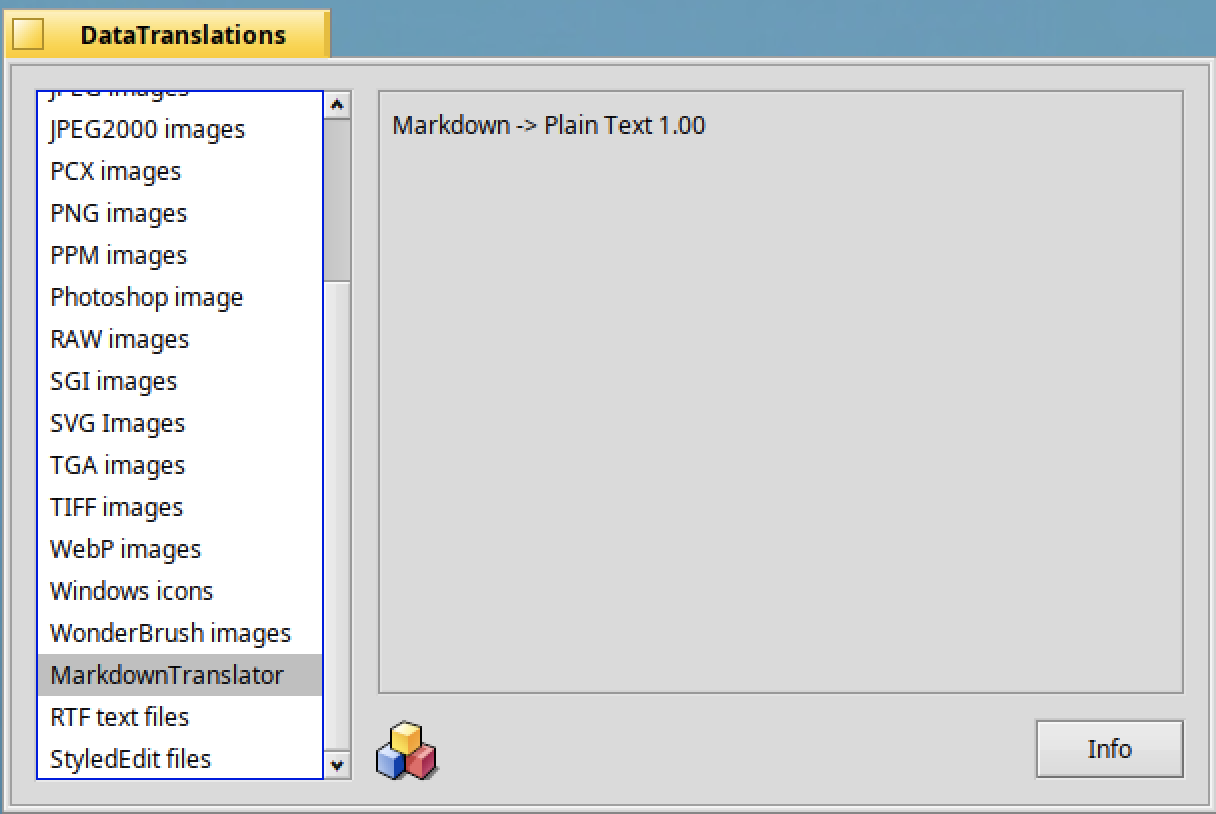
You should also see the Markdown translator listed among the available translators:
Test It
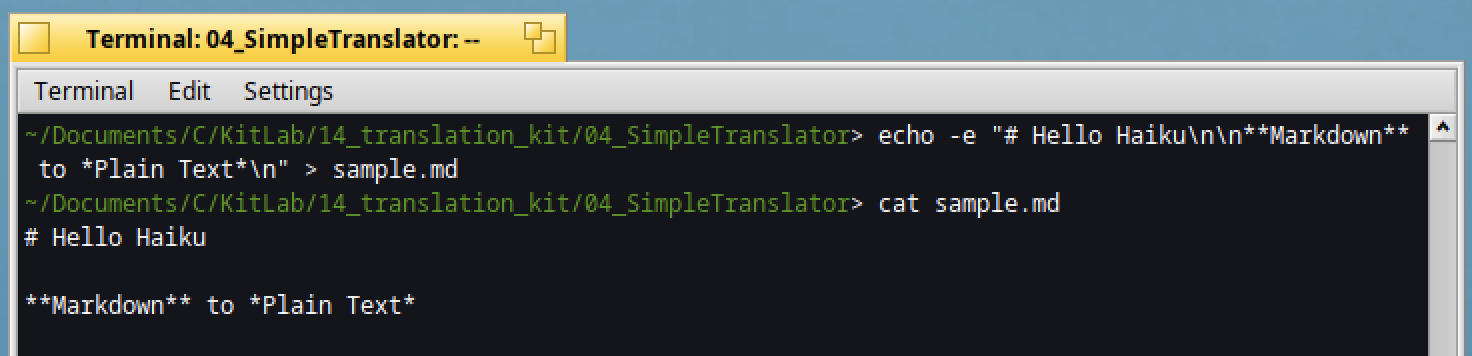
In order to test this new translator, create a simple markdown file:
echo -e "# Hello Haiku\n\n**Markdown** to *Plain Text*\n" > sample.md
Then use the Translation Kit in your own code using BTranslatorRoster:
BFile markdownFile("./sample.md", B_READ_ONLY);
BFile txtFile("./sample.txt", B_CREATE_FILE | B_ERASE_FILE | B_WRITE_ONLY);
BTranslatorRoster* roster = BTranslatorRoster::Default();

BMessage ext;
ext.AddString("name", "./sample.md");
ext.AddString("BEOS:TYPE", "text/markdown");

translator_info tinfo;
roster->Identify(&markdownFile, &ext, &tinfo);
roster->Translate(&markdownFile, nullptr, &ext, &txtFile, B_TRANSLATOR_TEXT);
Please note the BMessage "ext" parameter (ie "ioExtension") for the Translate() method is containing the filename and the MIME type of the sample markdown file.
In order to showcase the usage of this new translator, the complete source code for the testing program is available as per below:
#include <TranslatorRoster.h>
#include <TranslatorFormats.h>
#include <DataIO.h>
#include <File.h>
#include <Entry.h>
#include <Message.h>
#include <iostream>

int main() {
    // Open the Markdown file for reading
    BFile markdownFile("./sample.md", B_READ_ONLY);
    if (markdownFile.InitCheck() != B_OK) {
        std::cerr << "Failed to open sample.md\n";
        return 1;
    }

    // Create the text file for writing (overwrite if exists)
    BFile txtFile("./sample.txt", B_CREATE_FILE | B_ERASE_FILE | B_WRITE_ONLY);
    if (txtFile.InitCheck() != B_OK) {
        std::cerr << "Failed to create sample.txt\n";
        return 1;
    }

    // Get the default translator roster
    BTranslatorRoster* roster = BTranslatorRoster::Default();
    if (!roster) {
        std::cerr << "Failed to get translator roster\n";
        return 1;
    }

    // Prepare identification info
    BMessage ext;
    ext.AddString("name", "./sample.md");
    ext.AddString("BEOS:TYPE", "text/markdown");

    translator_info tinfo;
    status_t result = roster->Identify(&markdownFile, &ext, &tinfo);

    if (result == B_OK) {
        const char* name = nullptr;
        const char* info = nullptr;
        int32 version = 0;

        // Get translator details
        if (roster->GetTranslatorInfo(tinfo.translator, &name, &info, &version) == B_OK) {
            std::cout << "Translator selected: " << name << " (version " << version << ")\n";
            std::cout << "Info: " << info << "\n";
        } else {
            std::cerr << "Error: GetTranslatorInfo() failed\n";
        }
    } else {
        std::cerr << "Identify failed: " << result << "\n";
        return 1;
    }

    // Reset file pointer to the beginning before translation
    markdownFile.Seek(0, SEEK_SET);

    // Translate the Markdown file to plain text
    status_t status = roster->Translate(&markdownFile, nullptr, &ext, &txtFile, B_TRANSLATOR_TEXT);

    if (status != B_OK) {
        std::cerr << "Translation failed: " << status << "\n";
        return 1;
    } else {
        std::cout << "Saved txt file: sample.txt\n";
    }

    return 0;
}
Save the source code under "UseTranslator.cpp".
Then compile it:
g++ UseTranslator.cpp -o UseTranslator -ltranslation -lbeRun the program:
./UseTranslator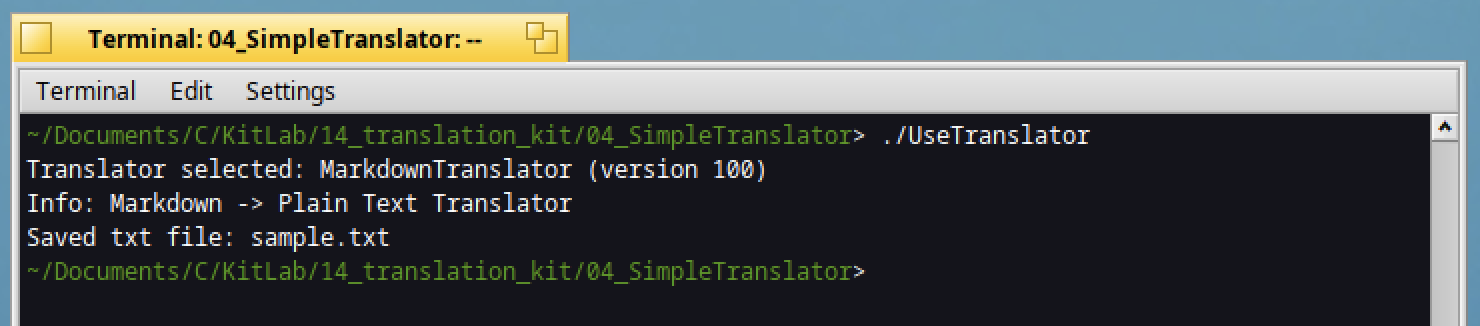
The sample.txt file generated will contain the converted plain text.
Open the sample.txt file:
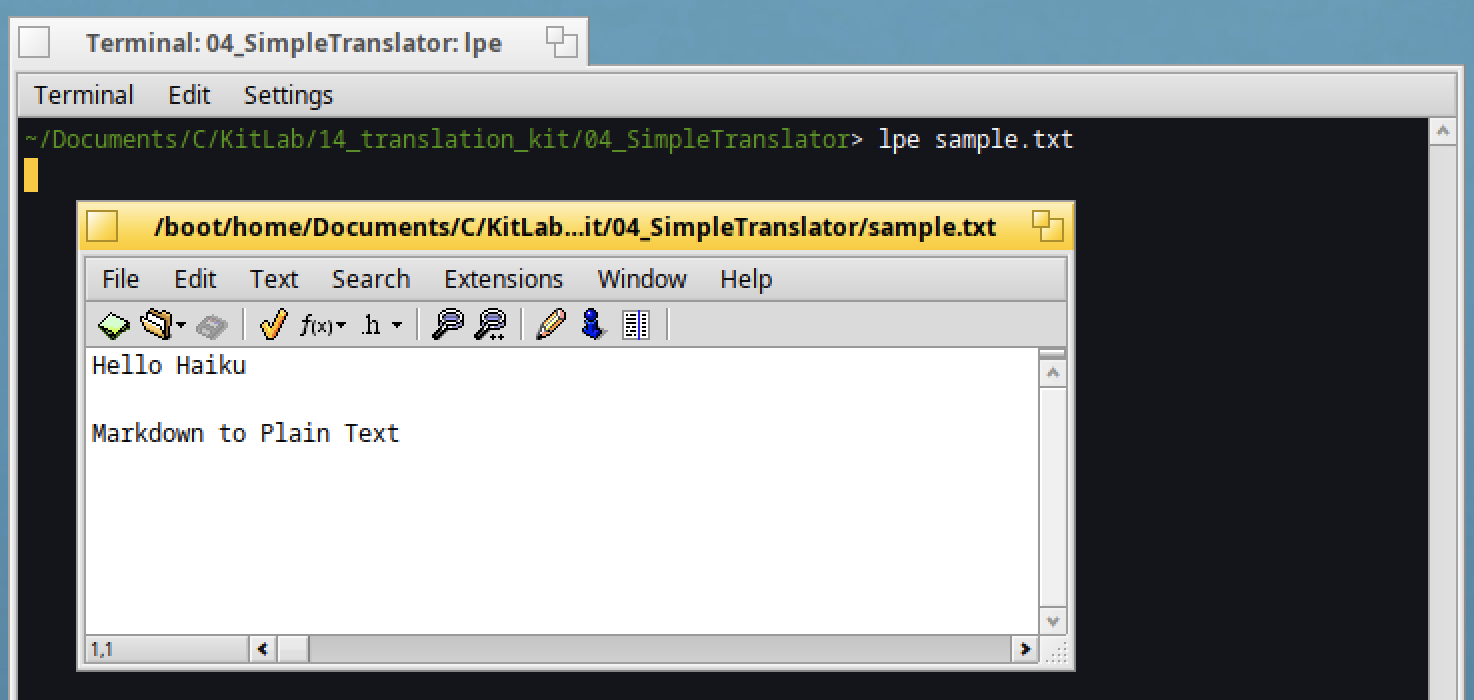
As you can see, the markdown tags have been removed in order to have a plain text file.
Really nice, isn't it?
Try this
- Enhance the translator to handle additional Markdown syntax (links, lists, etc.).
- Add a simple configuration view in MakeConfig() to display additional options.
- Create a translator for another lightweight format of your choice
Wrap-Up
This exercise demonstrates how to extend Haiku’s Translation Kit with a custom translator.
You’ve now seen how translators:
- Identify supported files
- Convert data between formats
- Integrate seamlessly with Haiku’s modular system
Haiku’s Translation Kit has been demonstrated during these 4 articles and has shown the OS flexible, modular, and format-agnostic.
In the next articles, we’ll dive into another kit : the Storage Kit!
We will explore how Haiku manages files, directories, attributes, and queries, and how you can harness it in your own applications.
Keep on exploring!